Manage record stages
Configure the stages available to the records in your inventory. Record stages are manipulated via workflow transitions and are used to track the progress of records through your organization’s record lifecycles.
Configure workflows to match your organizational needs for overseeing development, validation, implementation, ongoing monitoring, auditing, or other risk management activities.
To view workflows set up for your organization:
In the left sidebar, click Settings.
Under Governance, select Workflows.
All workflows are listed together in a single table, with a total count of workflows shown beneath the table:
Draft workflow or an Active workflow.Artifact, Inventory RecordSearch, sort, and filter the list of workflows to narrow down results:
Click to search for workflows by name.
Click on any column header to sort the list of workflows by that column:
Click Filter to filter for workflows using different workflow fields:
Draft workflow or an Active workflow.Artifact, Inventory RecordFiltering supports simple and complex conditions using AND or OR logic with nested groups. You can filter on both the default fields created by ValidMind and custom fields created by your organization.
Rules define individual conditions to filter by, such as the business unit or owner.
To add a rule:
Click click Add Rule to add a filter condition.
A filter rule contains three components:

| Text fields | Date fields | Number fields | Boolean fields | Multi-select fields |
|---|---|---|---|---|
| equals | equals | equals | equals | in |
| not equals | not equals | not equals | not equals | not in |
| contains | before | greater than | is empty | contains |
| begins with | after | less than | is not empty | is empty |
| ends with | between | between | is not empty | |
| is empty | is empty | is empty | ||
| is not empty | is not empty | is not empty |
(Optional) Add more rules by following the same steps.
Click Apply Filters.
Groups combine multiple rules that are evaluated together and can be nested one level deep. You use groups for more complex filters, such as Condition A AND (Condition B OR Condition C).
To add a group:
Click Add Group to create a nested group of conditions.
Follow the same steps as in Rules to add one or several conditions to the group.
Click Apply Filters.
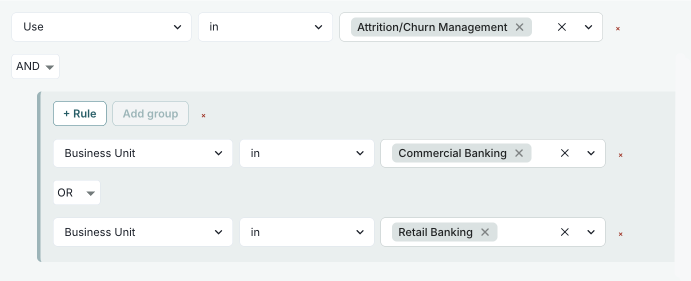
Combinators define how multiple rules or groups are logically combined when matching conditions. By default, multiple rules are combined with AND logic, meaning all conditions must match.
Supported combinators:
To change the combinator:
Click the AND or OR button between rules or groups to change how conditions are combined.
Click Apply Filters.
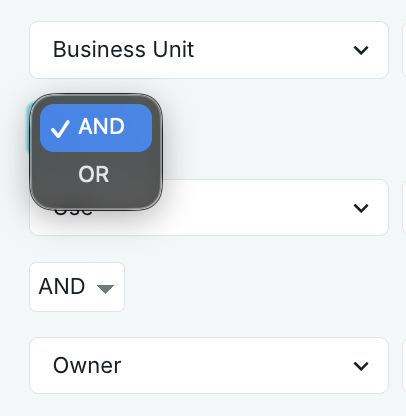
After applying filters, active filter conditions appear as individual chips next to the label Filtered by:.
Click the icon on any filter chip to remove that specific filter condition. The remaining filters are automatically reapplied.
Available values depend on your organization’s custom configuration
Show records where Record Field: Risk Level is High (requires that you have a custom select field called Risk Level):
On the Inventory page, click Filter.
Click Add Rule:
Record Field: Risk LevelequalsHighClick Apply Filters.
Show records that are Stage: In Production AND in Business Unit: Risk Management:
On the Inventory page, click Filter.
On the Select Your Filters dialog that opens, click Add Rule:
StageinIn ProductionAdd another rule:
Business UnitinRisk ManagementClick Apply Filters.
Show records that are (Stage: In Production AND in Business Unit: Risk Management) OR (Stage: In Production AND in Use: Attrition/Churn Management):
On the Inventory page, click Filter.
Click Add Rule to add your rules:
StageinIn ProductionBusiness UnitinRisk ManagementClick Add Group to create a new group:
Change combinator to OR (between the two groups).
In the new group, click Add Rule to add:
StageinIn ProductionUseinAttrition/Churn ManagementClick Apply Filters.
Show records where (Stage: Active OR In Periodic Review) AND (Risk Level: High OR Medium) AND Owner: John Doe:
On the Inventory page, click Filter.
Click Add Group to add your groups:
StageinIn Production, In Periodic ReviewRecord Field: Risk LevelequalsHigh, MediumAdd Rule to add a rule:
OwnerinJohn DoeEnsure all groups and rules use AND combinator.
Click Apply Filters.
Show records implemented between January 1, 2025 and January 31, 2025:
On the Inventory page, click Filter.
Add Rule:
Implementation Datebetween.Click Apply Filters.
Show records owned by a specific user that have .pdf attachments:
On the Inventory page, click Filter.
Click Add Rule:
OwnerinAdd another rule:
Attachmentsfile name contains.pdf.Ensure the combinator between rules is set to AND.
Click Apply Filters.
Click on a workflow in the list to open that workflow’s details page, where you can review the workflow’s configuration and monitor its activity before making any changes:1
The right sidebar shows the properties that apply to the workflow as a whole:
Artifact, Inventory RecordDraft workflow or an Active workflow.The sidebar also lists when and by whom the workflow was created and last updated, along with actions available for that workflow:
Draft workflows, publish the workflow for use.3You can continue to make changes to published workflows by creating new versions of workflows.
The details page displays the latest version of the workflow by default. To review a previous version, click on the Version drop-down and select the version you’d like to view.
For the selected version, the details page shows who created that version and when, along with the version notes describing the changes — and the workflow diagram and active executions update to reflect that version.
Under Workflow diagram, a read-only preview shows the steps and links that make up the selected version of the workflow.
When viewing the latest version, click Edit Workflow to open the workflow editor and make changes to the workflow’s steps and links.5
Under Active Executions, review the runs of the displayed version that are currently in progress: