Synchronize records with AWS SageMaker
Synchronize records registered in the ValidMind inventory with Amazon Web Services (AWS) SageMaker models.
Prerequisites
Sync ValidMind records with AWS SageMaker
In the left sidebar, click Settings.
Under Integrations, select Connections.
Click Add Connection.
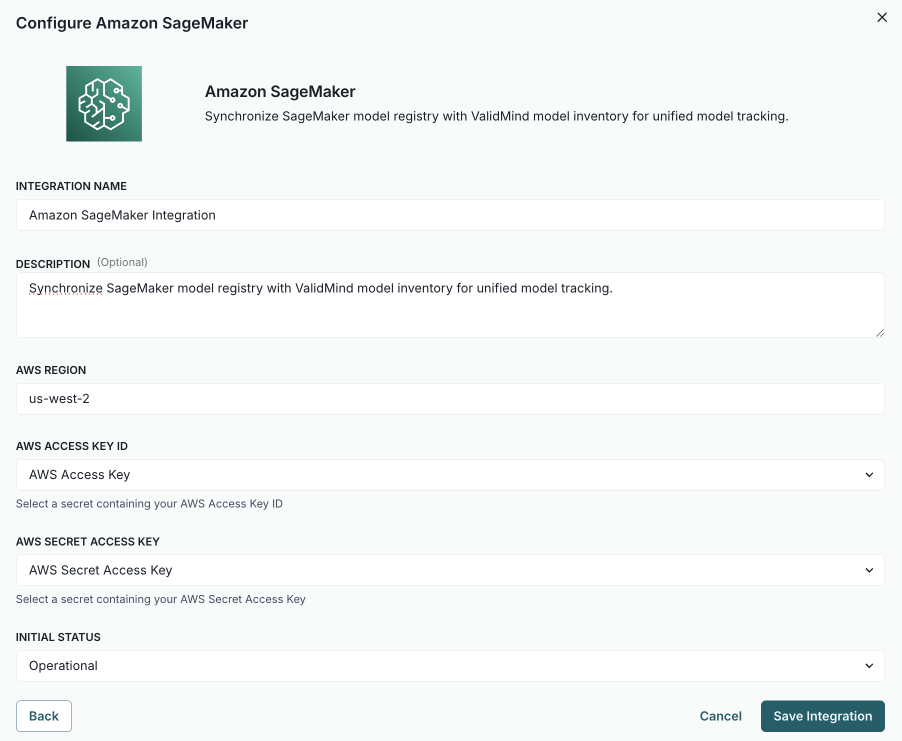
In the modal that opens, select AWS SageMaker.2
Complete:
- Integration Name — How other admins can identify the connection.
- Description (optional) — The intended usage or additional details.
- AWS Region - The primary region where your SageMaker model registry lives, for example
us-west-2. - AWS Access Key ID — The secret generated by AWS IAM with permissions to read the SageMaker model registry.
- AWS Secret Access Key — The secret generated by AWS IAM with permissions to read the SageMaker model registry.
- Initial Status — Set to
Operationalto enable immediately orDisabledif you plan to finish setup later.
Click Save Integration.
Test the connection:
- Hover over the AWS SageMaker connection you just created.
- When the menu appears, click on it and select Test Connection.
If the test is successful, the message Connection successful is displayed.
In the left sidebar, click Inventory.
Select a record or find your record by applying a filter or searching for it.3
Scroll down until you locate the Amazon SageMaker connection box in the right sidebar.
Hover over the Amazon SageMaker box.
When the menu appears, click on it and select Link Model.
In the modal that opens, click the Select Model dropdown to pick the AWS SageMaker model to link.
(Optional) Click Test Connection to ensure the connection is working as expected.
If the test is successful, the message Connection Test Successful is displayed.
Click Link Model.