2.8.20 Release notes
This release includes text support for custom test descriptions, a new notebook series for model validation with ValidMind, and a RAG benchmarking demo notebook.
Highlights
Add text support for custom test descriptions
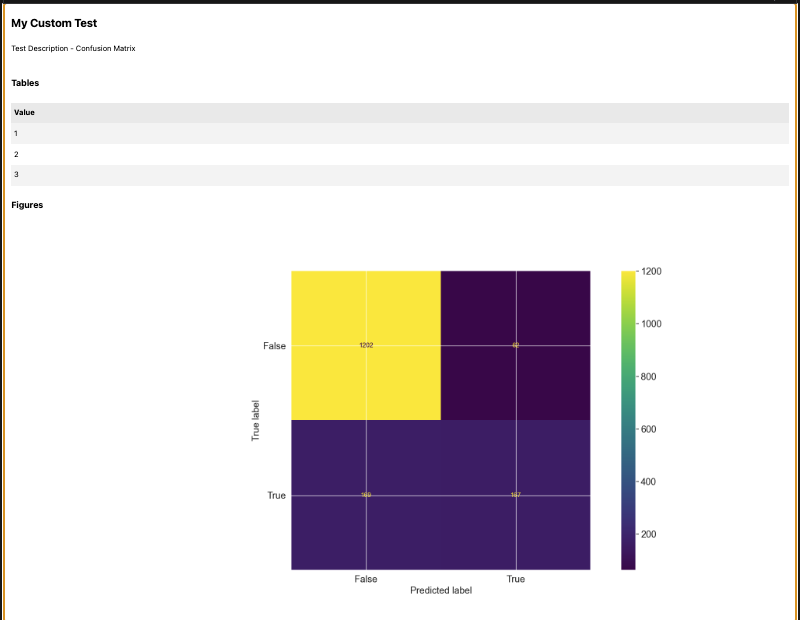
We have enhanced the custom test framework, allowing you to define custom descriptions for your tests. If a test returns a string, it will be used as the test description, overriding the automatic description generation.
@vm.test("my_custom_tests.MyCustomTest")
def my_custom_test(dataset, model):
    """
    This is a custom test that does nothing.
    """
    y_true = dataset.y
    y_pred = dataset.y_pred(model)

    confusion_matrix = metrics.confusion_matrix(y_true, y_pred)

    cm_display = metrics.ConfusionMatrixDisplay(
        confusion_matrix=confusion_matrix, display_labels=[False, True]
    )
    cm_display.plot()

    plt.close()  # close the plot to avoid displaying it

    return cm_display.figure_, "Test Description - Confusion Matrix", pd.DataFrame({"Value": [1, 2, 3]})
Run test
from validmind.tests import run_test

result = run_test(
    "my_custom_tests.MyCustomTest",
    inputs={"model": "model", "dataset": "test_dataset"},
)
Output
New notebook series for model validation with ValidMind
Explore our new series of introductory notebooks designed for model validation with ValidMind. These notebooks guide you through the entire process, tailored to common scenarios:
- 1 — Set up ValidMind for validation.
- 2 — Start the validation process.
- 3 — Develop a potential challenger model.
- 4 — Finalize validation and reporting.
You'll learn the basics of the ValidMind Library through interactive notebooks that introduce key concepts and familiarize you with tasks such as running and logging quality, performance, and comparison tests. Additionally, you'll learn how to develop potential challenger models and use validation report tools. By the end of this series, you'll have a sample validation report ready to use.
Documentation
Add RAG benchmarking demo notebook
We have introduced a comprehensive notebook, rag_benchmarking_demo.ipynb, to help you benchmark Retrieval-Augmented Generation (RAG) models using the ValidMind library. This notebook allows you to compare multiple configurations for the RAG RFP use case.
You can evaluate two embedding models: OpenAI's text-embedding-3-small and text-embedding-3-large. Additionally, the notebook includes two retrieval models with different k parameters, 5 and 10. There are also two LLM generators available: gpt-3.5-turbo and gpt-4o. This results in four complete RAG configurations for thorough testing.
The notebook replicates tests from rag_documentation_demo.ipynb. It evaluates context precision, faithfulness, and answer correctness. It also assesses generation quality using metrics like ROUGE, BLEU, and BERT Score. Furthermore, it conducts bias and toxicity evaluations across all configurations.