25.07 Release notes
This release includes a customizable UI for finding statuses, a revamped quickstart for model development with ValidMind, updated workflow documentation and configuration, a new quickstart for model validation, and more.
Backend
Enhancements
Introduce simple IDP auth mode with default organization user setup
When you are added to an organization, you automatically receive the Basic User role. This role includes default permissions that let you browse certain organization entities. As a Customer Admin, you can modify the permissions of the Basic User role anytime by going to Settings -> Roles.
Implement broadcast step for email notifications
We have introduced a new broadcast notification feature that lets you send emails to a group of users. You can configure dedicated broadcast steps in workflows for better visibility and control over email distribution. This enhancement streamlines communication, ensuring important messages reach the intended recipients efficiently.
Add Okta as an authentication provider
You can now use Okta as an authentication provider with support for Okta OIDC, alongside the existing options of Auth0 and Keycloak.
Add endpoint to expose OIDC providers
This update enhances authentication and user management workflows by introducing a new configuration flag, can_modify_oidc, in the validmind_config.toml.
When the can_modify_oidc flag is set to False, you will not be able to perform management actions in OIDC, such as sending verification emails, adding users, and modifying user passwords.
By default, this flag is set to True to maintain current functionality. Even when set to False, you can still add users to ValidMind.
This flag complements the existing global idp_user_creation_enabled setting available on the admin page.
Add role-based access to ValidMind with multiple OIDC providers
You can now configure role-based access within the multiple OIDC providers authentication flow by setting specific values in the OIDC configuration.
The following optional values have been added to the OIDC configuration:
check_role_mapping = true
auth_oidc_outer_key_value = "claims"
auth_oidc_role_names = [ "ROLE_AscendOps_Ops", "unx_s00grp_validmind_developer" ]
If you choose to set one of these values, all three must be configured. By default, role mapping is turned off (check_role_mapping=false).
Set check_role_mapping=true to check the decoded JWT token for access to ValidMind. The system looks for the field specified by auth_oidc_outer_key_value in the decoded token. Within this field, it checks for any roles listed in auth_oidc_role_names. If a match is found, you gain access to ValidMind. If no match is found, access is denied, and the token is considered invalid.
Other changes
Add public logo assets endpoint and refactor asset handling
You now have access to a new public /assets/logo/<path> endpoint. This allows you to access logo assets without needing to log in. We've improved error handling and added options to set cache durations. Logo assets now have a cache period of 7 days, while other assets have a standard cache duration of 1 day. This update makes it easier to access branding materials while keeping organization-specific assets secure.
Bug fixes
Fix policy updater tasks for group user changes
This update fixes an issue where asynchronous policy updates would fail when you added or removed a user from a group.
Frontend
Highlights
UI allows customization of finding statuses
We have introduced a new feature that lets you manage finding statuses within the application. This enhancement streamlines the process of tracking and updating finding statuses, improving overall workflow efficiency.
Enhancements
Simple IDP auth mode for users not in any organization yet
You can now configure the support email in the Admin App under Settings. This email will be dynamically added to any page that includes a mailto tag for support.
Add Basic User role with preset permissions
When you are added to an organization, you now receive a Basic User role, identified by the is_basic_role property, with preset permissions. These permissions can be modified later if needed.
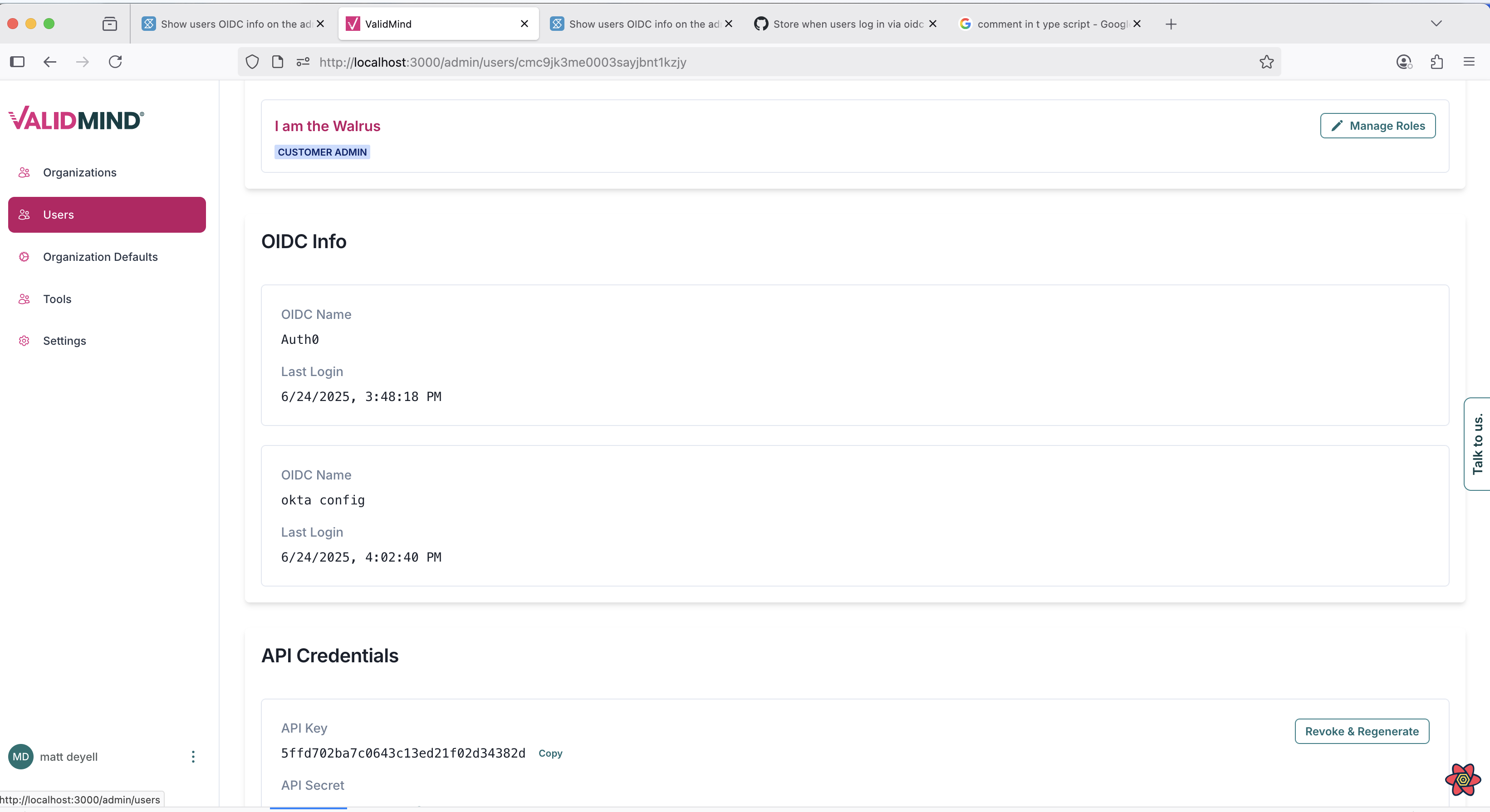
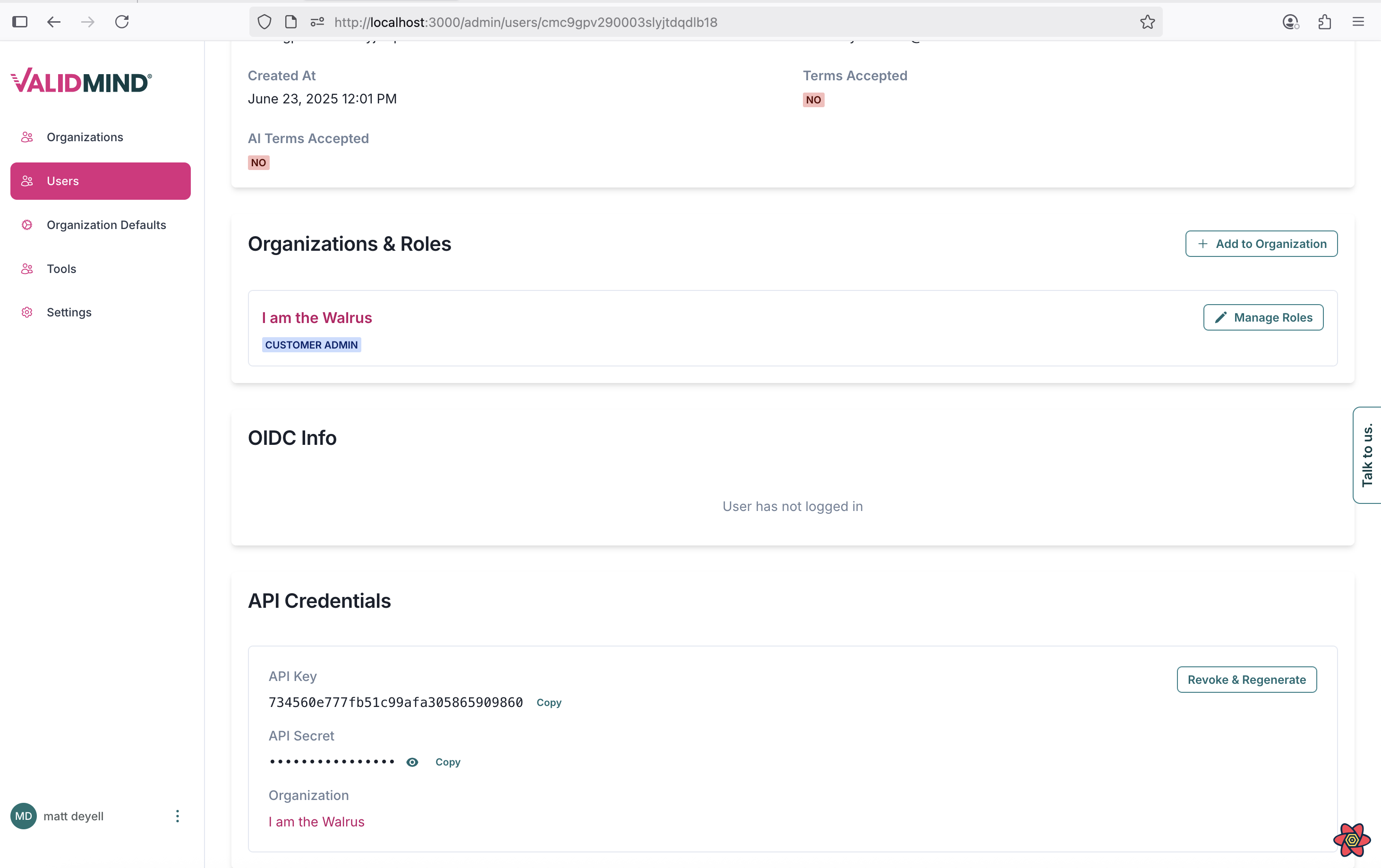
Add OIDC info to admin users page
You can now view the OIDC (OpenID Connect) provider and login timestamp for a user by accessing their details page on the admin/users page.
Supporting multiple OIDC providers
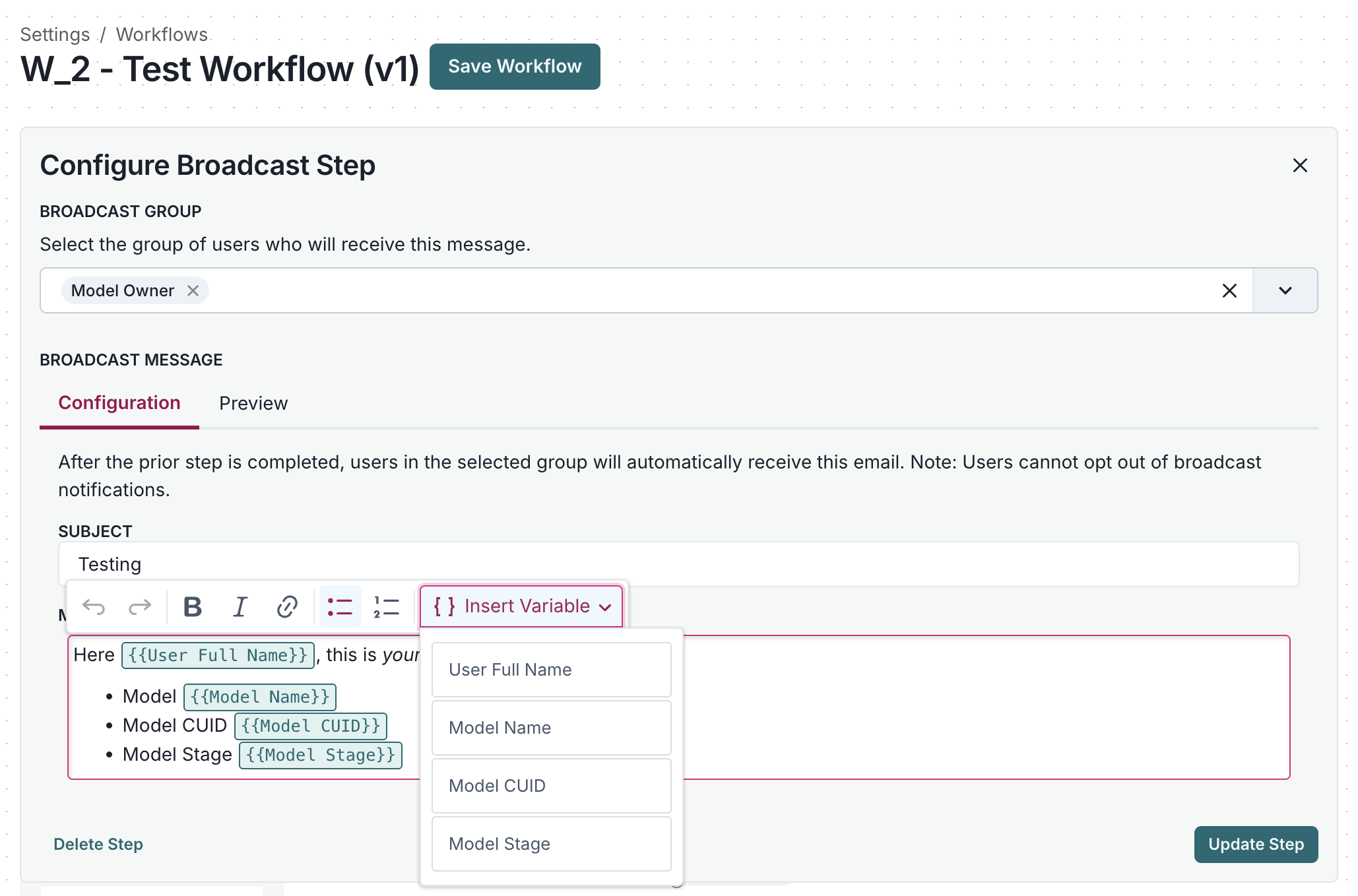
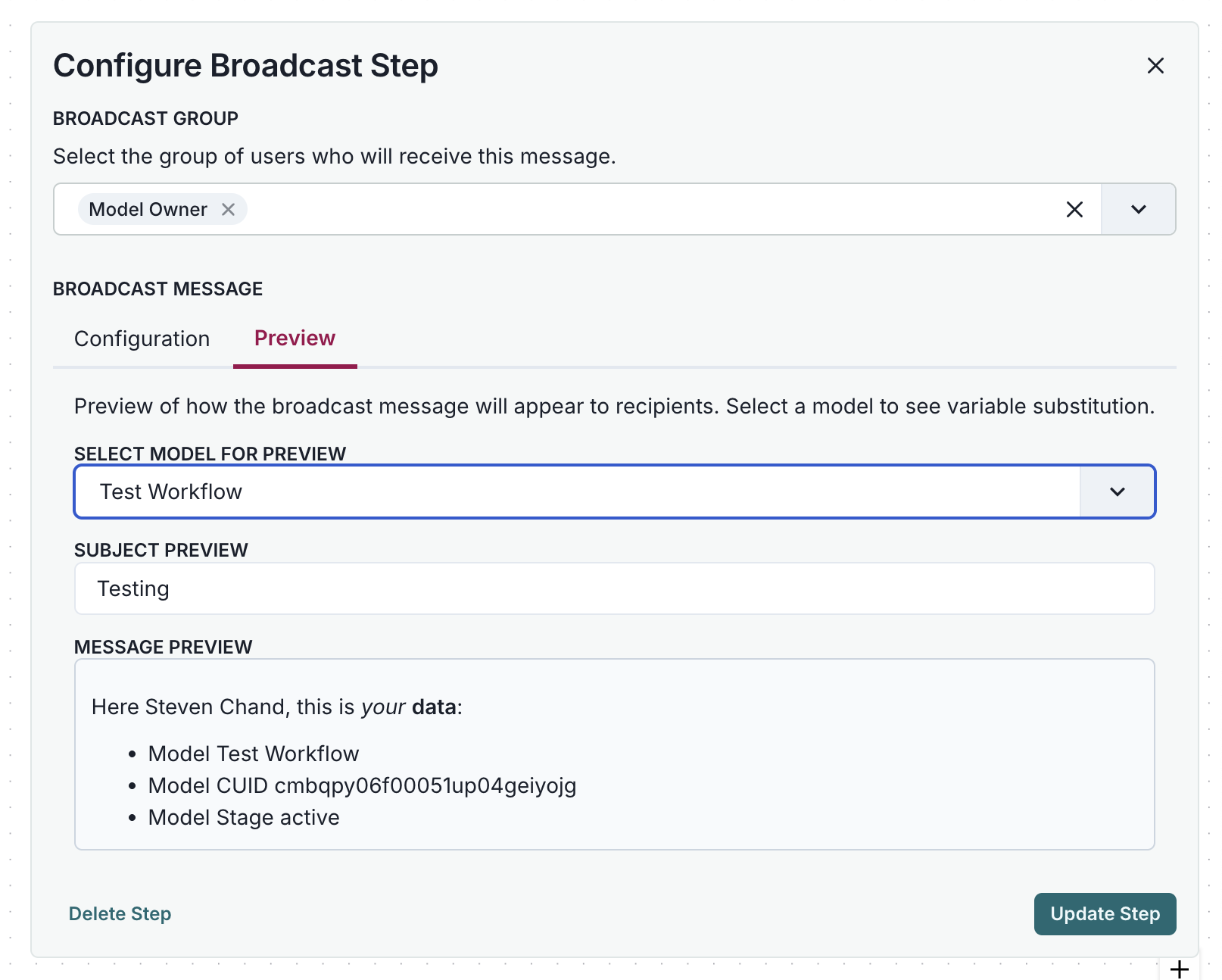
Add broadcast messaging feature to workflows
You can now enhance your workflows with a new broadcast messaging feature. This update lets you add broadcast steps that send messages with dynamic variable substitution. Key features include:
- Choose variables from available broadcast options.
- See a live preview of message content with resolved variables.
- Use rich text editing to craft broadcast messages.
- Integrate seamlessly with the existing workflow builder.
Bug fixes
Update ID format in formatId and unformatId functions in SwapTemplateModal
We have updated the ID formatting functions in the SwapTemplateModal component to resolve an issue with template swapping.
Installation
Enhancements
Update Helm charts for ValidMind deployment
This update enhances the ValidMind platform by allowing you to annotate helm deployments. This feature improves the organization and documentation of your deployment configurations. Additionally, liveness and readiness checks have been added to more containers, enhancing the reliability and monitoring of your deployments.
Add security context toggles for enhanced deployment security
This update introduces several improvements to enhance security and deployment stability for your ValidMind deployments. You can now enable a security context that enforces these default constraints:
- Privilege escalation is not allowed.
- The
api,worker, andworker-beatcontainers run as uservmuserwith UID1000. Thelitellmcontainer runs as usernobodywith UID65534. Theappcontainer runs as usernginxwith UID101. Therediscontainer runs as userrediswith UID999. Thepostgrescontainer, for proof-of-concept purposes only, runs as userpostgreswith UID999. - A seccomp profile can be specified; otherwise, it defaults to
RuntimeDefault. - All Linux capabilities are removed to maintain least-privilege. Future updates may allow adding capabilities back if needed.
The following applies whether securityContext.enabled is true or not:
- The
apppod now listens on port8000. Theappservice continues to listen on port80and proxies to8000on the container. - The
api,app,worker,worker-beat, andlitellmcontainers will run as non-root users by default.
Please upgrade to the latest CMVM version and use Helm chart tag v0.0.8 to enable this functionality.
Documentation
Highlights
Revamp quickstart for model development with ValidMind
We have revamped the quickstart experience for model developers to provide a user-friendly introduction to using ValidMind for documenting models. This update covers the basics of using ValidMind to develop models. It guides you through registering your first model, using the ValidMind Library to run tests and document a model, and then reviewing your generated model documentation on the ValidMind platform.
This quickstart is the first in a series of new user journeys. Stay tuned for our upcoming introductory guides on model validation and platform administration.
Updated workflow documentation and configuration
We have enhanced our user guides with a revamped section on model workflows. This update offers clear instructions on configuring workflows to suit your organizational needs, whether for model development, validation, implementation, ongoing monitoring, auditing, or other risk management activities. Once configured, you can seamlessly transition your models through the different stages of their lifecycle.
New quickstart for model validation
We've introduced a new quickstart experience for model validation, providing an easy introduction to ValidMind. This update guides you through using the ValidMind Library to test and evaluate a champion model. You'll learn to add your test results as evidence in your validation report on the ValidMind platform.
This quickstart is the second in a series of new user journeys. Stay tuned for our upcoming guide for platform administration!
Enhancements
Create rebrandable documentation site with Kubernetes configuration
The ValidMind documentation site Docker image now supports full customization for white-label deployments and branded environments.
Configurable branding & URLs
- Customize product names in both long and short forms.
- Replace the ValidMind logo and favicon with your own SVG assets.
- Set custom URLs for your ValidMind platform and JupyterHub instances.
Local development support
- Kind (Kubernetes in Docker) integration is now available for local development.
- Use simple
makecommands to set up a local Kubernetes environment. - Access real-time log viewing and cluster management.
For detailed setup instructions and configuration options, refer to Create a rebranded docs site. For a sample configuration, see validmind-docs.yaml.
Bug fixes
Update links in training FAQ
This update updates the documentation links in the site/training/program/training-faq.qmd file.