ValidMind for development 4 — Finalize testing and documentation

Learn how to use ValidMind for your end-to-end documentation process with our introductory notebook series. In this last notebook, finalize the testing and documentation of your model and have a fully documented sample model ready for review.

We'll first use run_documentation_tests() previously covered in 2 — Start the development process to ensure that your custom test results generated in 3 — Integrate custom tests are included in your documentation. Then, we'll view and update the configuration for the entire documentation template to suit your needs.

Learn by doing

Our course tailor-made for developers new to ValidMind combines this series of notebooks with more a more in-depth introduction to the ValidMind Platform — Developer Fundamentals

Prerequisites

In order to finalize the testing and documentation for your sample model, you'll need to first have:

Need help with the above steps?

Refer to the first three notebooks in this series:

Setting up

This section should be very familiar to you now — as we performed the same actions in the previous two notebooks in this series.

Initialize the ValidMind Library

As usual, let's first connect up the ValidMind Library to our model we previously registered in the ValidMind Platform:

  1. On the left sidebar that appears for your model, select Getting Started and select Development from the Document drop-down menu.

  2. Click Copy snippet to clipboard.

  3. Next, load your model identifier credentials from an .env file or replace the placeholder with your own code snippet:

# Make sure the ValidMind Library is installed

%pip install -q validmind

# Load your model identifier credentials from an `.env` file

%load_ext dotenv
%dotenv .env

# Or replace with your code snippet

import validmind as vm

vm.init(
    # api_host="...",
    # api_key="...",
    # api_secret="...",
    # model="...",
    document="documentation",
)
Note: you may need to restart the kernel to use updated packages.
2026-09-11 23:48:58,137 - INFO(validmind.api_client): 🎉 Connected to ValidMind!
📊 Model: [ValidMind Academy] Model development (ID: cmalgf3qi02ce199qm3rdkl46)
📁 Document Type: model_documentation

Import sample dataset

Next, we'll import the same public Bank Customer Churn Prediction dataset from Kaggle we used in the last notebooks so that we have something to work with:

from validmind.datasets.classification import customer_churn as demo_dataset

print(
    f"Loaded demo dataset with: \n\n\t• Target column: '{demo_dataset.target_column}' \n\t• Class labels: {demo_dataset.class_labels}"
)

raw_df = demo_dataset.load_data()
Loaded demo dataset with: 

    • Target column: 'Exited' 
    • Class labels: {'0': 'Did not exit', '1': 'Exited'}

We'll apply a simple rebalancing technique to the dataset before continuing:

import pandas as pd

raw_copy_df = raw_df.sample(frac=1)  # Create a copy of the raw dataset

# Create a balanced dataset with the same number of exited and not exited customers
exited_df = raw_copy_df.loc[raw_copy_df["Exited"] == 1]
not_exited_df = raw_copy_df.loc[raw_copy_df["Exited"] == 0].sample(n=exited_df.shape[0])

balanced_raw_df = pd.concat([exited_df, not_exited_df])
balanced_raw_df = balanced_raw_df.sample(frac=1, random_state=42)

Remove highly correlated features

Let's also quickly remove highly correlated features from the dataset using the output from a ValidMind test.

As you learned previously, before we can run tests you'll need to initialize a ValidMind dataset object:

# Register new data and now 'balanced_raw_dataset' is the new dataset object of interest
vm_balanced_raw_dataset = vm.init_dataset(
    dataset=balanced_raw_df,
    input_id="balanced_raw_dataset",
    target_column="Exited",
)

With our balanced dataset initialized, we can then run our test and utilize the output to help us identify the features we want to remove:

# Run HighPearsonCorrelation test with our balanced dataset as input and return a result object
corr_result = vm.tests.run_test(
    test_id="validmind.data_validation.HighPearsonCorrelation",
    params={"max_threshold": 0.3},
    inputs={"dataset": vm_balanced_raw_dataset},
)

❌ High Pearson Correlation

The High Pearson Correlation test evaluates pairwise linear relationships between features to identify potentially redundant variables or concentrations of linear dependence. The result table lists the top correlations observed in the dataset, along with each pair’s Pearson coefficient and its Pass/Fail status relative to the configured absolute correlation threshold of 0.3. Across the 10 reported pairs, coefficients range from -0.1857 to 0.3499. Only one pair exceeds the threshold, while the remaining reported relationships are below the cutoff.

Key insights:

  • Single threshold breach identified: The pair (Age, Exited) has a Pearson correlation coefficient of 0.3499, which exceeds the 0.3 threshold and is the only relationship in the reported output marked Fail.
  • All other reported pairs remain below threshold: The other nine reported correlations have absolute values between 0.0369 and 0.1857, and each is marked Pass under the configured threshold.
  • Reported relationships are generally weak: Aside from (Age, Exited), the largest absolute correlations in the table are (Balance, NumOfProducts) = -0.1857, (IsActiveMember, Exited) = -0.1831, and (Balance, Exited) = 0.1549, all materially below the fail threshold.
  • Both positive and negative associations appear: The reported coefficients include positive values such as (Age, Exited) = 0.3499 and (Balance, Exited) = 0.1549, as well as negative values such as (Balance, NumOfProducts) = -0.1857 and (CreditScore, Exited) = -0.0369.

The reported correlation structure is concentrated around low-magnitude pairwise linear relationships, with one exception. Among the top 10 listed pairs, only Age and Exited exceed the configured threshold, while all remaining relationships are substantially smaller in absolute magnitude and pass the test criterion. Overall, the result indicates a largely limited level of pairwise linear dependence in the reported feature pairs, with a single flagged association in the output.

Parameters:

{
  "max_threshold": 0.3
}
            

Tables

Columns Coefficient Pass/Fail
(Age, Exited) 0.3499 Fail
(Balance, NumOfProducts) -0.1857 Pass
(IsActiveMember, Exited) -0.1831 Pass
(Balance, Exited) 0.1549 Pass
(Age, Balance) 0.0568 Pass
(NumOfProducts, Exited) -0.0420 Pass
(Tenure, IsActiveMember) -0.0413 Pass
(HasCrCard, IsActiveMember) -0.0386 Pass
(NumOfProducts, IsActiveMember) 0.0380 Pass
(CreditScore, Exited) -0.0369 Pass
# From result object, extract table from `corr_result.tables`
features_df = corr_result.tables[0].data
features_df
Columns Coefficient Pass/Fail
0 (Age, Exited) 0.3499 Fail
1 (Balance, NumOfProducts) -0.1857 Pass
2 (IsActiveMember, Exited) -0.1831 Pass
3 (Balance, Exited) 0.1549 Pass
4 (Age, Balance) 0.0568 Pass
5 (NumOfProducts, Exited) -0.0420 Pass
6 (Tenure, IsActiveMember) -0.0413 Pass
7 (HasCrCard, IsActiveMember) -0.0386 Pass
8 (NumOfProducts, IsActiveMember) 0.0380 Pass
9 (CreditScore, Exited) -0.0369 Pass
# Extract list of features that failed the test
high_correlation_features = features_df[features_df["Pass/Fail"] == "Fail"]["Columns"].tolist()
high_correlation_features
['(Age, Exited)']
# Extract feature names from the list of strings
high_correlation_features = [feature.split(",")[0].strip("()") for feature in high_correlation_features]
high_correlation_features
['Age']

We can then re-initialize the dataset with a different input_id and the highly correlated features removed and re-run the test for confirmation:

# Remove the highly correlated features from the dataset
balanced_raw_no_age_df = balanced_raw_df.drop(columns=high_correlation_features)

# Re-initialize the dataset object
vm_raw_dataset_preprocessed = vm.init_dataset(
    dataset=balanced_raw_no_age_df,
    input_id="raw_dataset_preprocessed",
    target_column="Exited",
)
# Re-run the test with the reduced feature set
corr_result = vm.tests.run_test(
    test_id="validmind.data_validation.HighPearsonCorrelation",
    params={"max_threshold": 0.3},
    inputs={"dataset": vm_raw_dataset_preprocessed},
)

✅ High Pearson Correlation

The High Pearson Correlation test evaluates pairwise linear relationships between features to identify potentially redundant variables or multicollinearity. The result table reports the top 10 feature pairs ranked by Pearson correlation coefficient after removing duplicate and self-correlations, using an absolute threshold of 0.3 for pass/fail classification. In this run, all reported coefficients fall within a narrow range from -0.1857 to 0.1549, and each listed pair is classified as Pass under the configured threshold.

Key insights:

  • No pair exceeds threshold: All 10 reported feature pairs are marked Pass, with absolute correlation values below the configured 0.3 threshold.
  • Weak relationships throughout: The largest absolute coefficient is 0.1857 for (Balance, NumOfProducts), followed by 0.1831 for (IsActiveMember, Exited), indicating that even the strongest observed linear relationships are weak in magnitude.
  • Top correlations are mixed in sign: The reported coefficients include both negative and positive values, with the strongest negative relationships observed for (Balance, NumOfProducts) at -0.1857 and (IsActiveMember, Exited) at -0.1831, and the strongest positive relationship observed for (Balance, Exited) at 0.1549.
  • Target-related correlations remain low: Feature pairs involving Exited in the reported top 10 show coefficients of -0.1831, 0.1549, -0.0420, -0.0369, and -0.0321, all below the threshold and low in absolute magnitude.

The reported correlation structure shows low pairwise linear dependence across the top-ranked feature combinations under the 0.3 threshold. None of the listed relationships meet the test’s criterion for high Pearson correlation, and the strongest observed coefficients remain materially below the threshold. Within the reported results, the linear associations are limited in magnitude and do not indicate concentrated pairwise correlation.

Parameters:

{
  "max_threshold": 0.3
}
            

Tables

Columns Coefficient Pass/Fail
(Balance, NumOfProducts) -0.1857 Pass
(IsActiveMember, Exited) -0.1831 Pass
(Balance, Exited) 0.1549 Pass
(NumOfProducts, Exited) -0.0420 Pass
(Tenure, IsActiveMember) -0.0413 Pass
(HasCrCard, IsActiveMember) -0.0386 Pass
(NumOfProducts, IsActiveMember) 0.0380 Pass
(CreditScore, Exited) -0.0369 Pass
(CreditScore, EstimatedSalary) -0.0352 Pass
(Tenure, Exited) -0.0321 Pass

Train the model

We'll then use ValidMind tests to train a simple logistic regression model on our prepared dataset:

# First encode the categorical features in our dataset with the highly correlated features removed
balanced_raw_no_age_df = pd.get_dummies(
    balanced_raw_no_age_df, columns=["Geography", "Gender"], drop_first=True
)
balanced_raw_no_age_df.head()
CreditScore Tenure Balance NumOfProducts HasCrCard IsActiveMember EstimatedSalary Exited Geography_Germany Geography_Spain Gender_Male
3315 652 5 0.00 2 1 1 937.15 0 False False False
2148 696 9 149777.00 1 1 1 198032.93 0 False False True
5862 789 6 0.00 2 1 0 103603.65 0 False False True
6403 603 6 105000.85 2 1 1 87412.24 1 False True True
136 704 7 113034.22 1 1 0 162503.48 1 True False False
# Split the processed dataset into train and test
from sklearn.model_selection import train_test_split

train_df, test_df = train_test_split(balanced_raw_no_age_df, test_size=0.20)

X_train = train_df.drop("Exited", axis=1)
y_train = train_df["Exited"]
X_test = test_df.drop("Exited", axis=1)
y_test = test_df["Exited"]
from sklearn.linear_model import LogisticRegression

# Logistic Regression grid params
log_reg_params = {
    "penalty": ["l1", "l2"],
    "C": [0.001, 0.01, 0.1, 1, 10, 100, 1000],
    "solver": ["liblinear"],
}

# Grid search for Logistic Regression
from sklearn.model_selection import GridSearchCV

grid_log_reg = GridSearchCV(LogisticRegression(), log_reg_params)
grid_log_reg.fit(X_train, y_train)

# Logistic Regression best estimator
log_reg = grid_log_reg.best_estimator_

Initialize the ValidMind objects

Let's initialize the ValidMind Dataset and Model objects in preparation for assigning model predictions to each dataset:

# Initialize the datasets into their own ValidMind dataset objects
vm_train_ds = vm.init_dataset(
    input_id="train_dataset_final",
    dataset=train_df,
    target_column="Exited",
)

vm_test_ds = vm.init_dataset(
    input_id="test_dataset_final",
    dataset=test_df,
    target_column="Exited",
)

# Initialize the ValidMind model object
vm_model = vm.init_model(log_reg, input_id="log_reg_model_v1")

Assign predictions

Once the model is registered, we'll assign predictions to the training and test datasets:

vm_train_ds.assign_predictions(model=vm_model)
vm_test_ds.assign_predictions(model=vm_model)
2026-09-11 23:49:08,497 - INFO(validmind.vm_models.dataset.utils): Running predict_proba()... This may take a while
2026-09-11 23:49:08,500 - INFO(validmind.vm_models.dataset.utils): Done running predict_proba()
2026-09-11 23:49:08,500 - INFO(validmind.vm_models.dataset.utils): Running predict()... This may take a while
2026-09-11 23:49:08,502 - INFO(validmind.vm_models.dataset.utils): Done running predict()
2026-09-11 23:49:08,504 - INFO(validmind.vm_models.dataset.utils): Running predict_proba()... This may take a while
2026-09-11 23:49:08,504 - INFO(validmind.vm_models.dataset.utils): Done running predict_proba()
2026-09-11 23:49:08,505 - INFO(validmind.vm_models.dataset.utils): Running predict()... This may take a while
2026-09-11 23:49:08,506 - INFO(validmind.vm_models.dataset.utils): Done running predict()

Add custom tests

We'll also add the same custom tests we implemented in the previous notebook so that this session has access to the same custom inline test and local test provider.

Implement custom inline test

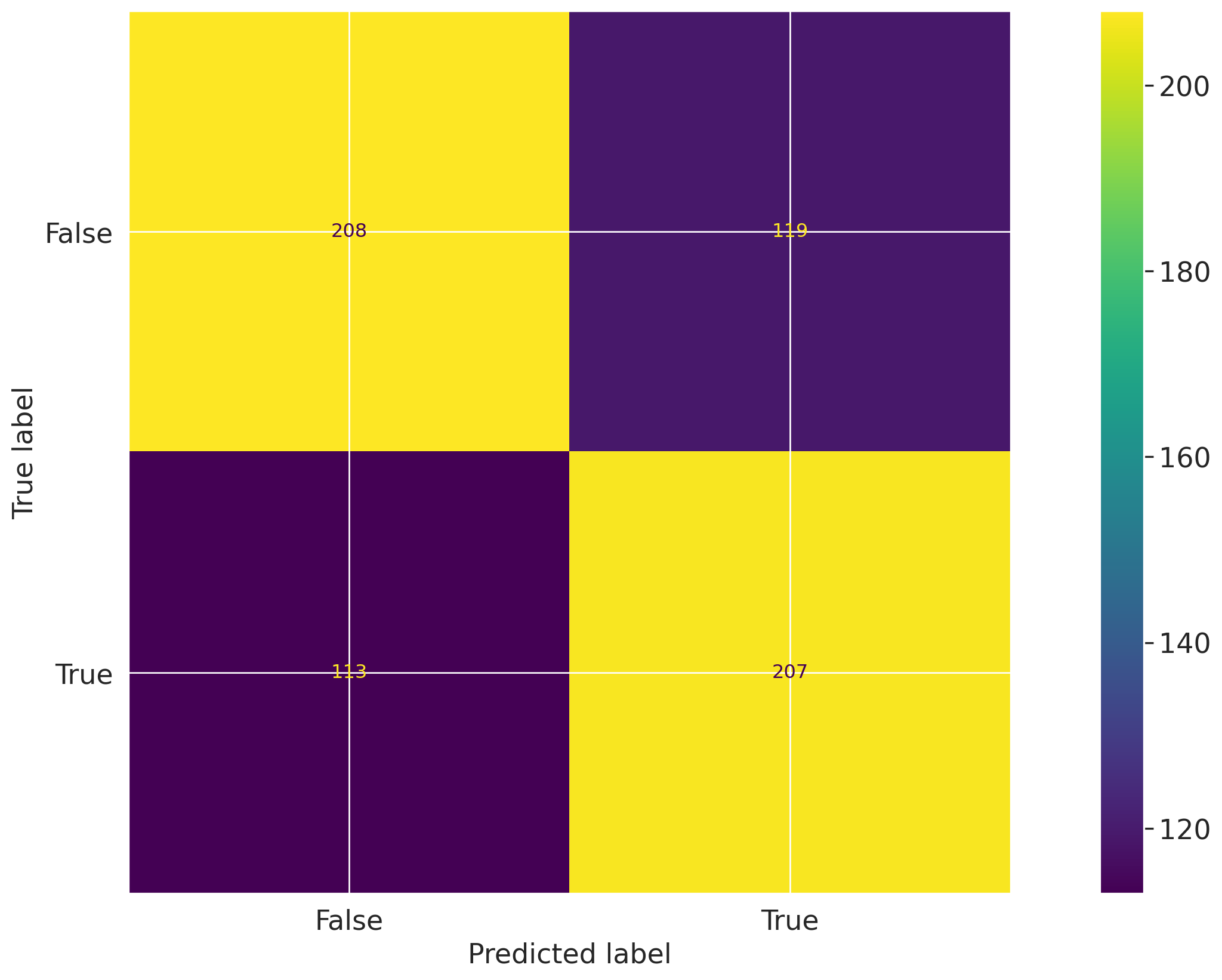
Let's set up a custom inline test that calculates the confusion matrix for a binary classification model:

# First create a confusion matrix plot
import matplotlib.pyplot as plt
from sklearn import metrics

# Get the predicted classes
y_pred = log_reg.predict(vm_test_ds.x)

confusion_matrix = metrics.confusion_matrix(y_test, y_pred)

cm_display = metrics.ConfusionMatrixDisplay(
    confusion_matrix=confusion_matrix, display_labels=[False, True]
)
cm_display.plot()

# Create the reusable ConfusionMatrix inline test with normalized matrix
@vm.test("my_custom_tests.ConfusionMatrix")
def confusion_matrix(dataset, model, normalize=False):
    """The confusion matrix is a table that is often used to describe the performance of a classification model on a set of data for which the true values are known.

    The confusion matrix is a 2x2 table that contains 4 values:

    - True Positive (TP): the number of correct positive predictions
    - True Negative (TN): the number of correct negative predictions
    - False Positive (FP): the number of incorrect positive predictions
    - False Negative (FN): the number of incorrect negative predictions

    The confusion matrix can be used to assess the holistic performance of a classification model by showing the accuracy, precision, recall, and F1 score of the model on a single figure.
    """
    y_true = dataset.y
    y_pred = dataset.y_pred(model=model)

    if normalize:
        confusion_matrix = metrics.confusion_matrix(y_true, y_pred, normalize="all")
    else:
        confusion_matrix = metrics.confusion_matrix(y_true, y_pred)

    cm_display = metrics.ConfusionMatrixDisplay(
        confusion_matrix=confusion_matrix, display_labels=[False, True]
    )
    cm_display.plot()

    plt.close()  # close the plot to avoid displaying it

    return cm_display.figure_  # return the figure object itself
# Test dataset with normalize=True
result = vm.tests.run_test(
    "my_custom_tests.ConfusionMatrix:test_dataset_normalized",
    inputs={"model": vm_model, "dataset": vm_test_ds},
    params={"normalize": True},
)

Confusion Matrix Test Dataset Normalized

The ConfusionMatrix test evaluates classification performance by comparing predicted labels with true labels, and this result presents the normalized confusion matrix for the test dataset. The figure shows the proportion of observations in each true/predicted label combination, with rows corresponding to true labels and columns to predicted labels. The normalized cell values are 0.31 for true negatives, 0.22 for false positives, 0.16 for false negatives, and 0.31 for true positives.

Key insights:

  • Correct classifications are balanced: The true negative and true positive cells are both 0.31, indicating equal normalized proportions of correct classifications for the negative and positive classes.

  • False positives exceed false negatives: The false positive cell is 0.22, compared with 0.16 for false negatives, showing that incorrect positive predictions occur more frequently than incorrect negative predictions in the normalized matrix.

  • Diagonal exceeds off-diagonal mass: The diagonal cells sum to 0.62 (0.31 + 0.31), while the off-diagonal cells sum to 0.38 (0.22 + 0.16), indicating that correct classifications account for a larger share of the normalized outcomes than misclassifications.

The normalized confusion matrix shows evenly distributed correct classification rates across both classes, with identical values for true negatives and true positives. Misclassifications are lower in aggregate than correct classifications, although the error distribution is asymmetric, with a higher normalized share of false positives than false negatives. Overall, the result reflects a balanced pattern in correct predictions alongside modestly higher positive overprediction error.

Parameters:

{
  "normalize": true
}
            

Figures

ValidMind Figure my_custom_tests.ConfusionMatrix:test_dataset_normalized:08f9

Add a local test provider

Finally, let's save our custom inline test to our local test provider:

# Create custom tests folder
tests_folder = "my_tests"

import os

# create tests folder
os.makedirs(tests_folder, exist_ok=True)

# remove existing tests
for f in os.listdir(tests_folder):
    # remove files and pycache
    if f.endswith(".py") or f == "__pycache__":
        os.system(f"rm -rf {tests_folder}/{f}")
# Save custom inline test to custom tests folder
confusion_matrix.save(
    tests_folder,
    imports=["import matplotlib.pyplot as plt", "from sklearn import metrics"],
)
2026-09-11 23:49:12,758 - INFO(validmind.tests.decorator): Saved to /home/runner/work/documentation/documentation/site/notebooks/EXECUTED/development/my_tests/ConfusionMatrix.py!Be sure to add any necessary imports to the top of the file.
2026-09-11 23:49:12,758 - INFO(validmind.tests.decorator): This metric can be run with the ID: <test_provider_namespace>.ConfusionMatrix
# Register local test provider
from validmind.tests import LocalTestProvider

# initialize the test provider with the tests folder we created earlier
my_test_provider = LocalTestProvider(tests_folder)

vm.tests.register_test_provider(
    namespace="my_test_provider",
    test_provider=my_test_provider,
)

Reconnect to ValidMind

After you insert test-driven blocks into your model documentation, changes should persist and become available every time you call vm.preview_template().

However, you'll need to reload the connection to the ValidMind Platform if you have added test-driven blocks when the connection was already established using reload():

vm.reload()

Now, when you run preview_template() again, the three test-driven blocks you added to your documentation in the last two notebooks in should show up in the template in sections 2.3 Correlations and Interactions and 3.2 Model Evaluation:

vm.preview_template()
1. Conceptual Soundness ('conceptual_soundness')
2. Data Preparation ('data_preparation')
3. Model Development ('model_development')
4. Monitoring and Governance ('monitoring_governance')

Include custom test results

Since your custom test IDs are now part of your documentation template, you can now run tests for an entire section and all additional custom tests should be loaded without any issues.

Let's run all tests in the Model Evaluation section of the documentation. Note that we have been running the sample custom confusion matrix with normalize=True to demonstrate the ability to provide custom parameters.

In the Run the model evaluation tests section of 2 — Start the development process, you learned how to assign inputs to individual tests with run_documentation_tests(). Assigning parameters is similar, you only need to provide assign a params dictionary to a given test ID, my_test_provider.ConfusionMatrix in this case.

test_config = {
    "validmind.model_validation.sklearn.ClassifierPerformance:in_sample": {
        "inputs": {
            "dataset": vm_train_ds,
            "model": vm_model,
        },
    },
    "my_test_provider.ConfusionMatrix": {
        "params": {"normalize": True},
        "inputs": {"dataset": vm_test_ds, "model": vm_model},
    },
}
results = vm.run_documentation_tests(
    section=["model_evaluation"],
    inputs={
        "dataset": vm_test_ds,  # Any test that requires a single dataset will use vm_test_ds
        "model": vm_model,
        "datasets": (
            vm_train_ds,
            vm_test_ds,
        ),  # Any test that requires multiple datasets will use vm_train_ds and vm_test_ds
    },
    config=test_config,
)
2026-09-11 23:49:13,030 - WARNING(validmind.vm_models.test_suite.runner): Config key 'my_test_provider.ConfusionMatrix' does not match a test_id in the template.
    Ensure you registered a content block with the correct content_id in the template
    The configuration for this test will be ignored.
Test suite complete!
18/18 (100.0%)

Test Suite Results: Binary Classification V2


Check out the updated documentation on ValidMind.

Template for binary classification models.

Model Evaluation

Configuring documentation template tests

Let's call the utility function vm.get_test_suite().get_default_config() which will return the default configuration for the entire documentation template as a dictionary:

  • This configuration will contain all the test IDs and their default parameters.
  • You can then modify this configuration as needed and pass it to run_documentation_tests() to run all tests in the documentation template if needed.
  • You still have the option to continue running tests for one section at a time; get_default_config() simply provides a useful reference for providing default parameters to every test.
import json

model_test_suite = vm.get_test_suite()
config = model_test_suite.get_default_config()
print("Suite Config: \n", json.dumps(config, indent=2))
Suite Config: 
 {
  "validmind.data_validation.DatasetDescription": {
    "inputs": {
      "dataset": "dataset"
    },
    "params": {}
  },
  "validmind.data_validation.ClassImbalance": {
    "inputs": {
      "dataset": "dataset"
    },
    "params": {
      "min_percent_threshold": 10
    }
  },
  "validmind.data_validation.Duplicates": {
    "inputs": {
      "dataset": "dataset"
    },
    "params": {
      "min_threshold": 1
    }
  },
  "validmind.data_validation.HighCardinality": {
    "inputs": {
      "dataset": "dataset"
    },
    "params": {
      "num_threshold": 100,
      "percent_threshold": 0.1,
      "threshold_type": "percent"
    }
  },
  "validmind.data_validation.MissingValues": {
    "inputs": {
      "dataset": "dataset"
    },
    "params": {
      "min_percentage_threshold": 1.0
    }
  },
  "validmind.data_validation.Skewness": {
    "inputs": {
      "dataset": "dataset"
    },
    "params": {
      "max_threshold": 1
    }
  },
  "validmind.data_validation.UniqueRows": {
    "inputs": {
      "dataset": "dataset"
    },
    "params": {
      "min_percent_threshold": 1
    }
  },
  "validmind.data_validation.TooManyZeroValues": {
    "inputs": {
      "dataset": "dataset"
    },
    "params": {
      "max_percent_threshold": 0.03
    }
  },
  "validmind.data_validation.IQROutliersTable": {
    "inputs": {
      "dataset": "dataset"
    },
    "params": {
      "threshold": 1.5
    }
  },
  "validmind.data_validation.IQROutliersBarPlot": {
    "inputs": {
      "dataset": "dataset"
    },
    "params": {
      "threshold": 1.5,
      "fig_width": 800
    }
  },
  "validmind.data_validation.DescriptiveStatistics": {
    "inputs": {
      "dataset": "dataset"
    },
    "params": {}
  },
  "validmind.data_validation.PearsonCorrelationMatrix": {
    "inputs": {
      "dataset": "dataset"
    },
    "params": {}
  },
  "validmind.data_validation.HighPearsonCorrelation": {
    "inputs": {
      "dataset": "dataset"
    },
    "params": {
      "max_threshold": 0.3,
      "top_n_correlations": 10,
      "feature_columns": null
    }
  },
  "validmind.model_validation.ModelMetadata": {
    "inputs": {
      "model": "model"
    },
    "params": {}
  },
  "validmind.data_validation.DatasetSplit": {
    "inputs": {
      "datasets": "datasets"
    },
    "params": {}
  },
  "validmind.model_validation.sklearn.PopulationStabilityIndex": {
    "inputs": {
      "datasets": "datasets",
      "model": "model"
    },
    "params": {
      "num_bins": 10,
      "mode": "fixed"
    }
  },
  "validmind.model_validation.sklearn.ConfusionMatrix": {
    "inputs": {
      "dataset": "dataset",
      "model": "model"
    },
    "params": {
      "threshold": 0.5
    }
  },
  "validmind.model_validation.sklearn.ClassifierPerformance:in_sample": {
    "inputs": {
      "dataset": "dataset",
      "model": "model"
    },
    "params": {
      "average": "macro"
    }
  },
  "validmind.model_validation.sklearn.ClassifierPerformance:out_of_sample": {
    "inputs": {
      "dataset": "dataset",
      "model": "model"
    },
    "params": {
      "average": "macro"
    }
  },
  "validmind.model_validation.sklearn.PrecisionRecallCurve": {
    "inputs": {
      "model": "model",
      "dataset": "dataset"
    },
    "params": {}
  },
  "validmind.model_validation.sklearn.ROCCurve": {
    "inputs": {
      "model": "model",
      "dataset": "dataset"
    },
    "params": {}
  },
  "validmind.model_validation.sklearn.TrainingTestDegradation": {
    "inputs": {
      "datasets": "datasets",
      "model": "model"
    },
    "params": {
      "max_threshold": 0.1
    }
  },
  "validmind.model_validation.sklearn.MinimumAccuracy": {
    "inputs": {
      "dataset": "dataset",
      "model": "model"
    },
    "params": {
      "min_threshold": 0.7
    }
  },
  "validmind.model_validation.sklearn.MinimumF1Score": {
    "inputs": {
      "dataset": "dataset",
      "model": "model"
    },
    "params": {
      "min_threshold": 0.5
    }
  },
  "validmind.model_validation.sklearn.MinimumROCAUCScore": {
    "inputs": {
      "dataset": "dataset",
      "model": "model"
    },
    "params": {
      "min_threshold": 0.5
    }
  },
  "validmind.model_validation.sklearn.PermutationFeatureImportance": {
    "inputs": {
      "model": "model",
      "dataset": "dataset"
    },
    "params": {
      "fontsize": null,
      "figure_height": null
    }
  },
  "validmind.model_validation.sklearn.SHAPGlobalImportance": {
    "inputs": {
      "model": "model",
      "dataset": "dataset"
    },
    "params": {
      "kernel_explainer_samples": 10,
      "tree_or_linear_explainer_samples": 200,
      "class_of_interest": null
    }
  },
  "validmind.model_validation.sklearn.WeakspotsDiagnosis": {
    "inputs": {
      "datasets": "datasets",
      "model": "model"
    },
    "params": {
      "features_columns": null,
      "metrics": null,
      "thresholds": null
    }
  },
  "validmind.model_validation.sklearn.OverfitDiagnosis": {
    "inputs": {
      "model": "model",
      "datasets": "datasets"
    },
    "params": {
      "metric": null,
      "cut_off_threshold": 0.04
    }
  },
  "validmind.model_validation.sklearn.RobustnessDiagnosis": {
    "inputs": {
      "datasets": "datasets",
      "model": "model"
    },
    "params": {
      "metric": null,
      "scaling_factor_std_dev_list": [
        0.1,
        0.2,
        0.3,
        0.4,
        0.5
      ],
      "performance_decay_threshold": 0.05
    }
  }
}
Preview test configuration

The default config does not assign any inputs to a test, but you can assign inputs to individual tests as needed depending on the datasets and records (models) you want to pass to individual tests.

For this particular documentation template (binary classification), the ValidMind Library provides a sample configuration that can be used to populate the entire documentation using the following inputs as placeholders:

  • A raw_dataset raw dataset
  • A train_dataset training dataset
  • A test_dataset test dataset
  • A trained model instance

As part of updating the config you will need to ensure the correct input_ids are used in the final config passed to run_documentation_tests().

from validmind.datasets.classification import customer_churn
from validmind.utils import preview_test_config

test_config = customer_churn.get_demo_test_config()
preview_test_config(test_config)

Run updated documentation section tests

Using this sample configuration, let's finish populating documentation by running all tests for the Model Development section of the documentation.

Recall that the training and test datasets in our exercise have the following input_id values:

  • train_dataset_final for the training dataset
  • test_dataset_final for the test dataset
config = {
    "validmind.model_validation.ModelMetadata": {
        "inputs": {"model": "log_reg_model_v1"},
    },
    "validmind.data_validation.DatasetSplit": {
        "inputs": {"datasets": ["train_dataset_final", "test_dataset_final"]},
    },
    "validmind.model_validation.sklearn.PopulationStabilityIndex": {
        "inputs": {
            "model": "log_reg_model_v1",
            "datasets": ["train_dataset_final", "test_dataset_final"],
        },
        "params": {"num_bins": 10, "mode": "fixed"},
    },
    "validmind.model_validation.sklearn.ConfusionMatrix": {
        "inputs": {"model": "log_reg_model_v1", "dataset": "test_dataset_final"},
    },
    "my_test_provider.ConfusionMatrix": {
        "inputs": {"dataset": "test_dataset_final", "model": "log_reg_model_v1"},
    },
    "my_custom_tests.ConfusionMatrix:test_dataset_normalized": {
        "inputs": {"dataset": "test_dataset_final", "model": "log_reg_model_v1"},
    },
    "validmind.model_validation.sklearn.ClassifierPerformance:in_sample": {
        "inputs": {"model": "log_reg_model_v1", "dataset": "train_dataset_final"}
    },
    "validmind.model_validation.sklearn.ClassifierPerformance:out_of_sample": {
        "inputs": {"model": "log_reg_model_v1", "dataset": "test_dataset_final"}
    },
    "validmind.model_validation.sklearn.PrecisionRecallCurve": {
        "inputs": {"model": "log_reg_model_v1", "dataset": "test_dataset_final"},
    },
    "validmind.model_validation.sklearn.ROCCurve": {
        "inputs": {"model": "log_reg_model_v1", "dataset": "test_dataset_final"},
    },
    "validmind.model_validation.sklearn.TrainingTestDegradation": {
        "inputs": {
            "model": "log_reg_model_v1",
            "datasets": ["train_dataset_final", "test_dataset_final"],
        },
        "params": {
            "metrics": ["accuracy", "precision", "recall", "f1"],
            "max_threshold": 0.1,
        },
    },
    "validmind.model_validation.sklearn.MinimumAccuracy": {
        "inputs": {"model": "log_reg_model_v1", "dataset": "test_dataset_final"},
        "params": {"min_threshold": 0.7},
    },
    "validmind.model_validation.sklearn.MinimumF1Score": {
        "inputs": {"model": "log_reg_model_v1", "dataset": "test_dataset_final"},
        "params": {"min_threshold": 0.5},
    },
    "validmind.model_validation.sklearn.MinimumROCAUCScore": {
        "inputs": {"model": "log_reg_model_v1", "dataset": "test_dataset_final"},
        "params": {"min_threshold": 0.5},
    },
    "validmind.model_validation.sklearn.PermutationFeatureImportance": {
        "inputs": {"model": "log_reg_model_v1", "dataset": "test_dataset_final"},
    },
    "validmind.model_validation.sklearn.SHAPGlobalImportance": {
        "inputs": {"model": "log_reg_model_v1", "dataset": "test_dataset_final"},
        "params": {"kernel_explainer_samples": 10},
    },
    "validmind.model_validation.sklearn.WeakspotsDiagnosis": {
        "inputs": {
            "model": "log_reg_model_v1",
            "datasets": ["train_dataset_final", "test_dataset_final"],
        },
        "params": {
            "thresholds": {"accuracy": 0.75, "precision": 0.5, "recall": 0.5, "f1": 0.7}
        },
    },
    "validmind.model_validation.sklearn.OverfitDiagnosis": {
        "inputs": {
            "model": "log_reg_model_v1",
            "datasets": ["train_dataset_final", "test_dataset_final"],
        },
        "params": {"cut_off_percentage": 4},
    },
    "validmind.model_validation.sklearn.RobustnessDiagnosis": {
        "inputs": {
            "model": "log_reg_model_v1",
            "datasets": ["train_dataset_final", "test_dataset_final"],
        },
        "params": {
            "scaling_factor_std_dev_list": [0.0, 0.1, 0.2, 0.3, 0.4, 0.5],
            "accuracy_decay_threshold": 4,
        },
    },
}


full_suite = vm.run_documentation_tests(
    section="model_development",
    config=config,
)
2026-09-11 23:49:29,838 - WARNING(validmind.vm_models.test_suite.runner): Config key 'my_test_provider.ConfusionMatrix' does not match a test_id in the template.
    Ensure you registered a content block with the correct content_id in the template
    The configuration for this test will be ignored.
2026-09-11 23:49:29,838 - WARNING(validmind.vm_models.test_suite.runner): Config key 'my_custom_tests.ConfusionMatrix:test_dataset_normalized' does not match a test_id in the template.
    Ensure you registered a content block with the correct content_id in the template
    The configuration for this test will be ignored.
Test suite complete!
34/34 (100.0%)

Test Suite Results: Binary Classification V2


Check out the updated documentation on ValidMind.

Template for binary classification models.

Model Development

In summary

In this final notebook, you learned how to:

With our ValidMind for development series of notebooks, you learned how to document a record (model) end-to-end with the ValidMind Library by running through some common scenarios in a typical development setting:

  • Running out-of-the-box tests
  • Documenting your record (model) by adding evidence to documentation
  • Extending the capabilities of the ValidMind Library by implementing custom tests
  • Ensuring that the documentation is complete by running all tests in the documentation template

Next steps

Work with your documentation

Now that you've logged all your test results and generated a draft for your documentation, head to the ValidMind Platform to wrap up your documentation. Continue to work on your documentation by:

  • Run and log more tests: Use the skills you learned in this series of notebooks to run and log more individual tests, including custom tests, then insert them into your documentation as supplementary evidence. (Learn more: validmind.tests)

  • Inserting additional test results: Add Test-Driven Blocks under any relevant section of your documentation. (Learn more: Work with test results)

  • Making qualitative edits to your test descriptions: Click on the description of any inserted test results to review and edit the ValidMind-generated test descriptions for quality and accuracy. (Learn more: Working with documentation)

  • View guidelines: In any section of your documentation, click ValidMind Insights in the top right corner to reveal the Documentation Guidelines for each section to help guide the contents of your documentation. (Learn more: View development guidelines)

  • Collaborate with other stakeholders: Use the ValidMind Platform's real-time collaborative features to work seamlessly together with the rest of your organization, including validators. Review suggested changes in your content blocks, work with versioned history, and use comments to discuss specific portions of your documentation. (Learn more: Collaborate with others)

When your documentation is complete and ready for review, submit it for approval from the same ValidMind Platform where you made your edits and collaborated with the rest of your organization, ensuring transparency and a thorough development history. (Learn more: Submit documents)

Learn more

Now that you're familiar with the basics, you can explore the following notebooks to get a deeper understanding on how the ValidMind Library allows you generate documentation for any use case:

Use cases

Discover more learning resources

Learn more about the ValidMind Library tools we used in this notebook:

We offer many interactive notebooks to help you automate testing, documenting, validating, and more:

Or, visit our documentation to learn more about ValidMind.


Copyright © 2023-2026 ValidMind Inc. All rights reserved.
Refer to LICENSE for details.
SPDX-License-Identifier: AGPL-3.0 AND ValidMind Commercial