Using the documentation
This documentation site helps you learn ValidMind, implement it in your organization, govern your AI/ML models, and operate the platform day to day.
How to use this site
Depending on your goal, start in one of these areas:
- New to ValidMind? Begin with our quickstarts for a guided introduction tailored to your role — developer, validator, or administrator.
- Looking for step-by-step instructions? Browse the Guides for task-based walkthroughs organized by feature area.
- Ready to integrate programmatically? Explore the ValidMind Library for code samples, tutorials, and API references.
- Need hands-on practice? Visit ValidMind Academy for interactive courses and learning paths.
Documentation sections
About ValidMind
Introduces the platform, its use cases, and deployment options.
- About ValidMind — Platform overview and capabilities
- AI governance — EU AI Act compliance and risk classification
- Model risk management — SR 11-7, SS1/23, and E-23 compliance
- Library and platform — How the ValidMind Library and ValidMind Platform work together
- Deployment options — Multi-tenant cloud vs. Virtual Private ValidMind
Typical tasks: Understand what ValidMind does, evaluate fit for your organization, review compliance use cases.
Get started
Role-based quickstarts to help you begin using ValidMind quickly.
- Developer quickstart — Set up your environment and document your first model
- Validator quickstart — Review documentation and prepare validation reports
- Administrator quickstart — Configure users, roles, and organization settings
Typical tasks: Complete initial setup, onboard to your role, run through first workflows.
Guides
Step-by-step instructions for platform tasks, organized by feature area.
| Section | Intent | Typical tasks |
|---|---|---|
| Access | Signing up for and logging into ValidMind | Register, sign in via SSO, recover access |
| Configuration | Setting up your organization and users | Add users, create groups, assign roles and permissions |
| Integrations | Connecting ValidMind to external systems | Manage secrets, configure connections, link external models |
| Workflows | Automating model lifecycle processes | Configure workflow steps, manage transitions, set up approvals |
| Inventory | Managing your model and record inventory | Register records, edit fields, configure interdependencies |
| Documents & templates | Creating and customizing documentation | Manage document types, customize templates, use the text block library |
| Model documentation | Authoring and collaborating on model docs | Edit content blocks, add test results, manage versions, submit for approval |
| Model validation | Reviewing and validating models | Review documentation, assess compliance, manage findings and artifacts |
| Reporting | Analyzing and exporting data | View reports, create custom analytics, export inventory and documents |
| Monitoring | Tracking model performance over time | Enable monitoring, review results, set thresholds and alerts |
| Attestation | Managing formal attestations | Create, submit, review, and approve attestations |
ValidMind Library
Resources for developers integrating ValidMind into their workflows.
- ValidMind Library — Python library overview and installation
- Code samples — Jupyter notebooks for common use cases
- Test descriptions — Reference for available validation tests
- ValidMind Library Python API — Python API documentation
- Public REST API — REST API for platform integrations
Typical tasks: Install the library, run tests, log results to the platform, automate documentation.
Training
Hands-on courses and learning paths for ValidMind.
- Training overview — Available courses and videos
- Learning paths — Role-based training tracks
- Sample training plan — Example onboarding schedule
Typical tasks: Complete role-based training, gain hands-on platform experience, prepare for certification.
Support
Help resources and troubleshooting.
- Get help — Contact support and community resources
- Troubleshooting — Common issues and solutions
- FAQ — Frequently asked questions by topic
Typical tasks: Resolve errors, find answers to common questions, contact support.
In-product help
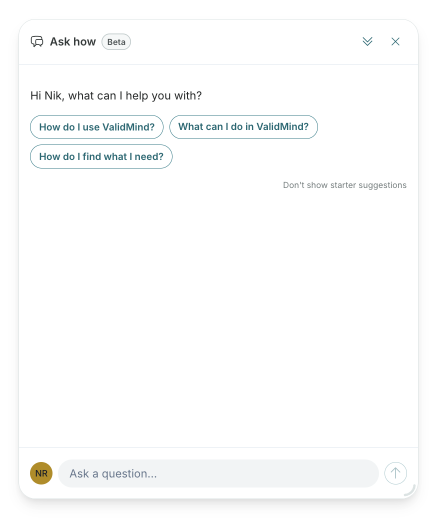
The ValidMind Platform includes a built-in assistant that answers questions about features and workflows. The documentation you find here is the source of truth for packaged product knowledge — the in-app assistant draws from these pages to provide contextual guidance.
When you need:
- Quick, contextual answers — Use the in-app assistant
- Detailed walkthroughs or reference material — Search or browse this documentation site
Where to go next
- Get started — Begin with a quickstart for your role
- Guides — Find step-by-step instructions
- ValidMind Library — Integrate programmatically
- Support — Get help when you need it