26.03 Release notes
Highlights include improvements to documentation, model inventory, workflows, integrations, and reporting & analytics. This release also includes other enhancements and bug fixes across the platform.
Future releases will require you to specify the document parameter when initializing the ValidMind Library. Update your existing code snippets now to prevent a breaking change in the future.
Support for configuring identity providers (IDPs) via environment variables has been removed. Starting with this release, IDPs must be configured using the TOML configuration file.
Frontend
Document highlights
Configure assessment options for validation reports
Assessment options are now configurable per template, allowing each template to have its own customized set of assessment options for validation reports.
This change provides greater flexibility for different template types and use cases:
Configure custom assessment options at the template level besides the default options of No Adherence, Some Adherence, Strong Adherence, and Full Adherence.
Enable different templates to have different assessment scales that match their specific requirements.
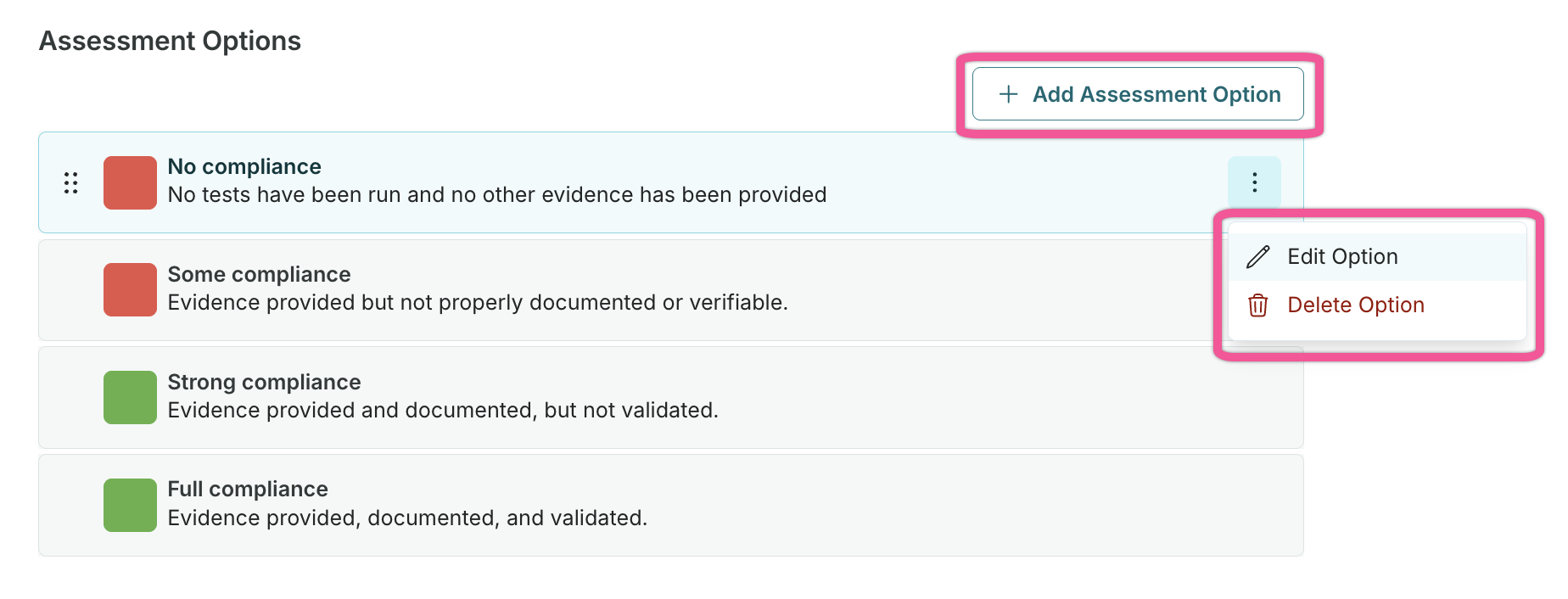
Existing assessment options have been automatically migrated to template scope, no migration required.
Edit document template outline at the model level
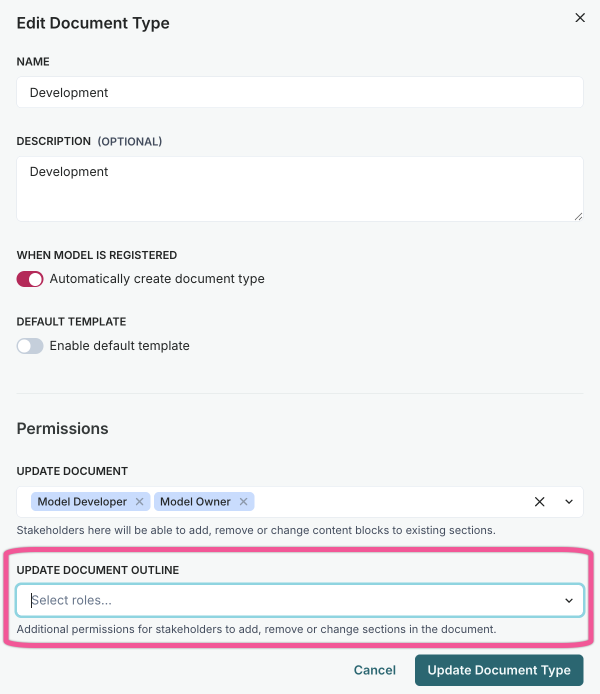
You can now add, rename, reorder, and delete sections in your model documentation outline, enabling customization based on relevancy for individual models.
A new permission allows defined organization roles to edit document template outlines at the model level:
- Add new sections to document outlines.
- Rename existing sections.
- Reorder sections via drag-and-drop.
- Delete sections no longer needed.
Edits to the outline apply to singular documents only and do not affect other documents or the template in use.
Automatic change tracking for documentation
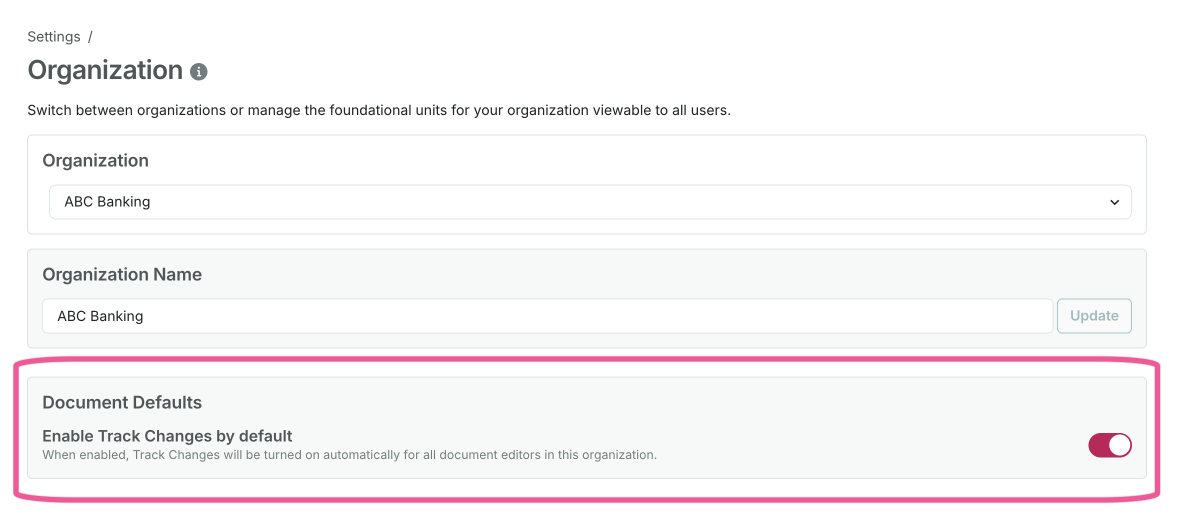
Organization administrators can now enable to track changes by default for all document editors, improving change tracking and audit visibility across the organization.
When enabled under Settings > Organization > Document Defaults > Enable Track Changes by default, change tracking automatically activates whenever a user opens a model documentation editor.
This feature ensures all document modifications are tracked consistently without requiring manual activation by each editor.
Renamed core document types
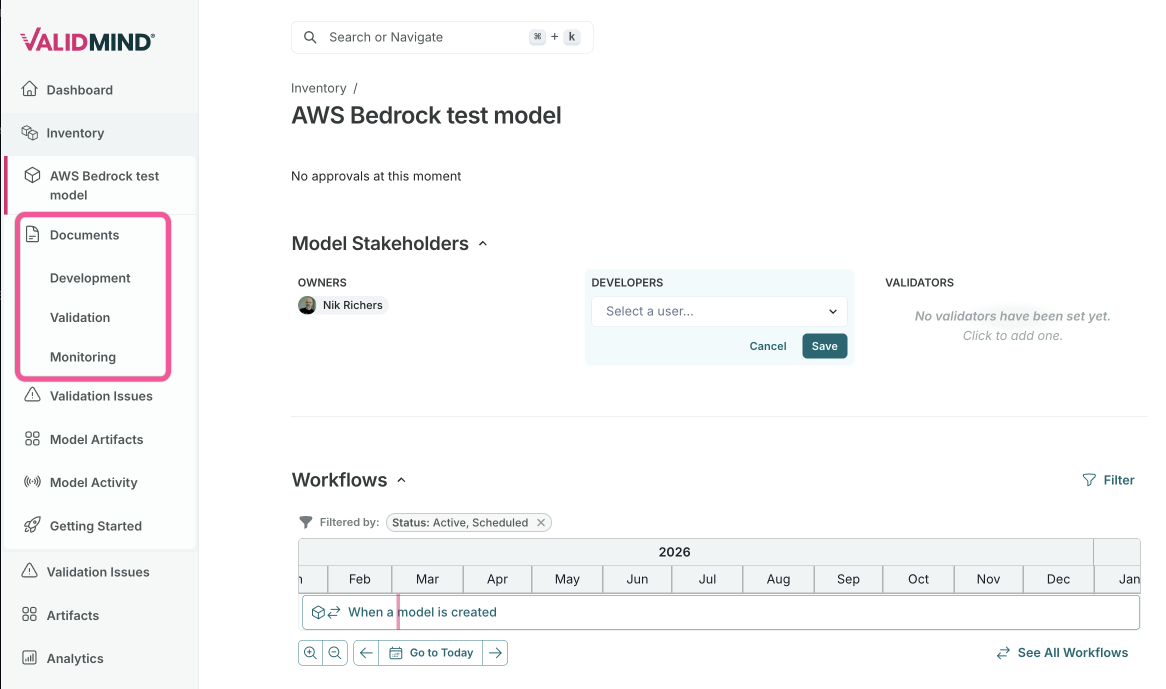
Core document types have been renamed for improved clarity, aligning terminology with user workflows across development, validation, and monitoring.
The following document types have been renamed:
- Model Documentation Development
- Continues to be used for development-phase documentation.
- Validation Report Validation
- Continues to be used for validation findings and assessments.
- Ongoing Monitoring Monitoring
- Continues to be used for ongoing monitoring documentation.
Reference model and artifact fields as variables
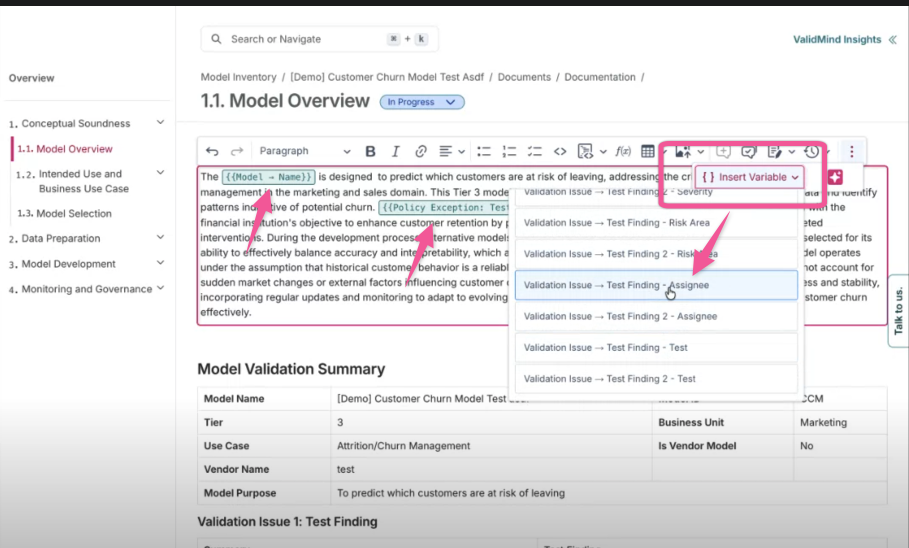
You can now insert model and artifact field values directly into your documentation as variables, reducing duplicate data entry and keeping documentation in sync with your model inventory.
In the Content Block Editor, use the new variable insertion button to reference field values:
- Model fields: Insert values like tiering, owners, purpose, or custom fields directly from the model.
- Artifact fields: Select an artifact type, choose a specific artifact, then pick the field to reference.
- Auto-refresh: Field values update automatically when documentation is opened.
- Version preservation: When documents are versioned, variable values are flattened to preserve the point-in-time snapshot.
Model inventory highlights
Surface model fields as read-only in downstream artifacts
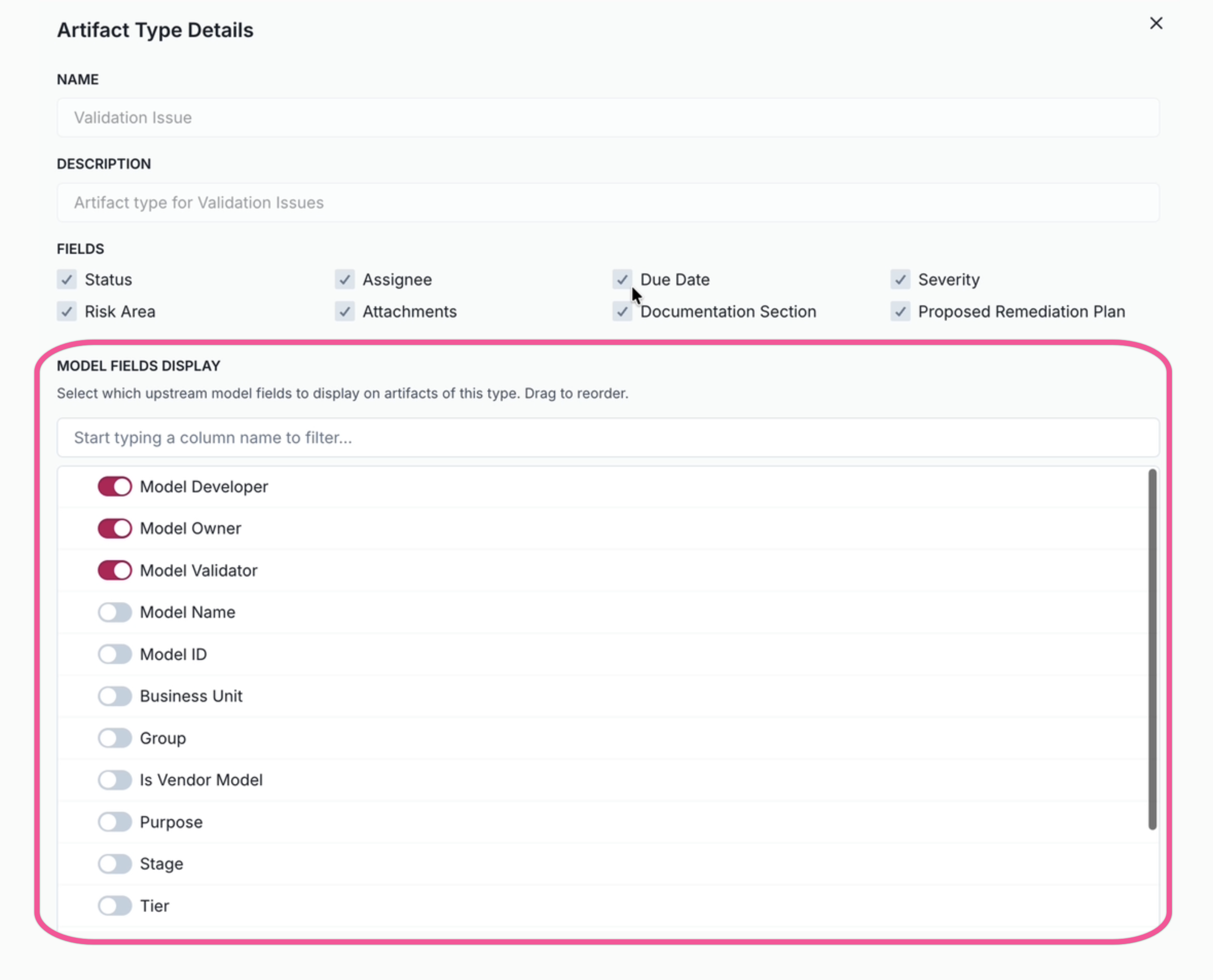
Administrators can now configure which upstream model fields to display on artifact detail pages, providing critical model context directly in the artifact view.
This enhancement provides better visibility on relationships between records:
- View model information, such as tiering, owners, purpose, or stakeholders, directly on artifact pages.
- Configure field visibility per artifact type in Settings > Artifact Types.
- Reduce the navigation required to understand the full context of artifacts.
- Validation issue artifact types are pre-configured with core model fields enabled by default.
New field type for artifact aggregation
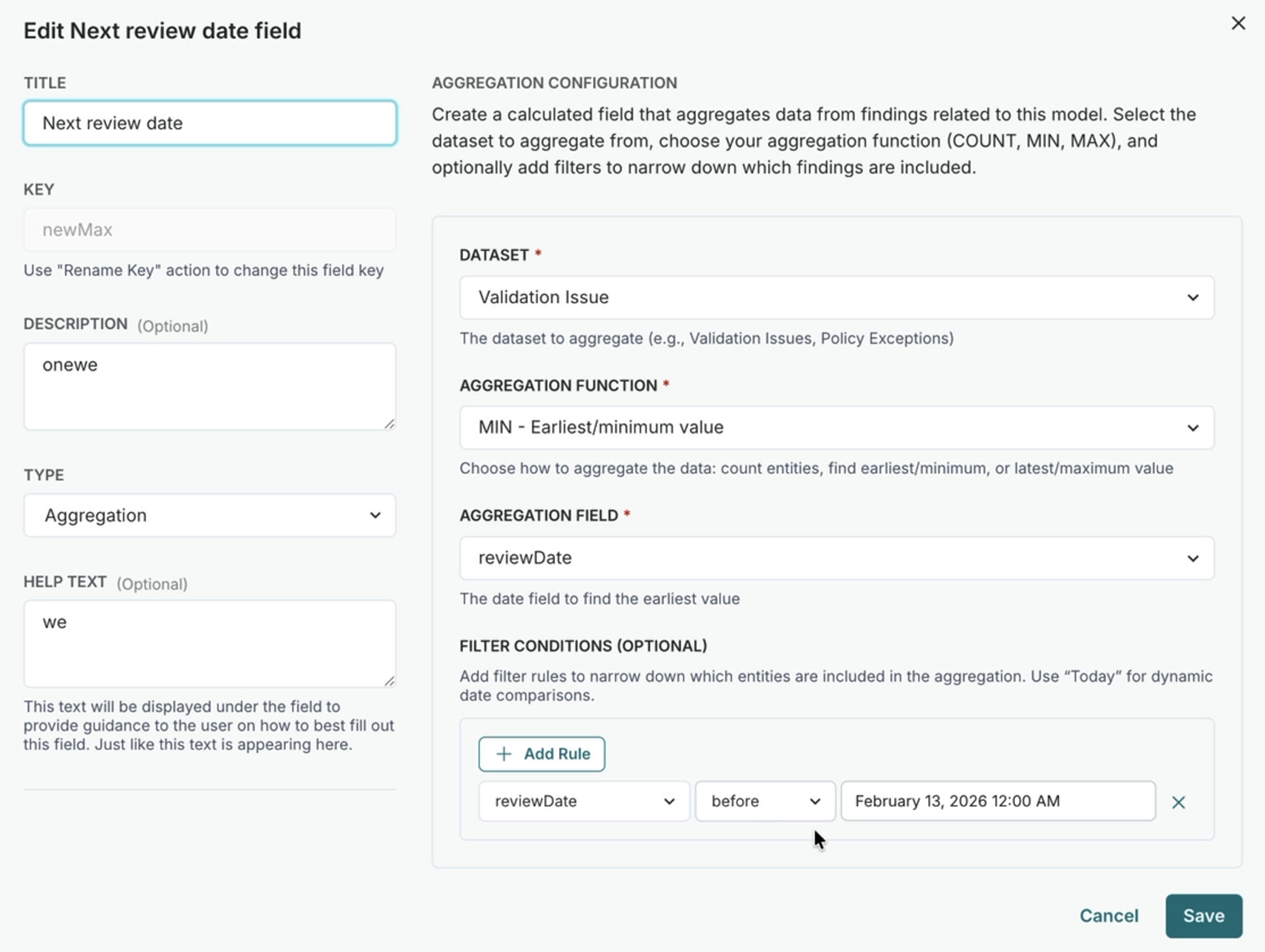
A new aggregate custom field type enables automatic computation of rollup metrics from related artifacts, providing visibility into downstream data without manual entry.
Automatically compute values from related artifacts:
Count artifacts: Track the number of artifacts matching specific criteria, such as critical issues or open policy exceptions.
Track earliest/latest dates: Use MIN/MAX aggregations on date fields to find the first or most recent occurrence.
Filter aggregations: Apply optional filter conditions to narrow down which artifacts are included in the computation.
Dynamic dataset discovery: Aggregate fields automatically discover available artifact types from your organization's configuration.
Relationship-based filtering: Filter artifacts based on their relationship to the parent inventory model.
Specify Other option in select fields
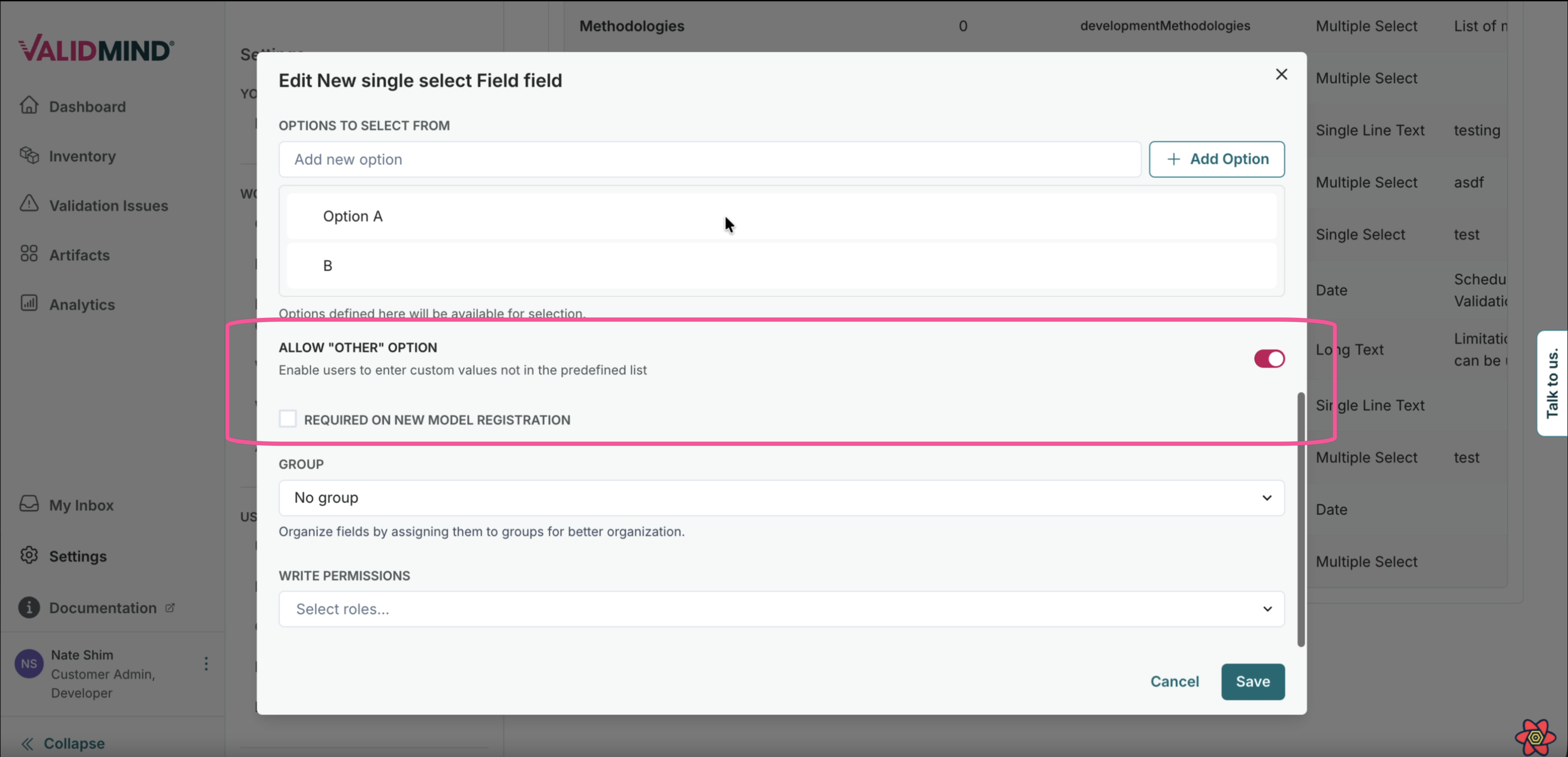
Single-Select and Multi-Select custom fields can now include an Other option that enables a text entry field for additional detail when selected.
This enhancement improves flexibility when predefined options don't fully capture the needed classification:
- Configure Other as an option in Single-Select or Multi-Select custom fields.
- When users select Other, a text entry field appears to provide more detail.
- Capture non-standard classifications without compromising field structure.
Workflow highlights
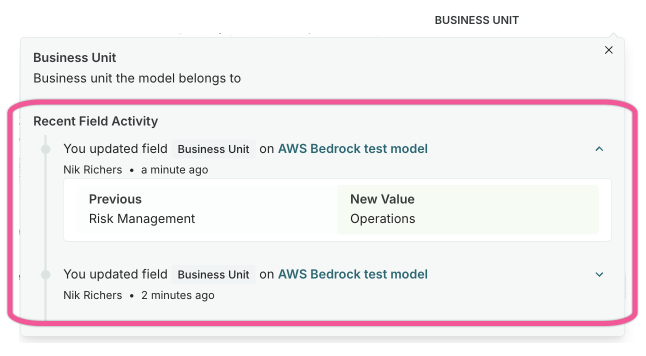
View field change history on hover
You can now view contextual field activity directly in user action step submissions and model/artifact pages, without parsing through all model or artifact activity.
This enhancement provides field-level change history on hover, enabling you to quickly understand:
- Who made changes to specific fields
- When those changes were made
- The previous values before the change
Better attribution of workflow actors
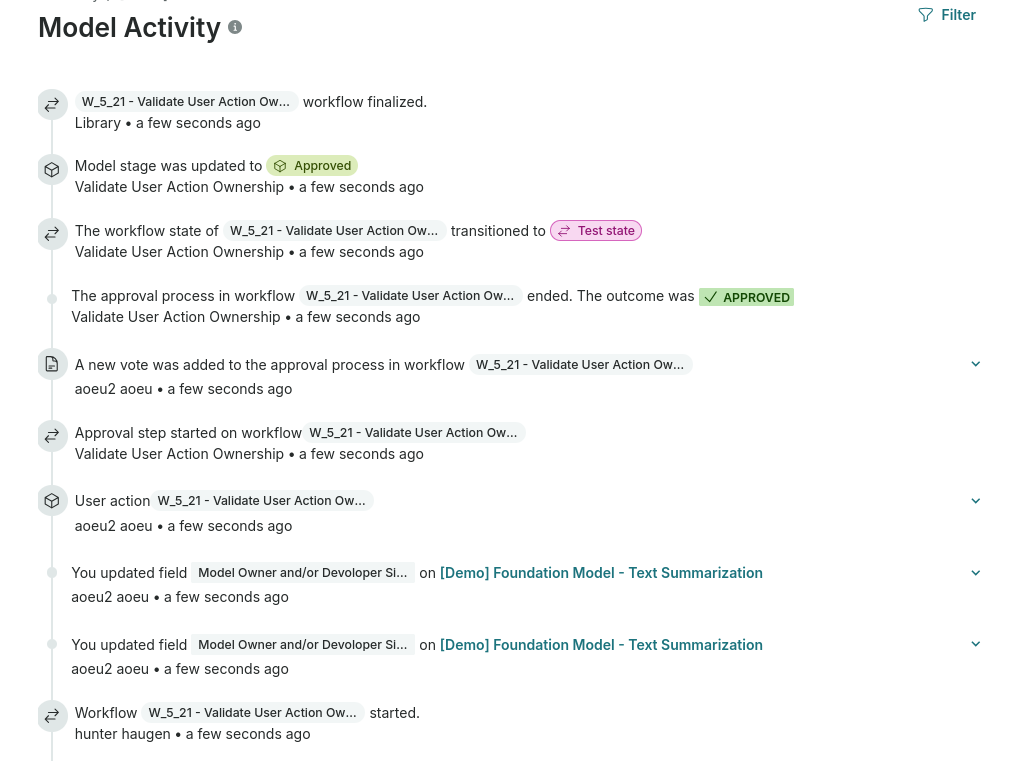
Model activity now correctly identifies the actor on workflow events, distinguishing between the individual who triggered the workflow and the workflow creator.
Previously, activity log events were sometimes misattributed. This improvement also ensures that workflow-triggered actions now show the correct user who initiated the workflow execution, rather than defaulting to the workflow configuration creator.
Integrations highlights
Scheduled exports of analytics data
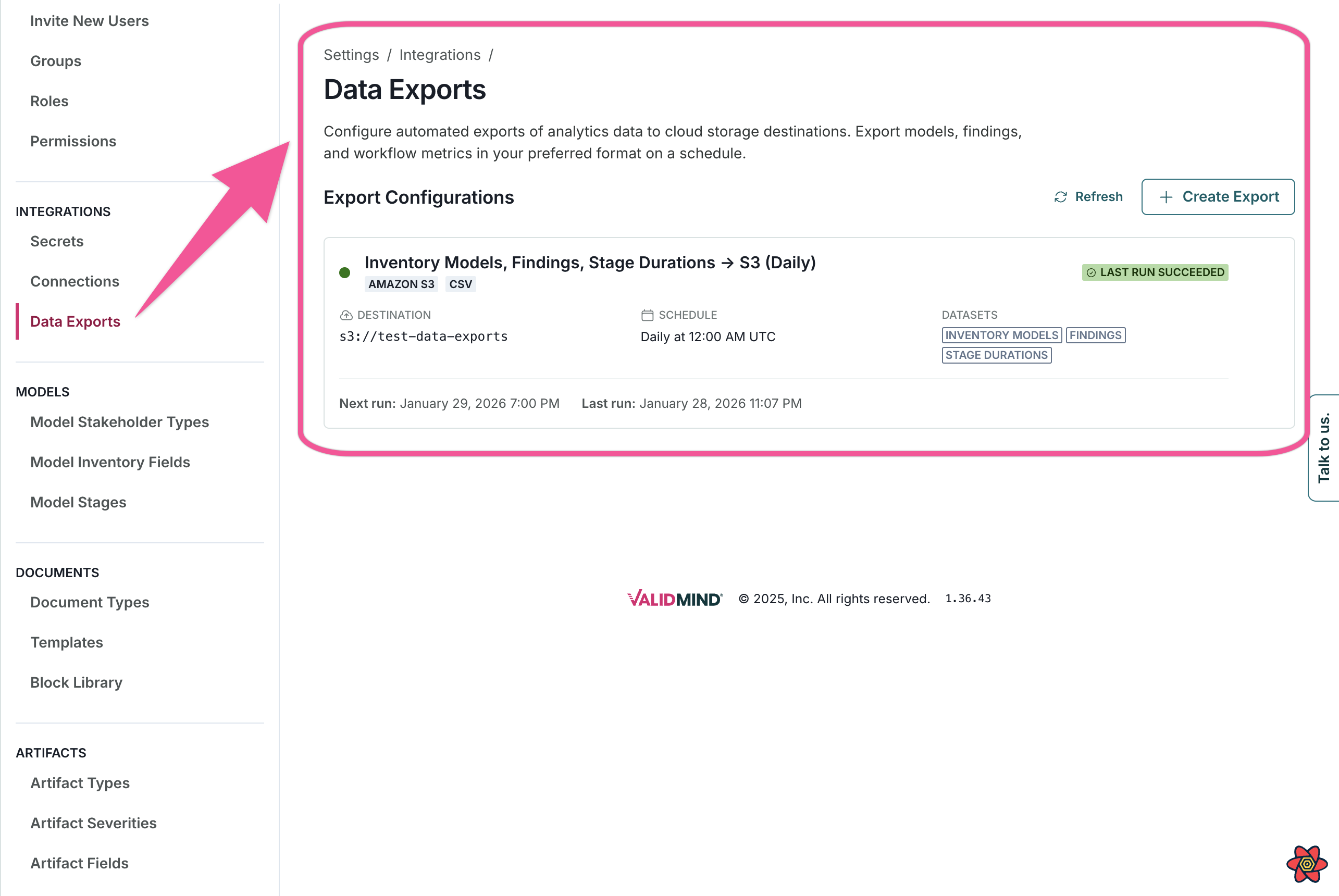
Schedule exports of analytics data to AWS S3 or S3-compatible object storage, with support for CSV, Parquet, and JSONL formats.
This integration enables you to:
- Configure S3 bucket connections with your storage credentials.
- Set up automated export schedules for analytics data.
- Choose your preferred file format (CSV, Parquet, or JSONL).
- Monitor export run history and status.
Reporting & analytics highlights
Retrieve model activity programmatically
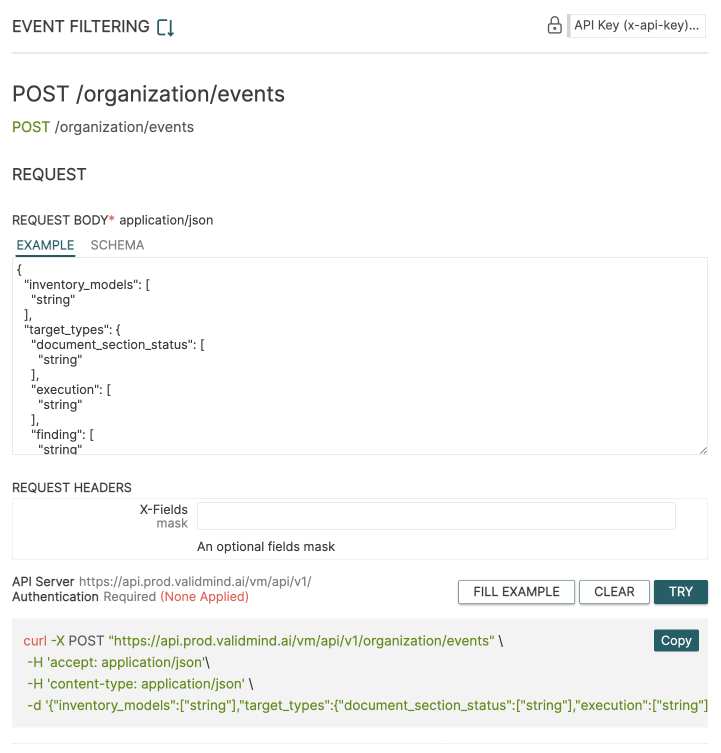
View model activity programmatically with optional filters.
Use the new POST /organization/events endpoint to:
- View model activity with optional filters.
- Export artifact data without requiring model context.
- Specify columns to reduce response payload and improve latency.
Enhancements
Parse PDF files to populate document templates
You can now populate document templates by parsing PDF files. The document parser shows clear status feedback for processing progress, success, and failures, and lets you cancel processing if needed.
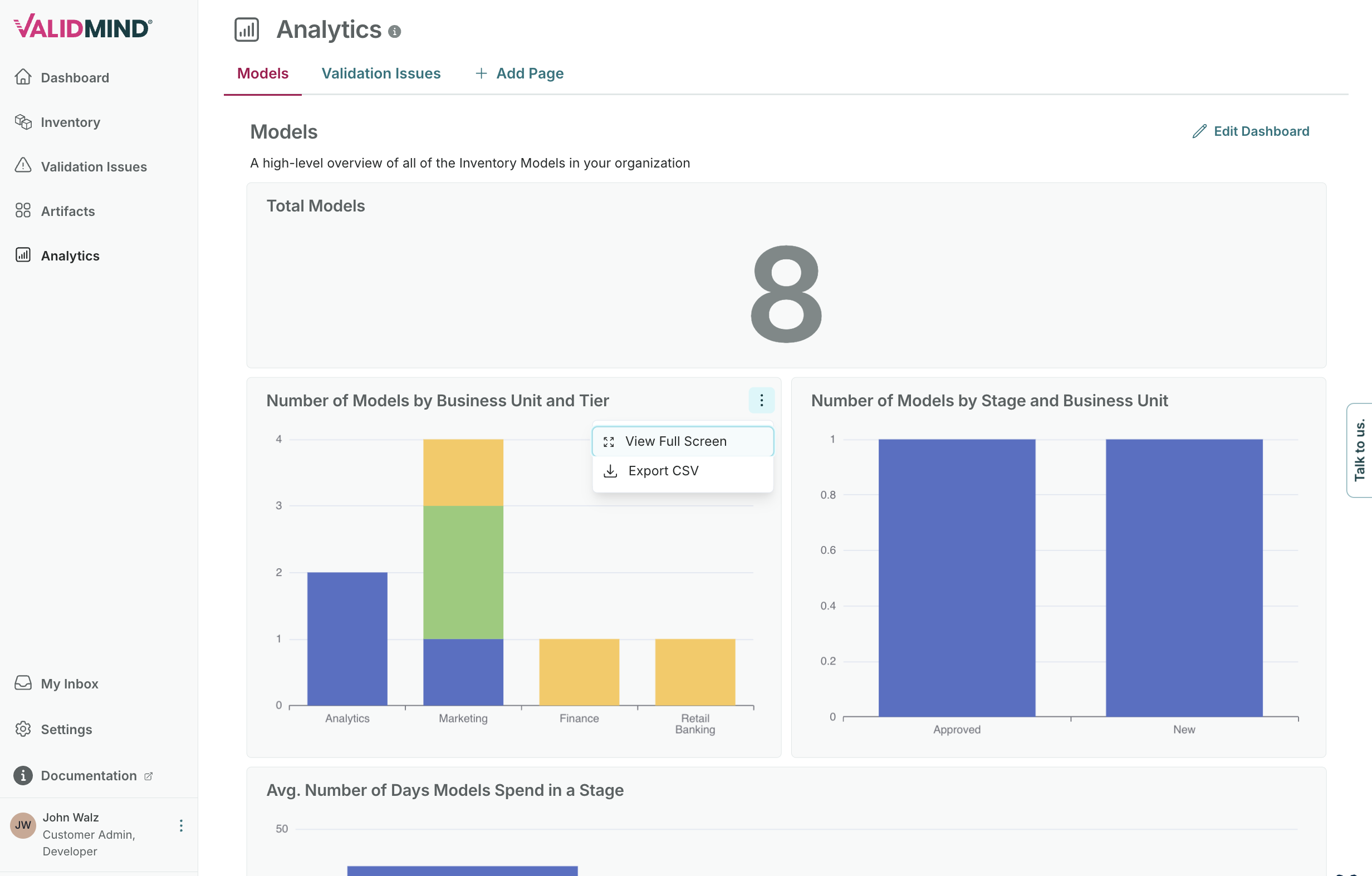
Export analytics visualizations as CSV
Added an Export CSV option to analytics visualization tiles on the dashboard. The export includes all applied filters, grouping, and metrics — downloading exactly what the chart displays.
Select document type when initializing the ValidMind Library
Future releases will require you to specify the document parameter when initializing the ValidMind Library. Update your existing code snippets now to prevent a breaking change in the future.
On the inventory models getting started page, you now pick which document to connect to your model. This improves the onboarding workflow by establishing the document association earlier in the process.
import validmind as vm

vm.init(
  api_host = "...",
  api_key = "...",
  api_secret = "...",
  model = "...",
  document = "..."
)
Improved timezone handling in CSV exports
CSV exports across model inventory and attestation exports benefit from improved timezone handling.
Improvements include:
- All date/datetime columns are now annotated with
(UTC)in their header, so you can know the timezone without guessing. - UTC datetime values now use ISO 8601 format (
2026-02-28T05:00:00Z) instead of the more ambiguous2026-02-28 05:00:00. - Attestation responses tab date column headers now show the actual user timezone (e.g.
Due Date (America/New_York)) when the export was requested with a timezone, rather than showing(UTC). - Finding due dates are now exported as full datetimes instead of date-only, allowing consumers to convert to local time.
Bug fixes & support
Task completion in inbox fixed
Fixed an issue where users were unable to complete tasks directly from the Inbox tab.
Fixed interactive charts failing to render
Fixed interactive charts failing to render. Previously, some interactive charts generated by the ValidMind Library would display as blank or corrupted in the UI. Charts now render correctly.
Fixed inventory column preferences lost after viewing model details
Fixed inventory column preferences resetting unexpectedly. Previously, your column customizations on the model inventory page could be lost when navigating to the model details page and back. Your column preferences now persist correctly across page navigation.
Fixed stale UI after deleting custom field
Fixed a bug where deleting a model inventory custom field from the admin settings page required a manual page refresh for the change to appear in the UI. The deletion now takes effect immediately.
Fixed workflow activity scrolling
Fixed a bug where the Workflow Activity tab on a model couldn't scroll, preventing users from viewing the full workflow history. The activity list now loads all events with infinite scroll and shows the most recent events first.
Fixed direct links redirecting to dashboard after login
Fixed an issue where clicking a direct link to a specific page (e.g. a model overview) while not logged in would redirect users to the dashboard after login instead of the intended page. Users no longer need to click the link a second time to reach the correct destination.
Fixed inventory column preferences resetting
Fixed a bug where inventory page column preferences would reset to defaults on page refresh for organizations with disabled core fields (e.g. tiering).
Backend
Enhancements
SIEM bridge integration support
Added support for optional hardcoded install-wide SIEM fields and SIEM bridge integration.
Upgraded PDF parsing with reduced image size and security fixes
Upgraded the pdf-parse service base images from docling-serve v1.9.0 to v1.13.0, which removes unused dependencies from the image. This reduces Docker image size and eliminates CVE exposure from unused transitive dependencies.
Bug fixes & support
Fixed workflow submissions failing on custom field validation
Fixed workflow user action submissions failing with "Custom field validation failed." Previously, certain custom field configurations could cause workflow submissions to fail unexpectedly. Workflow submissions now complete successfully regardless of custom field configuration.
Fixed inventory column preferences lost after viewing model details
Fixed inventory column preferences resetting after interacting with the model detail page layouts. Previously, changing model field layouts could overwrite your inventory column customizations. Your column preferences now persist correctly.
Fixed orphaned workflow tasks in inbox
Tasks from completed workflow executions no longer appear in users' inboxes. Previously, if a workflow's per-node task resolution callback failed silently (e.g. due to role changes between task creation and workflow completion), orphaned tasks would remain visible as pending inbox items indefinitely.
Fixed empty dashboard visualizations during edit mode
Fixed dashboard visualizations appearing empty when editing. Previously, some visualizations would display as blank when entering edit mode, making it difficult to modify them. Visualizations now display correctly in edit mode.
User guides
Reorganized ValidMind Library developer guides
We restructured the ValidMind Library developer guides to help you find information more easily. The new "How-To" section groups guides for running tests and using library features, while code samples are now organized by use case category.
Expanded AI governance training
We expanded the AI governance training course with richer content across all four modules: understanding AI governance, managing AI use cases, configuring AI workflows, and compliance and oversight. New media assets demonstrate platform capabilities.
AWS Marketplace integration documentation
You can now find documentation for signing up to ValidMind via AWS Marketplace, enabling you to streamline billing through your existing AWS account.
"What is ValidMind?" product tour
We added a new interactive product tour covering the key capabilities of the ValidMind platform: inventory management, workflows, reporting, documentation and testing, ongoing monitoring, and regulatory alignment.
Custom URL support for training pages
Training pages now support custom ValidMind URLs. Click the Settings icon to configure your organization's URL for interactive exercises.
Standardized support references
We standardized all support references across the documentation to use support.validmind.com and support@validmind.com.