25.10 Release notes
Highlights
Document checker
This release adds bulk upload of assessment questions in the document checker and introduces audit and status tracking for regulations assessments and questions with versioning and updates the results heading to "Observation".
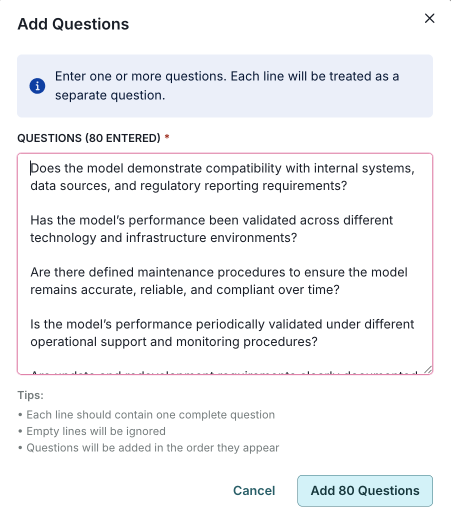
Enable bulk upload of compliance check questions
This update introduces a new bulk upload feature for the document checker. You can now upload multiple questions at once, making it easier to create assessment questions in a single operation.
The feature works with the existing single-question creation process and includes improved audit trails and automatic version management.
Add audit fields for tracking changes in regulations and assessments for the document checker
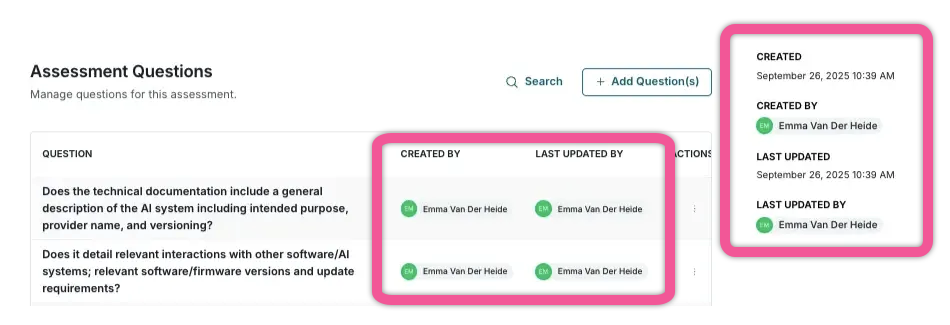
We have introduced a comprehensive audit trail and status tracking to the document checker. You can now track who created or updated regulations, assessment versions, and questions, along with their current status. This enhancement, featuring audit fields to monitor changes across several components, enables better compliance oversight and administrative control.
Update label for document checker results heading
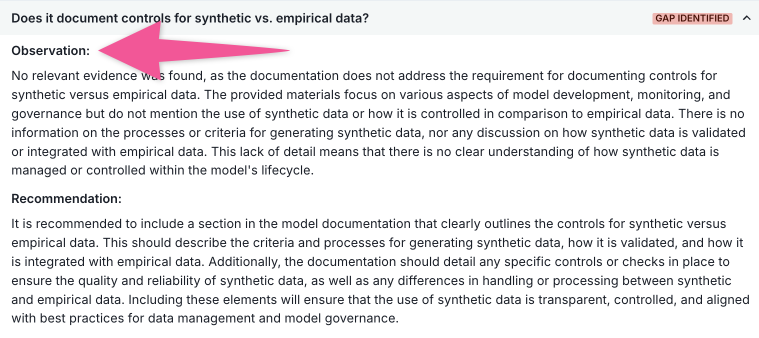
The document checker now uses the term "Observation" instead of "Finding" for improved clarity.
Findings
This release enhances findings with support for workflows, richer formula capabilities (including finding type and model data), improved CSV exports with selectable columns, a redesigned findings creation process with configurable field, and a new option to skip email notifications.
Support for findings in workflows
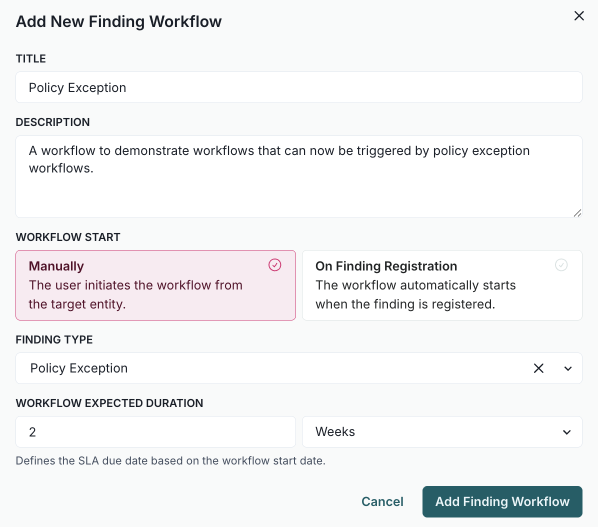
You can now use findings in workflows. Previously, you could already use workflows to transition your models into their appropriate next stages throughout their lifecycles. With this enhancement, you can now create similar workflows for findings that can be triggered manually or when a finding is created. For example, you might create a workflow that runs automatically when a policy exception finding is generated.
Expose finding type in formulas
With this update, you can now access finding type information in custom field formulas using the new finding_type parameter. This allows you to create dynamic calculations and conditional logic based on whether a finding is categorized as a "Validation Issue", "Policy Exception", or "Model Limitation".
Example uses:
- Calculate different risk scores based on finding type.
- Generate dynamic titles and descriptions.
- Set different due dates or priorities by finding category.
- Create type-specific business logic in formulas.
Simple dot notation:
finding_type.tag- Technical tag (e.g., "VALIDATION_ISSUE").finding_type.name- Human-readable name (e.g., "Validation Issue").
This feature is automatically available in all finding custom field formulas with no configuration required.
Example usage
Different calculations based on finding type:
if finding_type.tag == "VALIDATION_ISSUE":
    return severity_score * 2.5
elif finding_type.tag == "POLICY_EXCEPTION":
    return severity_score * 1.0
else:
    return severity_score * 1.8
Calculate due dates based on finding type:
base_days = 30
if finding_type.tag == "VALIDATION_ISSUE":
    urgency_multiplier = 0.5  # 15 days
elif finding_type.tag == "MODEL_LIMITATION":
    urgency_multiplier = 2.0  # 60 days
else:
    urgency_multiplier = 1.0  # 30 days

return base_days * urgency_multiplier
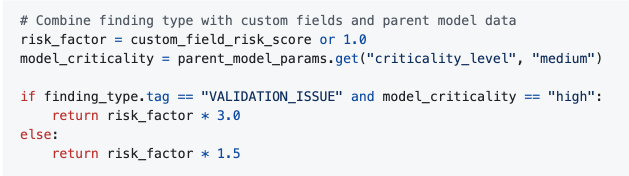
Combine finding type with custom fields and parent model data:
risk_factor = custom_field_risk_score or 1.0
model_criticality = parent_model_params.get("criticality_level", "medium")

if finding_type.tag == "VALIDATION_ISSUE" and model_criticality == "high":
    return risk_factor * 3.0
else:
    return risk_factor * 1.5
Add formula support for findings
This update allows you to use formula fields in findings to access custom field values from their parent inventory model using the params.model syntax. This enhancement enables more complex calculations by integrating both finding and model data.
Select columns when exporting findings
You can now export findings to CSV with the option to select specific columns, including custom fields. Custom fields are automatically filtered to show only those relevant to the chosen finding type.
Enhance CSV export for findings with custom fields
You can now export findings to CSV format, including all custom fields defined in your organization's finding schema, along with the standard finding information. Custom field values are formatted and labeled according to your schema configuration.
Add configurable registration fields
This update enhances the findings module with clearer field labels and an improved creation process.
- Clearer field labels: The finding interface now uses intuitive terms like "Creator" for the person who created the finding and "Assignee" for the person responsible for remediation.
- Enhanced finding creation: The finding creation form has been redesigned with a multi-step interface and now supports custom fields.
Allow skipping email notifications when creating findings or models
You can now opt to skip email notifications when creating findings or models using the public API by including the new optional parameter, skip_email_notification.
Workflows
This release introduces major workflow enhancements, including support for findings in workflows, editor improvements, multi-stakeholder approval logic with new review fields, time-delta wait steps, and custom-field filtering by workflow usage.
Support for findings in workflows
You can now use findings in workflows. For example, you can create your own workflow that is triggered when a policy exception finding is created.
Enhanced workflow editor
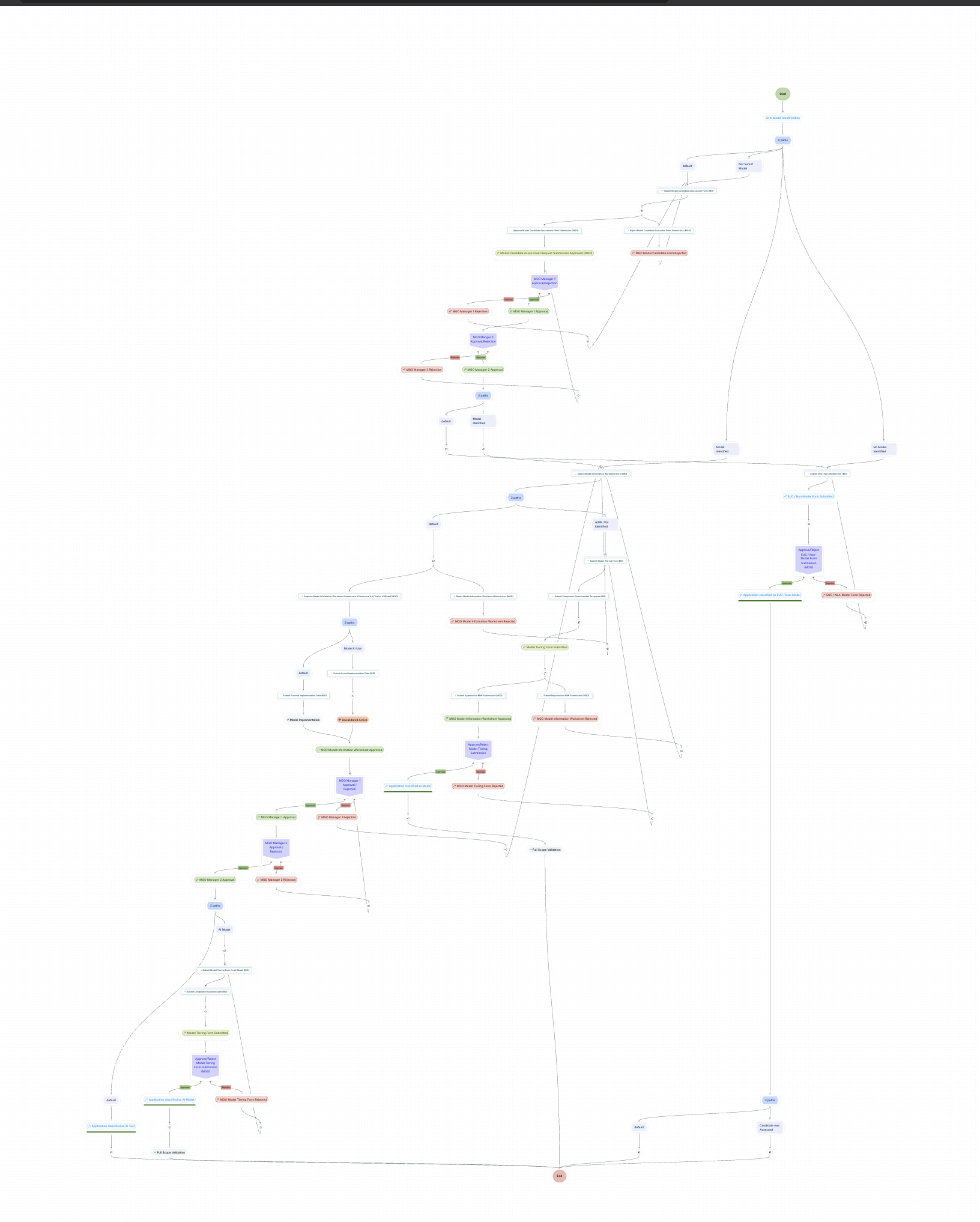
This update enhances the workflow editor with several new features and improvements, including undo and redo functions that let you easily revert or reapply changes, tidy and reset layout options that help organise your workflow visually, and a save button that appears only when there are changes to save.
The
NodesBarcomponent now usesArrowsRightLeftIconandArrowRightCircleIconinstead ofSignalIconAuto layout functionality in
WorkflowCanvasuses dagre for improved node positioningThe
zoomSelectorthreshold inNodeBoxis updated to 0.7 for better responsivenessVarious node components now use the new
zoomSelectorfor visibility control
Approval workflows that support multiple stakeholders and review fields
This update allows you to specify multiple conditions, including various voter roles. The voter threshold in the approval step configuration has been deprecated.
The voting process now follows these rules:
The approval step can consist of multiple "groups" connected by an AND operator.
The voting result will be approved only if all groups resolve to approved.
If at least one group is rejected, the voting result will be recorded as rejected.
Voting will continue until all groups are resolved.
A group's result is determined by the first vote that meets the group's condition.
Once a group's result is recorded, the remaining users qualified to vote in that group will be set to "No Vote, Not Required".
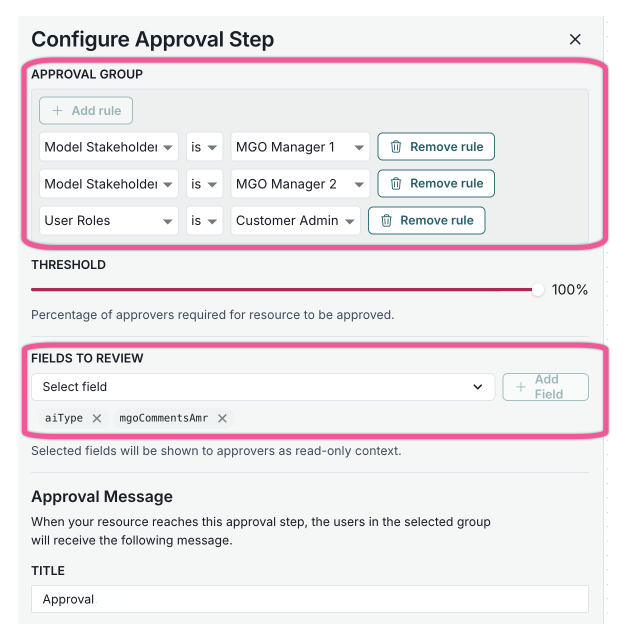
Additionally, you can now select specific fields to review when configuring an approval step in a workflow. These fields will be displayed to the voter during the approval step action.
Add time delta from field in wait step
You can now use the "Time Delta from Field" wait type in workflow steps. This feature lets you schedule workflow execution relative to custom field dates. Configure wait steps to trigger a specific time before or after dates in model fields, such as "wait 7 days before deadline" or "wait 2 hours after start_date". This enhancement supports more advanced workflow scheduling scenarios like deadline reminders and follow-up actions, offering extended functionality and validations for wait nodes in the workflow system.
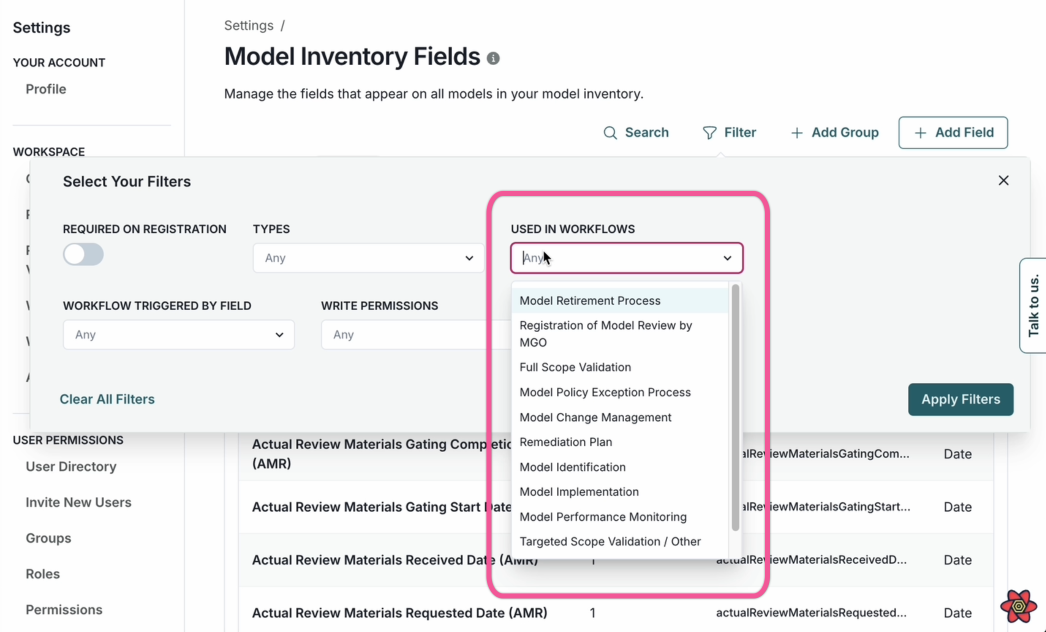
Add filtering for custom fields by workflow usage
You can now filter custom fields by the workflows that use them, enhancing filtering capabilities. This update supports workflow usage tracking across various parts of the application, providing a more streamlined and efficient experience.
Public REST API
This release introduces new public API endpoints to list findings with filters, retrieve a single finding, manage findings schemas and payloads, fetch finding severities, and get or update the inventory model schema.
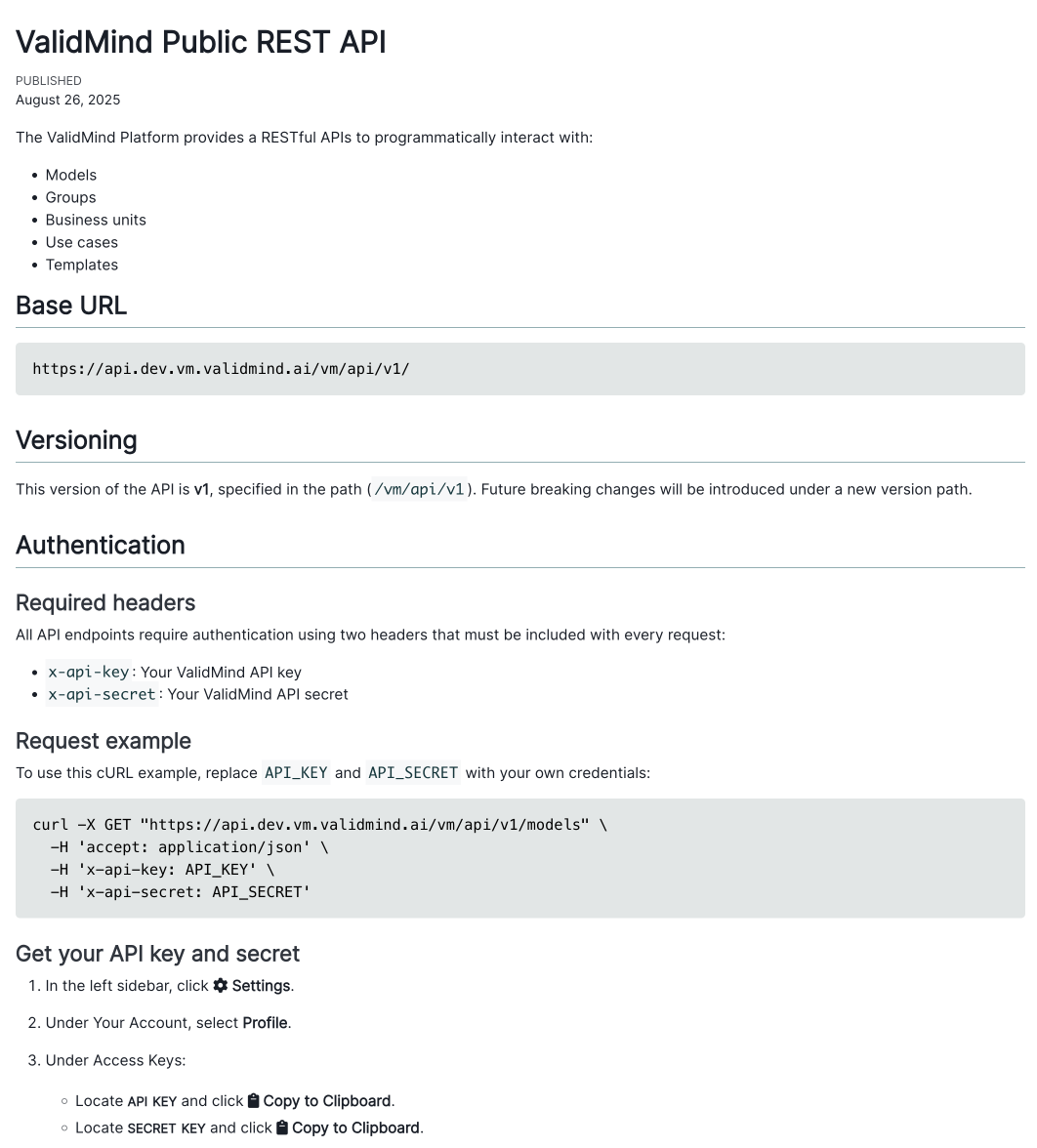
New API endpoint to list findings with filters
You can now access all findings through a new public API. This update introduces a flexible filtering method, get_findings_with_filters, allowing you to efficiently retrieve findings based on specific criteria. Additionally, several supporting helper functions have been added to enhance your experience.
New API endpoint to retrieve a single finding
We have introduced a new public API endpoint that allows you to retrieve a single finding. This enhancement simplifies accessing specific findings, making it easier to integrate with your existing systems.
New API endpoint for findings schemas and payload updates
This update improves how you manage data by introducing a public API for handling custom fields in findings. This enhancement allows for more flexible and detailed data management across both internal and public APIs.
New API endpoint to fetch finding severities
You now have access to a new public endpoint to fetch finding severities, enhancing your ability to manage and assess organizational risks effectively.
New API endpoints to get and update inventory model schema
We have introduced enhancements to the inventory model schema functionality. You can now use the following endpoints:
GETorganizations inventory model schema: Retrieve the current inventory model schema for organizations.PUTorganizations inventory model schema: Add, delete, or update custom fields within the inventory model schema.
Backend
Enhancements
Allow updating model and custom field values with arbitrary values
This update adds a strict parameter to several methods, providing a flexible validation mechanism for custom fields. You can now use a public API to override model and custom field value validation, allowing for greater control and customization in your workflows.
Enable custom test result description structure
This update improves how you generate test result descriptions by adding a new context parameter to run_test(). With this parameter, you can customize test descriptions using a dictionary with three optional keys:
test_description: Replace the default test documentation with content specific to your domain.additional_context: Include business context, real-time information, or other relevant background details for analyzing test results.instructions: Define the output formatting and style.
These enhancements give you full control over the creation of LLM-generated test descriptions. While the existing environment variable (VALIDMIND_LLM_DESCRIPTIONS_CONTEXT) is still supported for backward compatibility, the instructions parameter will take precedence if both are used. We recommend transitioning to this new parameter-based approach, as support for the environment variable will be phased out in future releases.
Bug fixes
Fix findings export issue
The findings export API now provides a consistent response format by correctly marshaling JSON responses according to the defined schema. This update ensures that when you retrieve findings by type, the data is accurately formatted and reliable.
Frontend
Enhancements
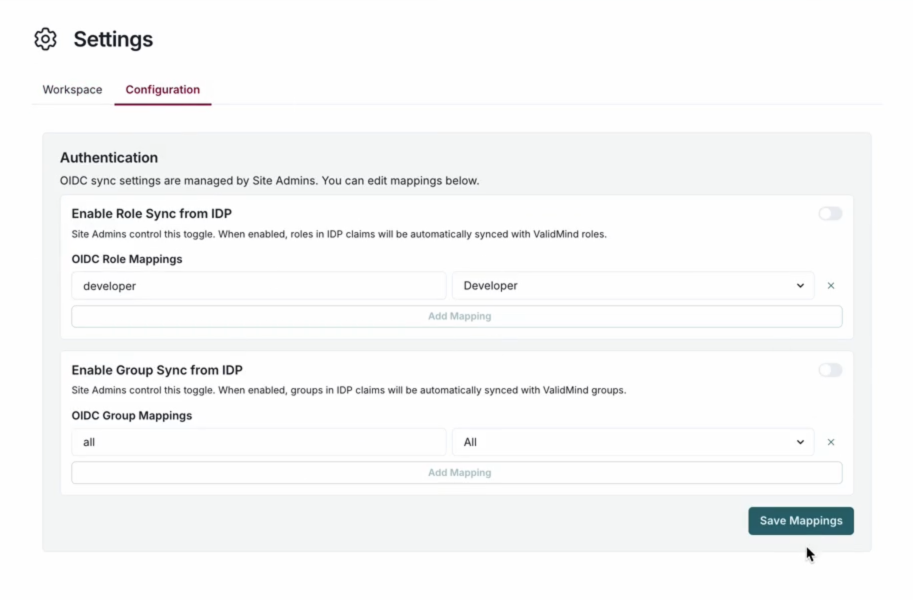
Add toggle for OIDC group and role sync at organization level
This update enhances organization settings by introducing a new tab under Settings > Configuration. As a Customer Admin, you can now update technical settings for your organization. You can manage OIDC (OpenID Connect) synchronization mappings. This allows you to associate groups and roles from claims with your organization's roles or groups. This feature is available when synchronization is enabled.
Update permission checks for managing model users
You can now manage user roles at the organization level, allowing you to add or remove model users within user groups. This update dynamically checks user roles and stakeholder type permissions to enable adding or deleting stakeholder users for a model.
Provide keys for items in block library
The Block Library UI now displays unique keys for shared blocks, making it easy for you to copy and reference these keys when embedding blocks into templates. You can now use the new copy functionality, which includes user feedback, in both the Block Library modal and settings page.
Add template deletion with confirmation modal and dependency checks
You can now delete ValidMind documentation templates with enhanced safeguards. When you attempt to delete a template, the system displays any models that depend on it and prevents deletion until these dependencies are resolved. The templates list also shows how many models use each template, providing better visibility into template usage.
Support custom stakeholder filters
You can now filter inventory models by custom stakeholder types within the model inventory API calls and related UI components. This update allows you to use any stakeholder type present in the database through the filter UI. Custom stakeholder filters appear dynamically based on available data and integrate seamlessly with existing filter functionality.
Display explicit changed values in model activity feed
The model inventory activity feed now displays clear before-and-after values when fields are updated. This enhancement allows you to easily track specific changes made to models.
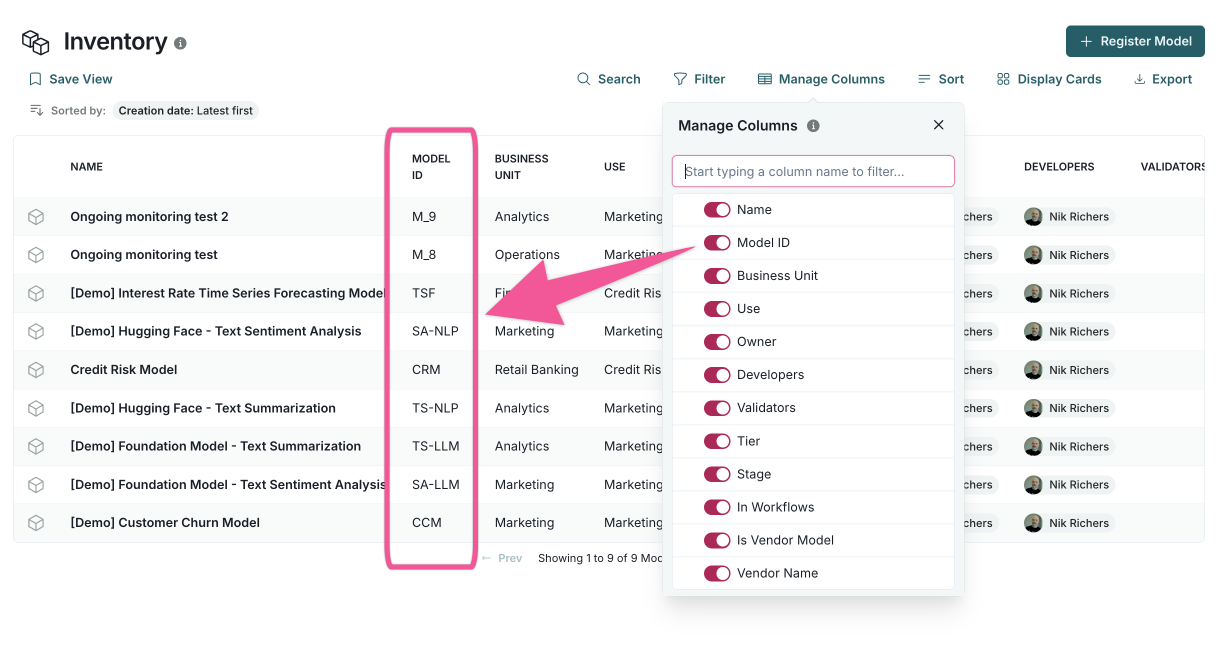
Make model ID and findings ID viewable and exportable
We have enhanced multiple table components by adding new columns and improved sorting capabilities. These updates make data management more efficient and user-friendly.
Bug fixes
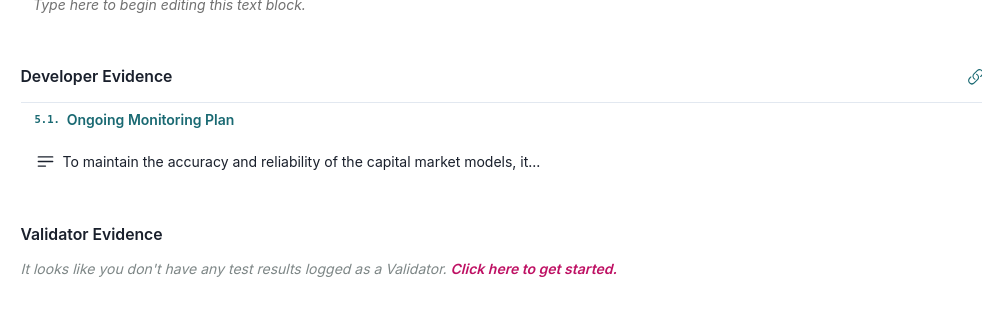
Metadata preview issue fixed
You can now see accurate metadata previews, as the issue with empty content has been fixed.
CSV export fixed for stakeholder types
The CSV export for inventory models has been fixed. Now, only the stakeholder types you specifically request in the CSV columns are processed and exported.