• Documentation
    • About ​ValidMind
    • Get Started
    • Guides
    • Support
    • Releases

    • ValidMind Library
    • Python API
    • Public REST API

    • Training Courses
  • Log In
  1. 25.09 Release notes
  • Installing ​ValidMind
  • Release notes
  • ​ValidMind systems access
  • Troubleshooting and support

  • Deployment
  • 1 — Prepare your environment
  • 2 — Pull the container images
  • 3 — Pull the Helm chart
  • 4 — Configure your Helm chart
  • 5 — Configure LiteLLM
  • 6 — Install or upgrade via Helm chart
  • 7 — Complete the initial setup
  • 8 — Verify your installation

  • Authentication
  • Configuring authentication
  • Configure local authentication
  • Configure OIDC integration
  • Authenticate with Entra
    • Configure frontend environment variables for Entra
    • Entra manifest JWT configuration
    • Configure single sign-on (SSO)
  • Supporting multiple OIDC providers

  • Administering
  • Operating ​ValidMind
  • Migrate to vmconfig.toml (26.02)
  • View ValidMind configuration
  • Configure AI model settings
  • Monitoring your deployment
  • Configuring email services
    • Configure email provider
    • Customize email templates

  • Reference
  • ​ValidMind Admin REST API
  • ValidMind configuration

  • Security advisories
  • VM-SA-2026-01
  • VM-SA-2026-02

On this page

  • Backend
    • Enhancements
      • Add finding types to enhance organization and management
      • Create an endpoint to highlight workflows needing user attention
      • Add public API routes for model stakeholders
      • Add public API for creating model findings
      • Add public API for managing custom field values in findings
      • Add public API for model registration, skip registration workflow, and update model stage
      • Add public API for specifying model dependency relationships
    • Bug fixes
      • ValidChecker improves detection of evidence in model documentation
  • Frontend
    • Highlights
      • Implement finding types for enhanced management
      • Document checker now supports the EU AI Act
    • Enhancements
      • Notes tracked on workflow transitions in activity panel
      • Summary badges added to document checker
      • Add 'My Tasks' tab to notifications sidebar for task management
      • Specify custom group mappings in admin UI
      • Select OIDC provider when changing user passwords in multi-OIDC mode
      • Enable sync of OIDC groups in ValidMind admin UI
  • Installation
    • Highlights
      • New ValidMind admin API reference
    • Enhancements
      • Enable multi-OIDC configuration via ValidMind TOML
    • Other changes
      • Set RUN_MODE=api in API container
  • Documentation
    • Highlights
      • New ValidMind public REST API reference
    • Bug fixes
      • Fix codeblock formatting and import modular CSS
  • Edit this page
  • Report an issue

25.09 Release notes

cmvm
25.09
release candidate
Published

September 3, 2025

This release includes finding types for enhanced management, the addition of the EU AI Act option to the Document Checker dropdown, linked curated questions, a new ValidMind admin API reference, a new ValidMind public REST API reference, and more.

Backend

Enhancements

Add finding types to enhance organization and management

New features:

  • Finding types system: You can now manage multiple finding types for Validation Issues, Policy Exceptions and Model Limitations with configurable fields and statuses, enhancing the organization and separation of findings.
  • Flexible field configuration: Each finding type allows you to show or hide specific fields such as risk area, owner, severity, and due date.
  • Type-specific statuses: Different finding types can have their own unique set of statuses.
  • API updates: All finding-related endpoints now require a finding_type_cuid parameter.
  • Route changes: Finding status endpoints are now scoped to specific finding types.
  • Permission updates: A new permission model is introduced for managing finding types.

Improvements:

  • Better organization: Findings are now categorized and organized by type.
  • Export/import: Organization templates now include configurations for finding types.

Create an endpoint to highlight workflows needing user attention

This update introduces a new tasks feature that integrates closely with the existing workflow system.

Add public API routes for model stakeholders

This update introduces new API endpoints and associated handler logic to manage inventory model users (stakeholders) and organization users.

Add public API for creating model findings

This update introduces a new public API feature that allows you to create model findings.

Add public API for managing custom field values in findings

This update allows you to access and modify custom field values in model findings using the public API.

Add public API for model registration, skip registration workflow, and update model stage

This update enhances the ValidMind platform by introducing new public APIs that improve organization scoping in database queries and streamline inventory model stage management. You can now set a model's stage directly using the new API, allowing for more precise control over your model lifecycle.

Additionally, you can register an existing model through a dedicated API, simplifying the process of integrating models into your workflow. An API is also available to skip the on-model-create workflow, providing flexibility in model management and deployment processes.

These enhancements aim to streamline your experience with the ValidMind platform, making it easier to manage and organize your models effectively.

Add public API for specifying model dependency relationships

This update allows you to update model dependency relationships with a new public API, enhancing how you manage inventory models' dependencies.

Bug fixes

ValidChecker improves detection of evidence in model documentation

This update enhances the regulatory prompt instructions for ValidChecker recommendations. You can now recognize result descriptions, including specific numbers and insights presented in text form, as valid and actual results, even without tables or figures. This change aims to produce more consistent and reliable results across runs.

Frontend

Highlights

Implement finding types for enhanced management

Findings are now organized into categories for Validation Issues, Policy Exceptions, and Model Limitations, each with specific field configurations and statuses: Manage finding types

  • Finding types: Create and manage findings with type-specific fields.
  • Finding creation: Select a finding type when adding a new finding.
  • Status management: Customize statuses for each finding type.
  • Settings: Manage your organization's finding type configurations in the new "Finding Types" section in settings.
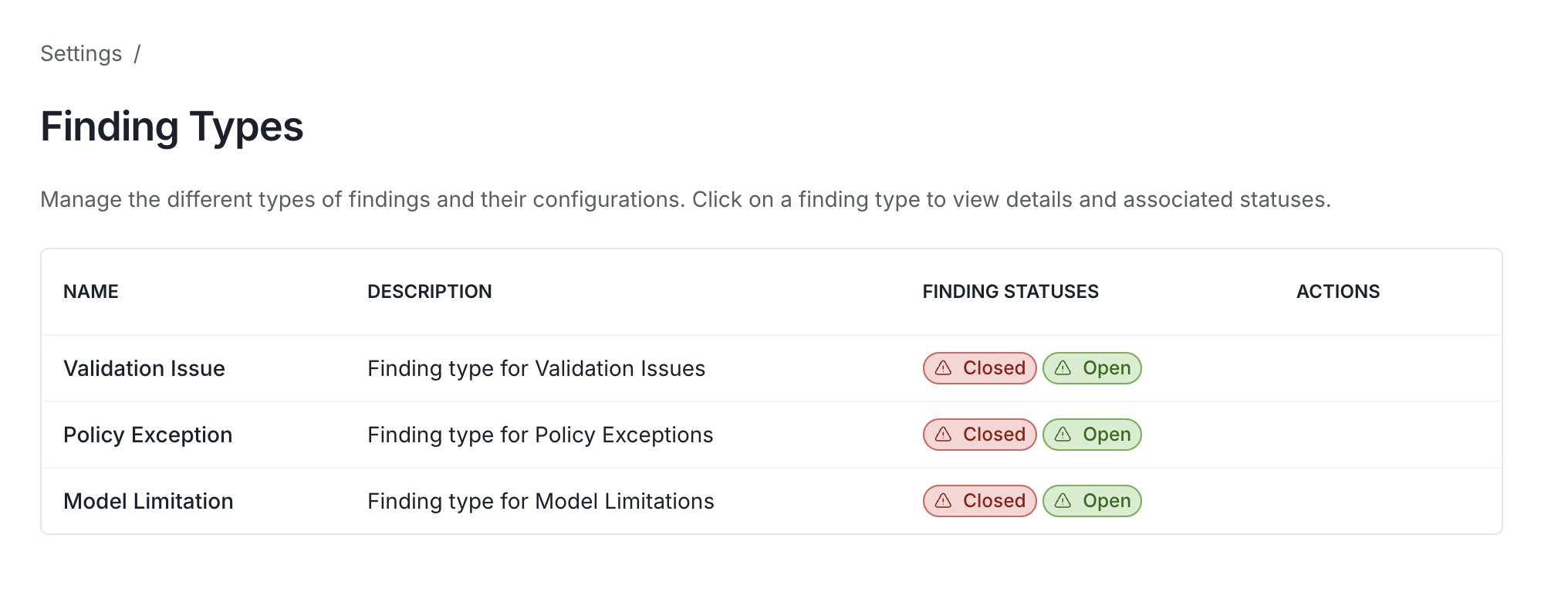
A web page displaying a section titled Finding Types in the settings page. The section contains a list of finding types, each with a name, description, and status. The section has a plus icon for adding a new finding type.

Finding types settings

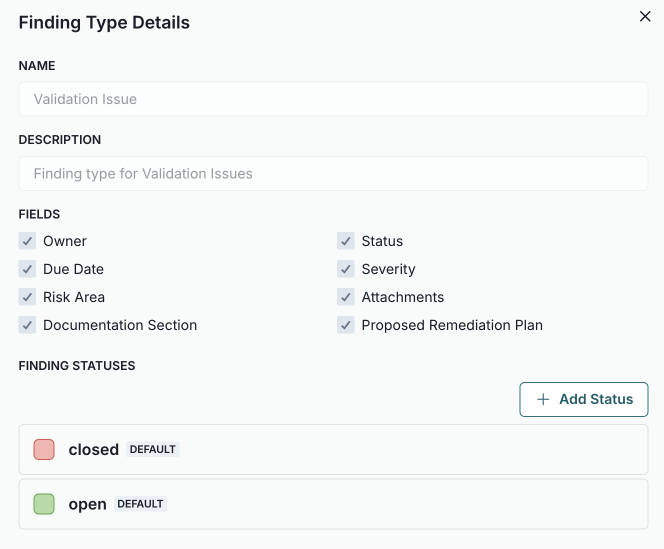
A web page displaying a section titled Finding Types in the details page. The section contains a list of finding types, each with a name, description, and status. The section has a plus icon for adding a new finding type.

Finding types details

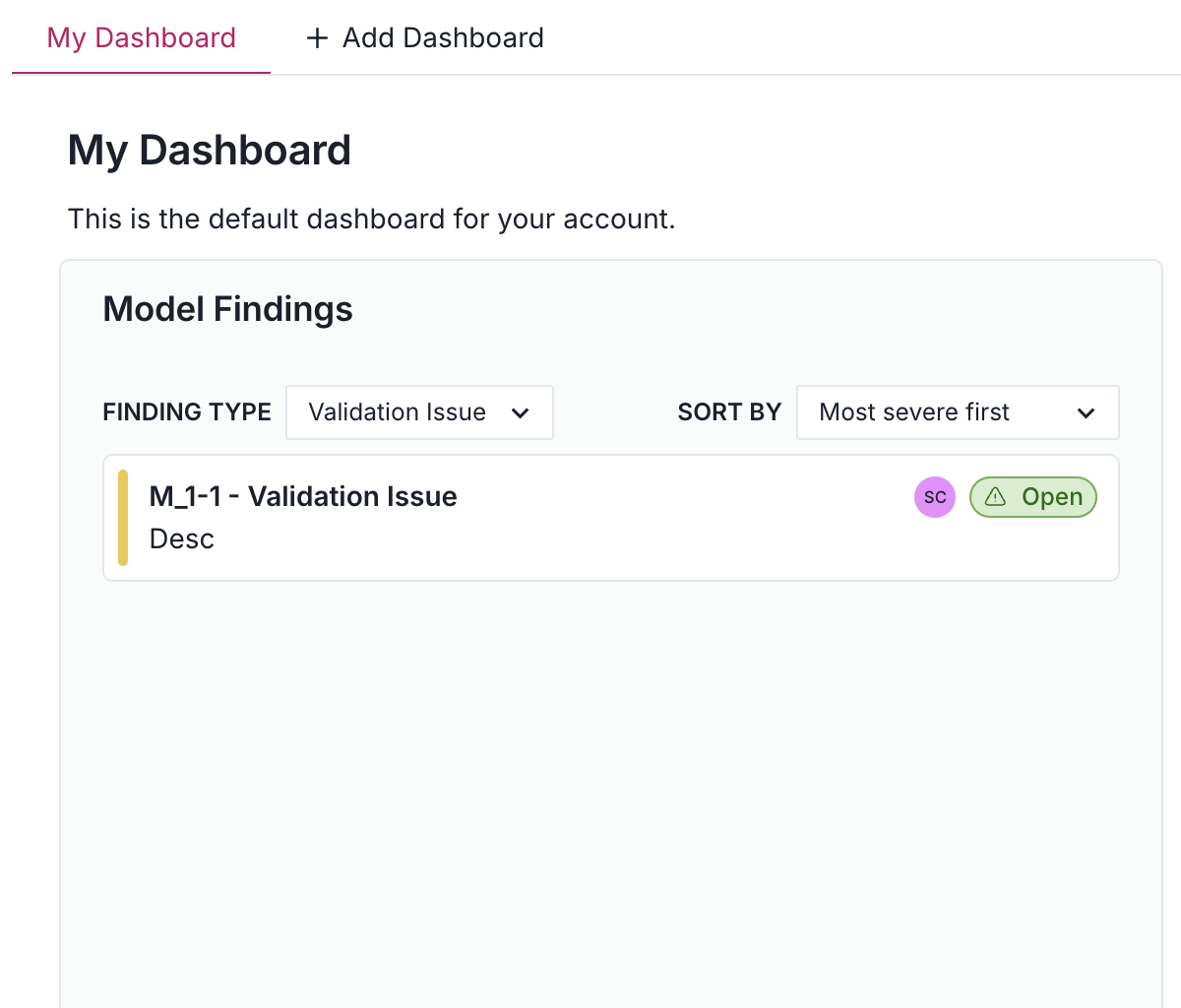
A web page displaying a section titled Finding Types in the dashboard. The section contains a list of finding types, each with a name, description, and status. The section has a plus icon for adding a new finding type.

Finding types in the dashboard

Document checker now supports the EU AI Act

We have added a new option for the EU AI Act in the dropdown menu of the document checker. This update connects you to an assessment with specially designed questions to help you meet the EU AI Act requirements: Check documentation for compliance
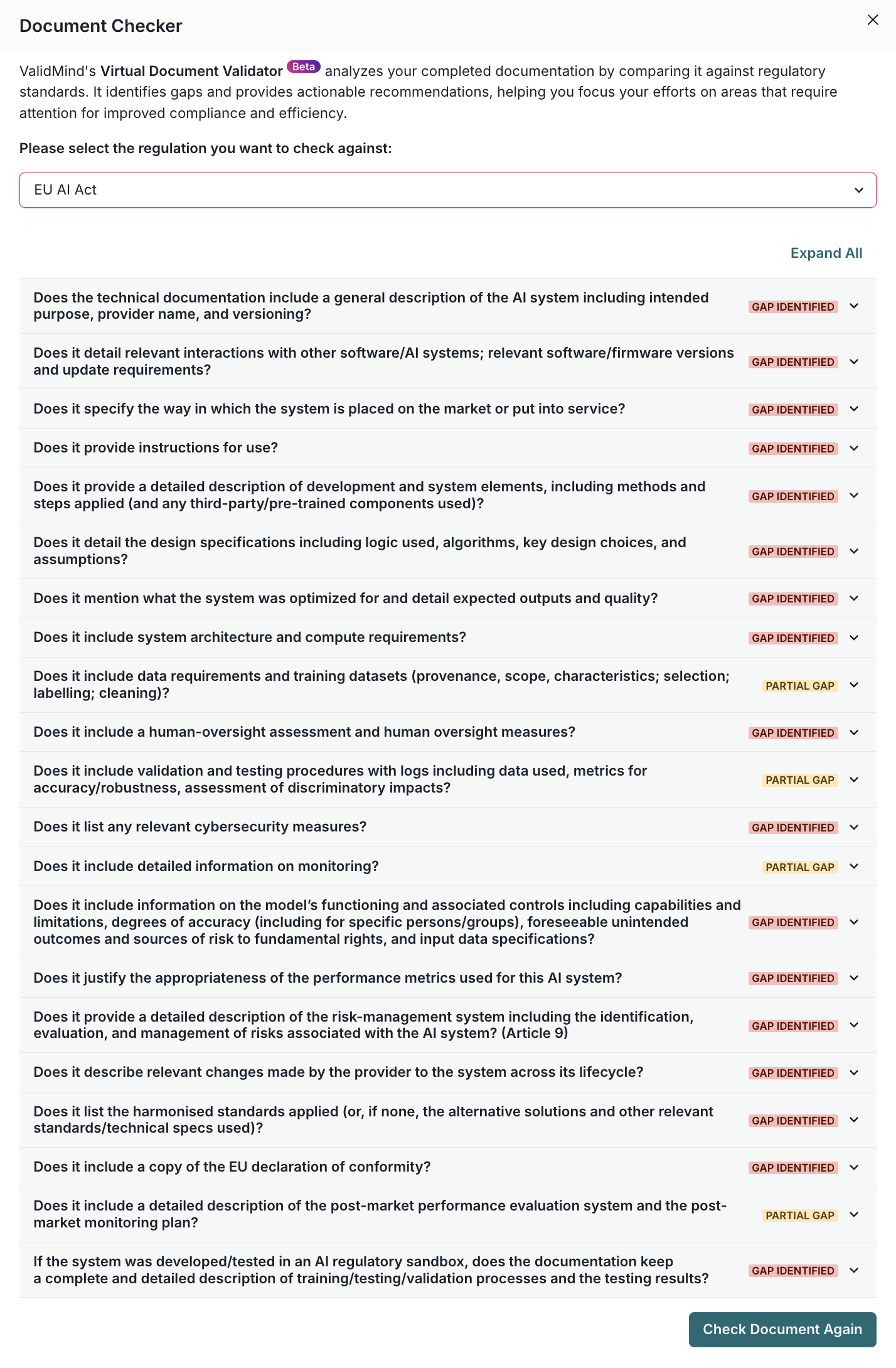
A document validation interface titled Document Checker is displayed with a dropdown menu at the top for selecting a regulation, currently set to EU AI Act. Below, there is a list of questions related to the AI system, each with a red label marked Important next to them. Each question has a toggle button labeled Expand All at the top right, allowing users to view more details. The questions cover topics such as technical documentation, interactions with other systems, and design specifications. At the bottom right, there is a green button labeled Check Document Again.

Here is how you can select the EU AI Act option:
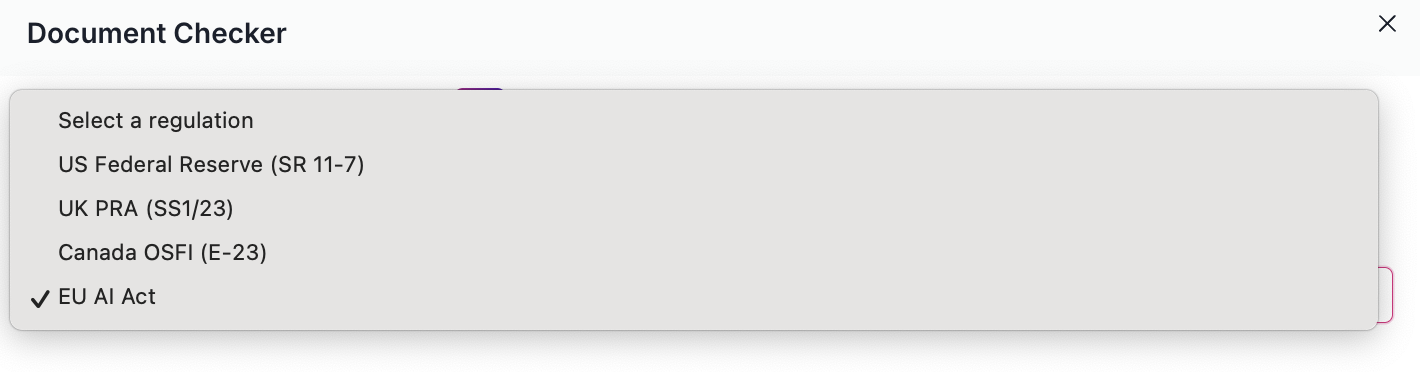
A dialog box titled Document Checker is displayed with a light gray background. The box contains a list of regulations to select from, including US Federal Reserve (SR 11-7), UK PRA (SS1/23), Canada OSFI (E-23), and EU AI Act. The EU AI Act option is selected, indicated by a checkmark. The dialog box has a close button in the top right corner. The options are presented in a vertical list with even spacing.

Enhancements

Notes tracked on workflow transitions in activity panel

Notes submitted during workflow transitions are now displayed in the workflow activity panel, improving the event row rendering within the ActivityFeedWidget. You can learn more about managing model workflows here: Manage model workflows.

Summary badges added to document checker

The document checker now displays a summary of findings as a badge on each question, improving visual feedback and assessment logic for document validation. For more details, see check documentation for compliance.
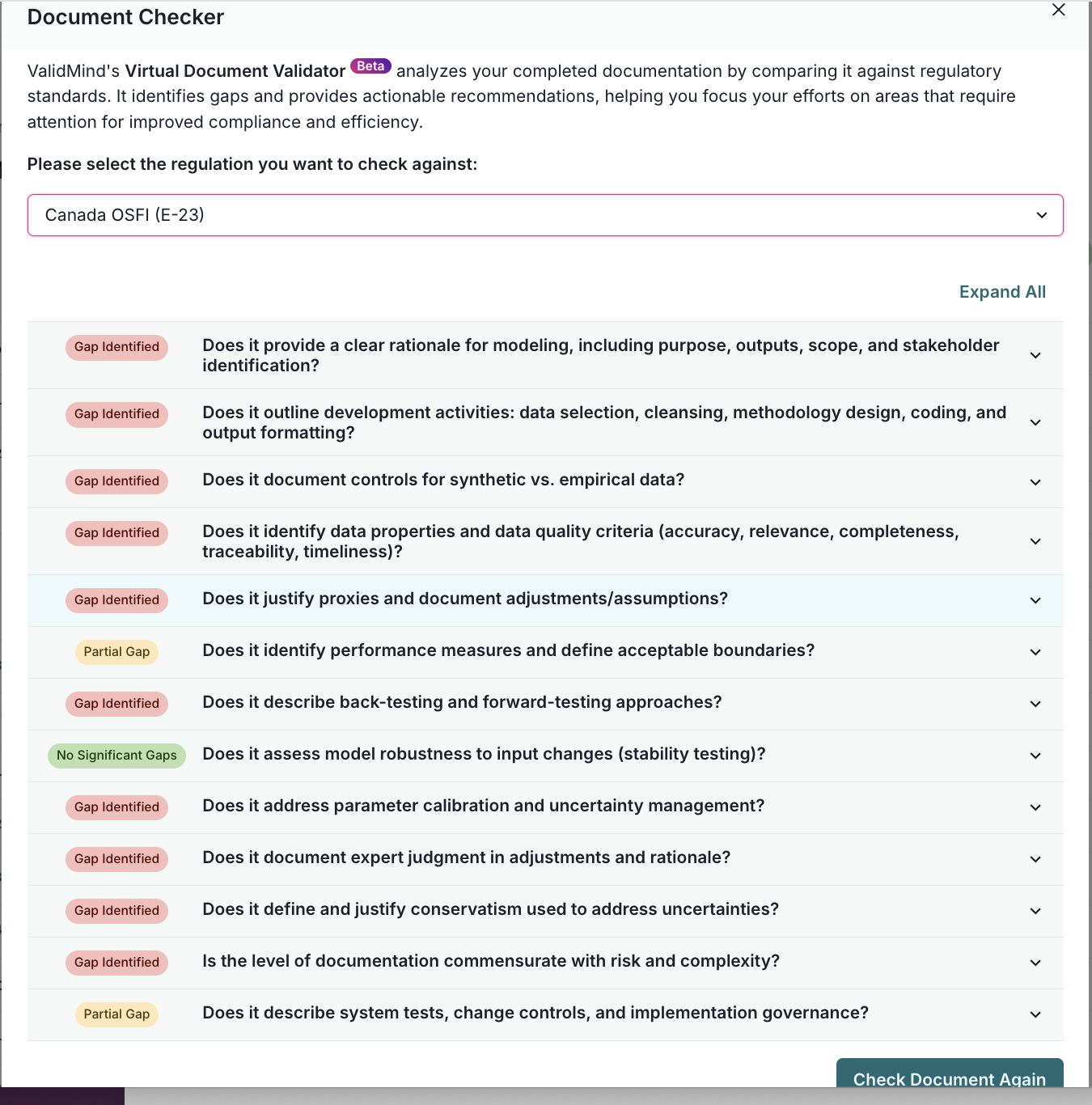
The image shows an interface titled Document Checker with a dropdown menu labeled Canada OSFI (E-23) at the top. Below, there is a list of questions with corresponding status indicators on the left, such as Gap Identified in red. Questions include topics like rationale for modeling, data selection, and empirical data controls. Each question has an Expand All option above them. At the bottom right, there is a blue button labeled Check Document Again. The layout is organized with questions in a vertical list and status indicators aligned to the left of each question.

Add 'My Tasks' tab to notifications sidebar for task management

This update introduces a 'My Tasks' tab to the notifications sidebar, enabling you to view and manage tasks more efficiently.

Specify custom group mappings in admin UI

This update enhances the OIDC mapping functionality by adding support for group mappings in addition to role mappings for organizations. You can now assign custom group mappings from IDP groups to ValidMind groups. Follow these steps once Sync OIDC Groups is toggled on in the ValidMind Admin UI:

  1. On the organizations tab, select the organization for which you want to assign group mappings.
  2. Click Edit Organization.
  3. Under oidc role mappings, enter the token ID on the left and specify the corresponding group on the right.
  4. Once you're finished mapping, click Update Organization.
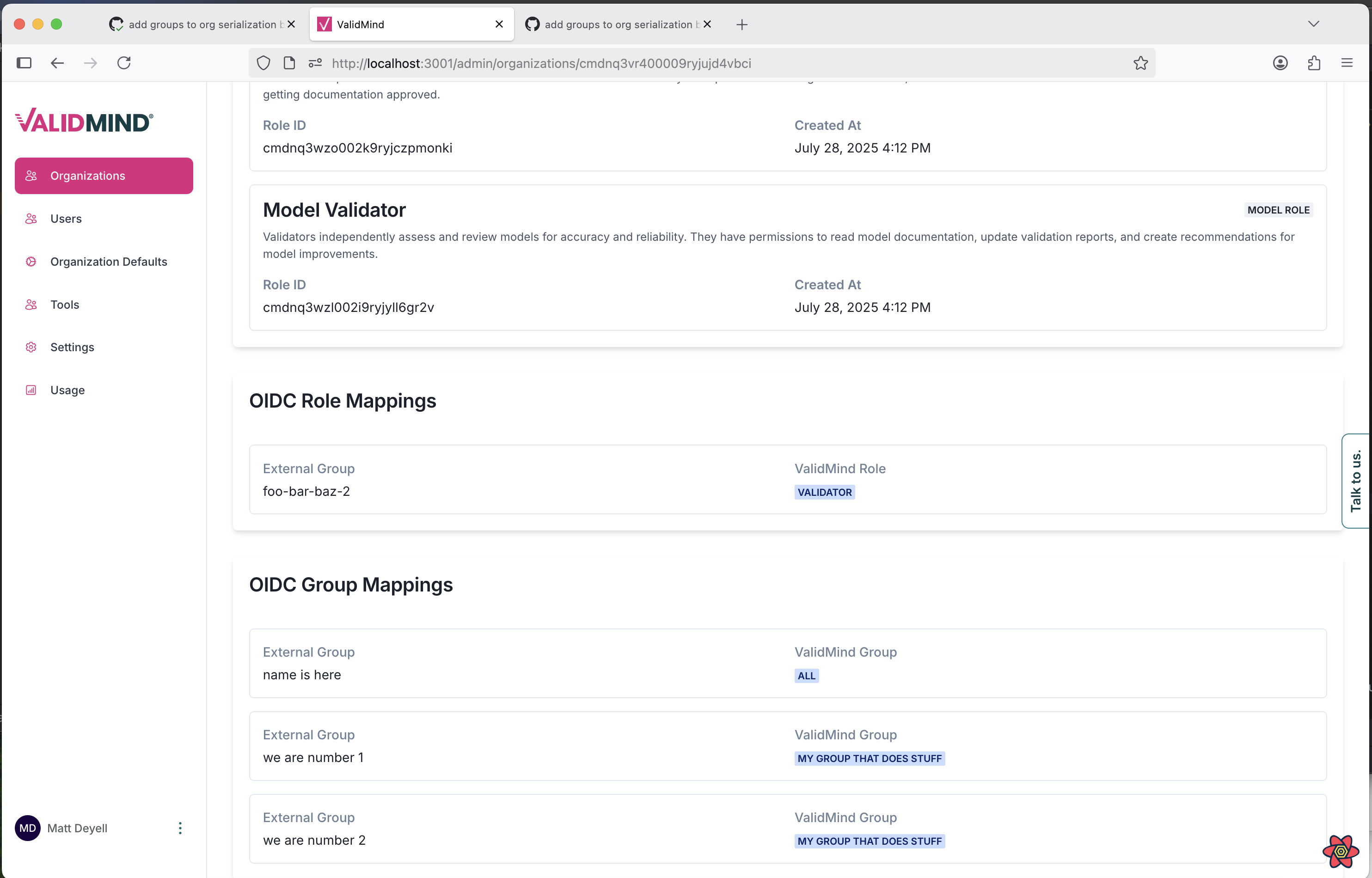
A web interface titled Model Validator displays a section with details about a model, including a Role ID and creation dates. Below, there are two subsections: OIDC Role Mappings and OIDC Group Mappings. The OIDC Role Mappings section lists an external group with a validated role link. The OIDC Group Mappings section contains entries with names and validated groups, each linked to a specific group type. The interface features a sidebar on the left with menu items such as Users, Organization Defaults, and Settings, and a vertical text button labeled Talk to Us on the right edge.

Select OIDC provider when changing user passwords in multi-OIDC mode

You can now select an OIDC provider when editing a user in the ValidMind platform. This update enhances the EditUserModal component by allowing you to choose from OIDC providers the user has previously signed in with. If an OIDC provider is not editable, it will appear greyed out.
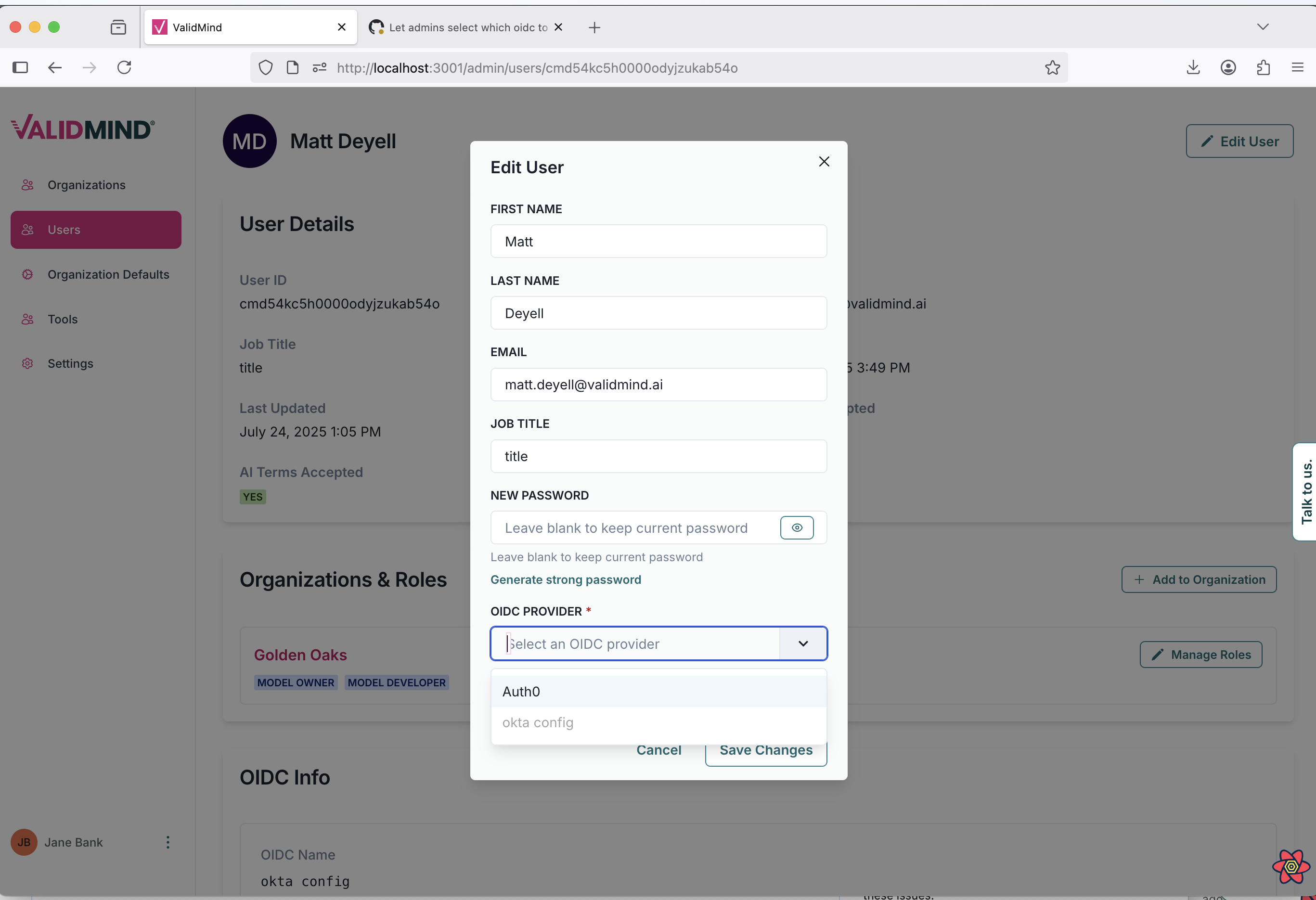
A user interface showing a web page titled ValidMind with a sidebar on the left and a central pop-up window labeled Edit User. The sidebar includes menu items such as Dashboard, Users, and Settings, with Users highlighted. The pop-up window contains fields for First Name, Last Name, Email, and Job Title, all filled with example data, and a New Password field with a note to leave blanks to keep the current password. Below is a dropdown menu labeled OIDC Provider with options including Auth0 and Okta config, and a blue Save Changes button at the bottom. The background displays user details like User ID and Job Title, with a section for Organizations & Roles showing labels such as Model Owner.

With multi-OIDC mode enabled, you can also select which OIDC provider to use when changing a user's password within the ValidMind platform Admin UI.

Enable sync of OIDC groups in ValidMind admin UI

You can now toggle the synchronization of OIDC groups with ValidMind groups within the ValidMind Admin UI. This update allows you to manage group memberships more efficiently by automatically aligning your identity provider's groups with your ValidMind groups.

For example, if you have a group in your identity provider for developers, this setting can ensure that all members are automatically added to the corresponding ValidMind group, streamlining access management.
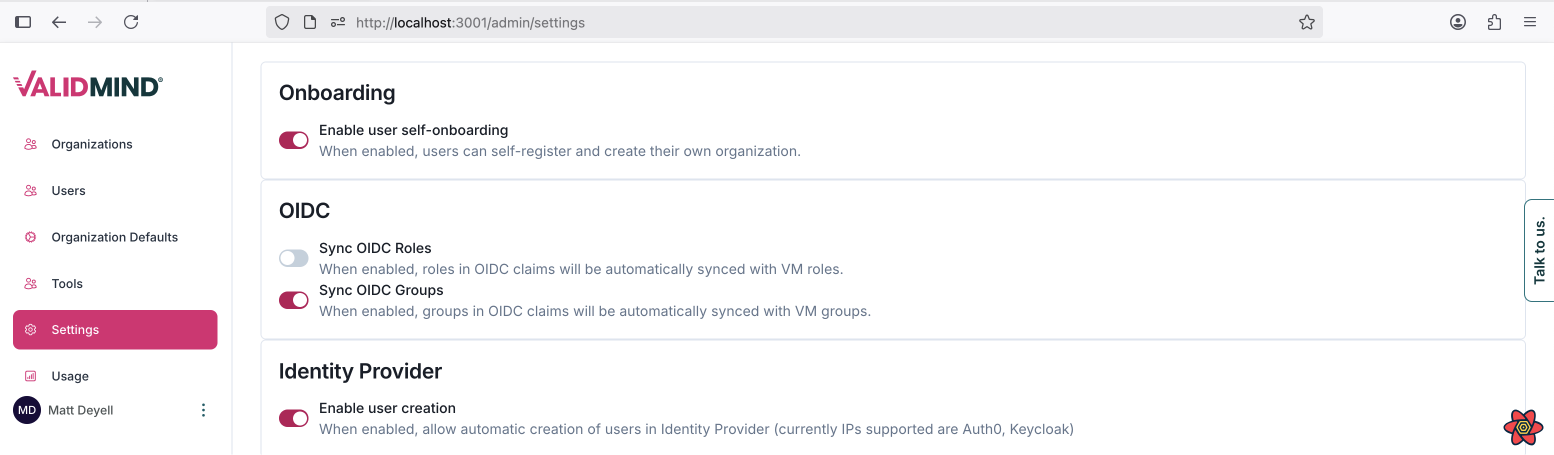
The image shows a web interface for ValidMind with a sidebar on the left and main content on the right. The sidebar includes a logo at the top, followed by menu items such as Organizations, Users, Organization Defaults, and Settings, with the Settings menu expanded to reveal a sub-item called Model Dev1. The main content area is titled Onboarding and contains three sections: OIDC, and Identity Provider, each with a brief description and toggle switches for enabling features. The Onboarding section has a toggle for enabling user self-onboarding, the OIDC section includes options for syncing OIDC roles and groups, and the Identity Provider section allows enabling user creation. Below the main content, a browser developer tools panel is open, displaying network activity with columns for status, type, and size.

Installation

Highlights

New ValidMind admin API reference

To enable you to manage models, groups, business units, use cases, and templates more efficiently, we have introduced a new API reference: ValidMind Admin REST API
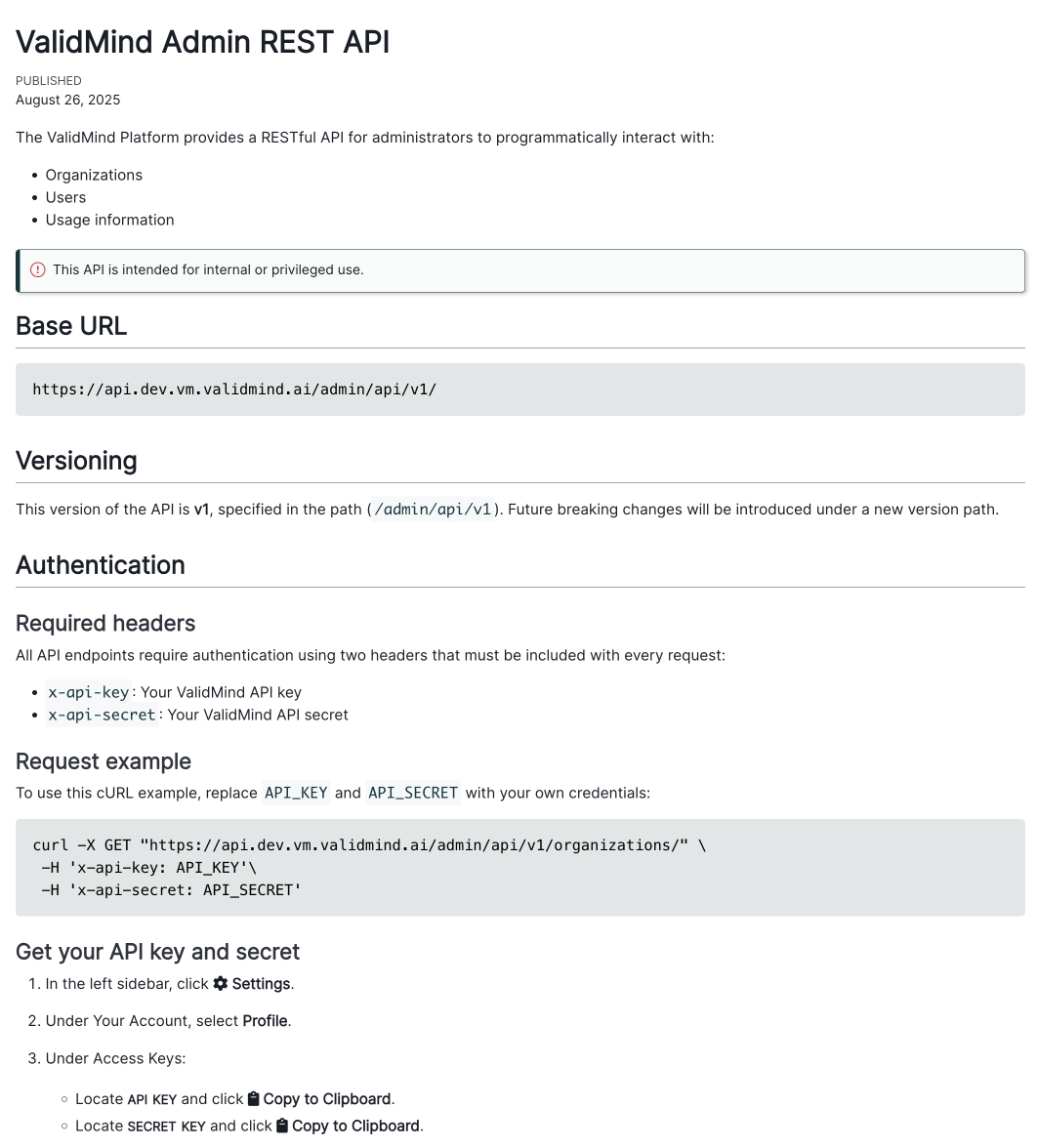
A web page displaying the landing page of the new ValidMind admin API reference. The same content can be found using the link to the API reference in this section.

ValidMind admin API reference

Enhancements

Enable multi-OIDC configuration via ValidMind TOML

You can now enable multiple identity providers by setting the useMultipleOidc global value to true. Ensure you create a secret named validmind-config in the same namespace where the ValidMind deployment is located. This secret must contain the complete contents of validmind_config.toml.

Other changes

Set RUN_MODE=api in API container

This update modifies the Helm chart for the API deployment by adding a new environment variable, RUN_MODE, with a fixed value of "api".

Documentation

Highlights

New ValidMind public REST API reference

To enable you to programmatically interact with models, groups, business units, use cases, and templates, we have introduced an API reference in our documentation: ValidMind Public REST API Reference
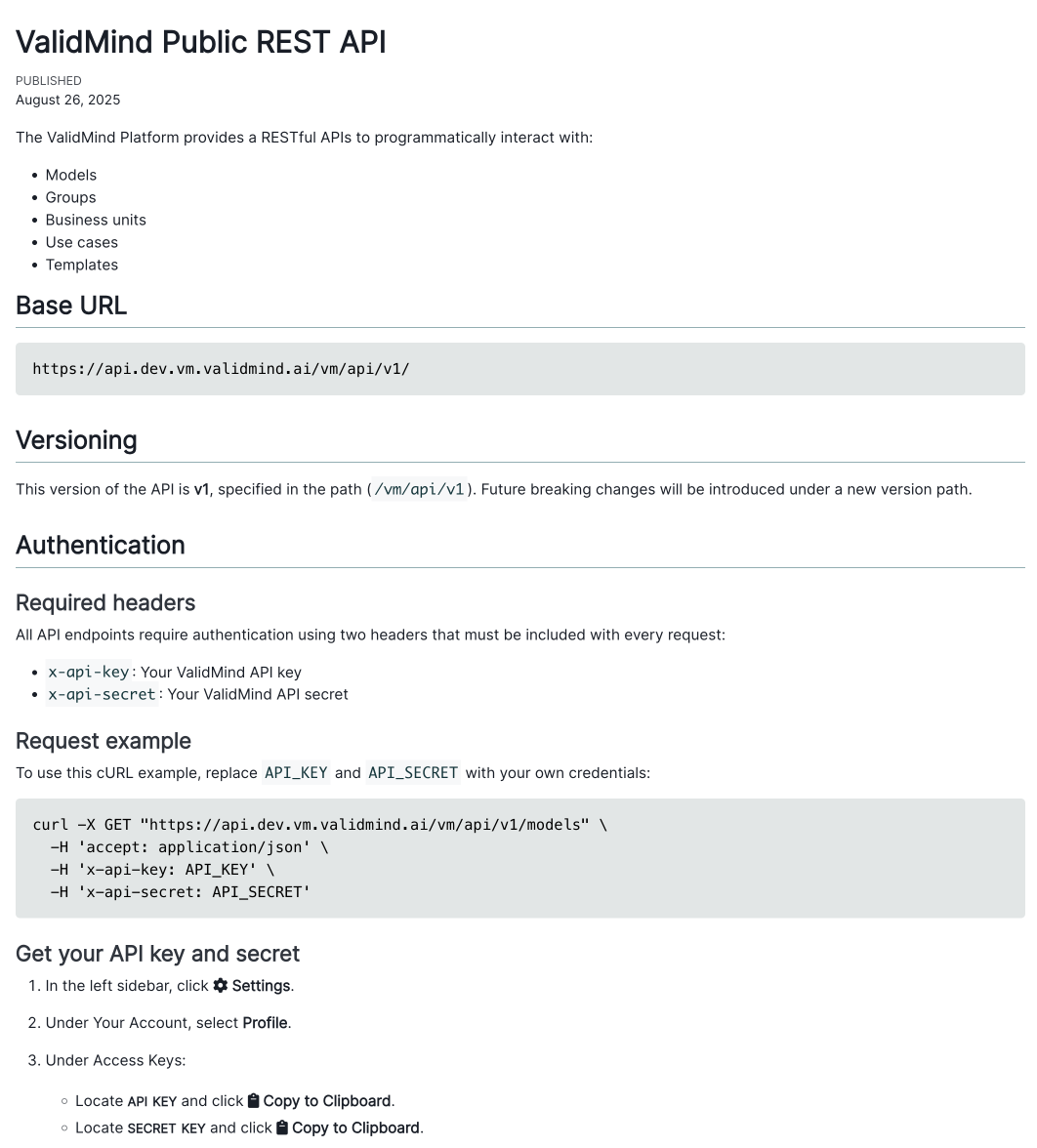
A web page displaying the landing page of the new ValidMind public REST API reference. The same content can be found using the link to the API reference in this section.

ValidMind Public API reference

Bug fixes

Fix codeblock formatting and import modular CSS

We have fixed an issue with codeblock formatting that previously caused incorrect text positioning when specifying a language, such as Python. Codeblocks now display correctly with proper formatting and text alignment.

  • ValidMind Logo
    ©
    Copyright 2026 ValidMind Inc.
    All Rights Reserved.
    Cookie preferences
    Legal
  • Get started
    • Development
    • Validation
    • Setup & admin
  • Guides
    • Access
    • Configuration
    • Integrations
    • Workflows
    • Inventory
    • Risk tiering
    • Documents & templates
    • Documentation
    • Validation
    • Reporting & auditing
    • Monitoring
    • Attestation
  • ValidMind Library
    • Quickstarts
    • Development tutorial
    • Validation tutorial
    • Run tests & test suites
    • Use library features
    • Code samples
    • Python API
    • Public REST API
  • Training
    • Learning paths
    • Courses
    • Videos
  • Support
    • Troubleshooting
    • FAQ
    • Get help
  • Edit this page
  • Report an issue
  • Community
    • GitHub
    • LinkedIn
    • Events
    • Blog