ValidMind for model development 2 — Start the model development process

Learn how to use ValidMind for your end-to-end model documentation process with our series of four introductory notebooks. In this second notebook, you'll run tests and investigate results, then add the results or evidence to your documentation.

You'll become familiar with the individual tests available in ValidMind, as well as how to run them and change parameters as necessary. Using ValidMind's repository of individual tests as building blocks helps you ensure that a model is being built appropriately.

For a full list of out-of-the-box tests, refer to our Test descriptions or try the interactive Test sandbox.

Learn by doing

Our course tailor-made for developers new to ValidMind combines this series of notebooks with more a more in-depth introduction to the ValidMind Platform — Developer Fundamentals

Prerequisites

In order to log test results or evidence to your model documentation with this notebook, you'll need to first have:

Need help with the above steps?

Refer to the first notebook in this series: 1 — Set up the ValidMind Library

Setting up

Initialize the ValidMind Library

First, let's connect up the ValidMind Library to our model we previously registered in the ValidMind Platform:

  1. In a browser, log in to ValidMind.

  2. In the left sidebar, navigate to Inventory and select the model you registered for this "ValidMind for model development" series of notebooks.

  3. Go to Getting Started and click Copy snippet to clipboard.

Next, load your model identifier credentials from an .env file or replace the placeholder with your own code snippet:

# Make sure the ValidMind Library is installed

%pip install -q validmind

# Load your model identifier credentials from an `.env` file

%load_ext dotenv
%dotenv .env

# Or replace with your code snippet

import validmind as vm

vm.init(
    # api_host="...",
    # api_key="...",
    # api_secret="...",
    # model="...",
)
Note: you may need to restart the kernel to use updated packages.
2026-01-10 02:02:06,518 - INFO(validmind.api_client): 🎉 Connected to ValidMind!
📊 Model: [ValidMind Academy] Model development (ID: cmalgf3qi02ce199qm3rdkl46)
📁 Document Type: model_documentation

Import sample dataset

Then, let's import the public Bank Customer Churn Prediction dataset from Kaggle.

In our below example, note that:

  • The target column, Exited has a value of 1 when a customer has churned and 0 otherwise.
  • The ValidMind Library provides a wrapper to automatically load the dataset as a Pandas DataFrame object. A Pandas Dataframe is a two-dimensional tabular data structure that makes use of rows and columns.
from validmind.datasets.classification import customer_churn as demo_dataset

print(
    f"Loaded demo dataset with: \n\n\t• Target column: '{demo_dataset.target_column}' \n\t• Class labels: {demo_dataset.class_labels}"
)

raw_df = demo_dataset.load_data()
raw_df.head()
Loaded demo dataset with: 

    • Target column: 'Exited' 
    • Class labels: {'0': 'Did not exit', '1': 'Exited'}
CreditScore Geography Gender Age Tenure Balance NumOfProducts HasCrCard IsActiveMember EstimatedSalary Exited
0 619 France Female 42 2 0.00 1 1 1 101348.88 1
1 608 Spain Female 41 1 83807.86 1 0 1 112542.58 0
2 502 France Female 42 8 159660.80 3 1 0 113931.57 1
3 699 France Female 39 1 0.00 2 0 0 93826.63 0
4 850 Spain Female 43 2 125510.82 1 1 1 79084.10 0

Identify qualitative tests

Next, let's say we want to do some data quality assessments by running a few individual tests.

Use the vm.tests.list_tests() function introduced by the first notebook in this series in combination with vm.tests.list_tags() and vm.tests.list_tasks() to find which prebuilt tests are relevant for data quality assessment:

  • tasks represent the kind of modeling task associated with a test. Here we'll focus on classification tasks.
  • tags are free-form descriptions providing more details about the test, for example, what category the test falls into. Here we'll focus on the data_quality tag.
# Get the list of available task types
sorted(vm.tests.list_tasks())
['classification',
 'clustering',
 'data_validation',
 'feature_extraction',
 'monitoring',
 'nlp',
 'regression',
 'residual_analysis',
 'text_classification',
 'text_generation',
 'text_qa',
 'text_summarization',
 'time_series_forecasting',
 'visualization']
# Get the list of available tags
sorted(vm.tests.list_tags())
['AUC',
 'analysis',
 'anomaly_detection',
 'bias_and_fairness',
 'binary_classification',
 'calibration',
 'categorical_data',
 'classification',
 'classification_metrics',
 'clustering',
 'correlation',
 'credit_risk',
 'data_analysis',
 'data_distribution',
 'data_quality',
 'data_validation',
 'descriptive_statistics',
 'dimensionality_reduction',
 'distribution',
 'embeddings',
 'feature_importance',
 'feature_selection',
 'few_shot',
 'forecasting',
 'frequency_analysis',
 'kmeans',
 'linear_regression',
 'llm',
 'logistic_regression',
 'metadata',
 'model_comparison',
 'model_diagnosis',
 'model_explainability',
 'model_interpretation',
 'model_performance',
 'model_predictions',
 'model_selection',
 'model_training',
 'model_validation',
 'multiclass_classification',
 'nlp',
 'normality',
 'numerical_data',
 'outliers',
 'qualitative',
 'rag_performance',
 'ragas',
 'regression',
 'retrieval_performance',
 'scorecard',
 'seasonality',
 'senstivity_analysis',
 'sklearn',
 'stationarity',
 'statistical_test',
 'statistics',
 'statsmodels',
 'tabular_data',
 'text_data',
 'threshold_optimization',
 'time_series_data',
 'unit_root_test',
 'visualization',
 'zero_shot']

You can pass tags and tasks as parameters to the vm.tests.list_tests() function to filter the tests based on the tags and task types.

For example, to find tests related to tabular data quality for classification models, you can call list_tests() like this:

vm.tests.list_tests(task="classification", tags=["tabular_data", "data_quality"])
ID Name Description Has Figure Has Table Required Inputs Params Tags Tasks
validmind.data_validation.ClassImbalance Class Imbalance Evaluates and quantifies class distribution imbalance in a dataset used by a machine learning model.... True True ['dataset'] {'min_percent_threshold': {'type': 'int', 'default': 10}} ['tabular_data', 'binary_classification', 'multiclass_classification', 'data_quality'] ['classification']
validmind.data_validation.DescriptiveStatistics Descriptive Statistics Performs a detailed descriptive statistical analysis of both numerical and categorical data within a model's... False True ['dataset'] {} ['tabular_data', 'time_series_data', 'data_quality'] ['classification', 'regression']
validmind.data_validation.Duplicates Duplicates Tests dataset for duplicate entries, ensuring model reliability via data quality verification.... False True ['dataset'] {'min_threshold': {'type': '_empty', 'default': 1}} ['tabular_data', 'data_quality', 'text_data'] ['classification', 'regression']
validmind.data_validation.HighCardinality High Cardinality Assesses the number of unique values in categorical columns to detect high cardinality and potential overfitting.... False True ['dataset'] {'num_threshold': {'type': 'int', 'default': 100}, 'percent_threshold': {'type': 'float', 'default': 0.1}, 'threshold_type': {'type': 'str', 'default': 'percent'}} ['tabular_data', 'data_quality', 'categorical_data'] ['classification', 'regression']
validmind.data_validation.HighPearsonCorrelation High Pearson Correlation Identifies highly correlated feature pairs in a dataset suggesting feature redundancy or multicollinearity.... False True ['dataset'] {'max_threshold': {'type': 'float', 'default': 0.3}, 'top_n_correlations': {'type': 'int', 'default': 10}, 'feature_columns': {'type': 'list', 'default': None}} ['tabular_data', 'data_quality', 'correlation'] ['classification', 'regression']
validmind.data_validation.MissingValues Missing Values Evaluates dataset quality by ensuring missing value ratio across all features does not exceed a set threshold.... False True ['dataset'] {'min_threshold': {'type': 'int', 'default': 1}} ['tabular_data', 'data_quality'] ['classification', 'regression']
validmind.data_validation.MissingValuesBarPlot Missing Values Bar Plot Assesses the percentage and distribution of missing values in the dataset via a bar plot, with emphasis on... True False ['dataset'] {'threshold': {'type': 'int', 'default': 80}, 'fig_height': {'type': 'int', 'default': 600}} ['tabular_data', 'data_quality', 'visualization'] ['classification', 'regression']
validmind.data_validation.Skewness Skewness Evaluates the skewness of numerical data in a dataset to check against a defined threshold, aiming to ensure data... False True ['dataset'] {'max_threshold': {'type': '_empty', 'default': 1}} ['data_quality', 'tabular_data'] ['classification', 'regression']
validmind.plots.BoxPlot Box Plot Generates customizable box plots for numerical features in a dataset with optional grouping using Plotly.... True False ['dataset'] {'columns': {'type': 'Optional', 'default': None}, 'group_by': {'type': 'Optional', 'default': None}, 'width': {'type': 'int', 'default': 1800}, 'height': {'type': 'int', 'default': 1200}, 'colors': {'type': 'Optional', 'default': None}, 'show_outliers': {'type': 'bool', 'default': True}, 'title_prefix': {'type': 'str', 'default': 'Box Plot of'}} ['tabular_data', 'visualization', 'data_quality'] ['classification', 'regression', 'clustering']
validmind.plots.HistogramPlot Histogram Plot Generates customizable histogram plots for numerical features in a dataset using Plotly.... True False ['dataset'] {'columns': {'type': 'Optional', 'default': None}, 'bins': {'type': 'Union', 'default': 30}, 'color': {'type': 'str', 'default': 'steelblue'}, 'opacity': {'type': 'float', 'default': 0.7}, 'show_kde': {'type': 'bool', 'default': True}, 'normalize': {'type': 'bool', 'default': False}, 'log_scale': {'type': 'bool', 'default': False}, 'title_prefix': {'type': 'str', 'default': 'Histogram of'}, 'width': {'type': 'int', 'default': 1200}, 'height': {'type': 'int', 'default': 800}, 'n_cols': {'type': 'int', 'default': 2}, 'vertical_spacing': {'type': 'float', 'default': 0.15}, 'horizontal_spacing': {'type': 'float', 'default': 0.1}} ['tabular_data', 'visualization', 'data_quality'] ['classification', 'regression', 'clustering']
validmind.stats.DescriptiveStats Descriptive Stats Provides comprehensive descriptive statistics for numerical features in a dataset.... False True ['dataset'] {'columns': {'type': 'Optional', 'default': None}, 'include_advanced': {'type': 'bool', 'default': True}, 'confidence_level': {'type': 'float', 'default': 0.95}} ['tabular_data', 'statistics', 'data_quality'] ['classification', 'regression', 'clustering']
Want to learn more about navigating ValidMind tests?

Refer to our notebook outlining the utilities available for viewing and understanding available ValidMind tests: Explore tests

Initialize the ValidMind datasets

With the individual tests we want to run identified, the next step is to connect your data with a ValidMind Dataset object. This step is always necessary every time you want to connect a dataset to documentation and produce test results through ValidMind, but you only need to do it once per dataset.

Initialize a ValidMind dataset object using the init_dataset function from the ValidMind (vm) module. For this example, we'll pass in the following arguments:

  • dataset — The raw dataset that you want to provide as input to tests.
  • input_id — A unique identifier that allows tracking what inputs are used when running each individual test.
  • target_column — A required argument if tests require access to true values. This is the name of the target column in the dataset.
# vm_raw_dataset is now a VMDataset object that you can pass to any ValidMind test
vm_raw_dataset = vm.init_dataset(
    dataset=raw_df,
    input_id="raw_dataset",
    target_column="Exited",
)

Running tests

Now that we know how to initialize a ValidMind dataset object, we're ready to run some tests!

You run individual tests by calling the run_test function provided by the validmind.tests module. For the examples below, we'll pass in the following arguments:

  • test_id — The ID of the test to run, as seen in the ID column when you run list_tests.
  • params — A dictionary of parameters for the test. These will override any default_params set in the test definition.

Run tabular data tests

The inputs expected by a test can also be found in the test definition — let's take validmind.data_validation.DescriptiveStatistics as an example.

Note that the output of the describe_test() function below shows that this test expects a dataset as input:

vm.tests.describe_test("validmind.data_validation.DescriptiveStatistics")
Test: Descriptive Statistics ('validmind.data_validation.DescriptiveStatistics')

Now, let's run a few tests to assess the quality of the dataset:

result = vm.tests.run_test(
    test_id="validmind.data_validation.DescriptiveStatistics",
    inputs={"dataset": vm_raw_dataset},
)

Descriptive Statistics

Descriptive Statistics is designed to provide a comprehensive summary of both numerical and categorical data within a dataset, offering key insights into the distribution, central tendency, variability, and diversity of the variables. The primary purpose of this test is to facilitate a clear understanding of the dataset’s structure and characteristics, which is essential for interpreting model behavior and anticipating performance.

The test operates by applying established statistical functions to the dataset. For numerical variables, it uses a summary statistics approach, calculating metrics such as count, mean, standard deviation, minimum, maximum, and several percentiles (including the 25th, 50th, 75th, 90th, and 95th). These metrics collectively describe the central tendency, spread, and range of the data. The mean provides an average value, while the standard deviation quantifies the typical deviation from the mean, indicating variability. Percentiles offer a view of the data’s distribution, highlighting where most values fall and identifying potential skewness or outliers. For categorical variables, the test counts the total number of entries, determines the number of unique categories, identifies the most frequent category (the mode), and calculates both the frequency and proportion of this top value. This approach reveals the diversity and dominance within categorical fields. The metrics for numerical data typically range from the minimum to the maximum observed values, while categorical metrics focus on counts and proportions, with the top value frequency percentage ranging from just above 0% to 100%. High proportions for a single category may indicate a lack of diversity, while large differences between mean and median in numerical data may suggest skewness or outliers.

The primary advantages of this test include its ability to deliver a thorough and accessible overview of the dataset, making it easier to detect patterns, anomalies, and potential data quality issues. By summarizing both numerical and categorical variables, the test supports a holistic understanding of the data landscape, which is particularly valuable during model development, validation, and monitoring. The inclusion of multiple percentiles and measures of spread allows for the identification of skewness, heavy tails, or clustering, which can impact model assumptions and performance. For categorical data, the test’s focus on unique values and dominant categories helps to quickly assess whether the data is sufficiently diverse or if certain categories are overrepresented, which could affect model fairness or generalizability. This versatility makes the test applicable across a wide range of scenarios, from initial data exploration to ongoing model risk management.

It should be noted that while this test provides a high-level summary of the data, it does not capture relationships or dependencies between variables, nor does it detect subtle or complex patterns that may influence model outcomes. The test is limited to univariate analysis, meaning it examines each variable in isolation. As a result, it cannot identify multicollinearity, interactions, or conditional distributions. Additionally, the test may not fully reveal the impact of rare but influential outliers, especially if they do not significantly affect summary statistics. For categorical variables, a high frequency of a single category or a low number of unique values may signal a lack of diversity, which could introduce bias or limit model robustness. For numerical variables, significant differences between the mean and median, or extreme values in the minimum and maximum, may indicate skewness or outliers, which could distort model training or evaluation. Therefore, while the test is a valuable starting point, it should be complemented by more detailed analyses to ensure a comprehensive understanding of the data.

This test shows the results in two tables: one summarizing numerical variables and the other summarizing categorical variables. The numerical table lists each variable alongside its count, mean, standard deviation, minimum, several percentiles (25th, 50th, 75th, 90th, 95th), and maximum. This format allows the reader to quickly assess the central tendency, spread, and range for each variable. For example, the “CreditScore” variable has a mean of 650.16, a standard deviation of 96.85, and values ranging from 350 to 850, with the 50th percentile (median) at 652, indicating a relatively symmetric distribution. The “Balance” variable shows a mean of 76,434.10 and a standard deviation of 62,612.25, with a minimum of 0 and a maximum of 250,898, suggesting a wide range and potential skewness, as the 25th percentile is 0 while the 75th is 128,045. The categorical table presents each variable with its total count, number of unique values, the most common value, its frequency, and the percentage this represents. For instance, “Geography” has three unique values, with “France” accounting for 50.12% of entries, while “Gender” has two unique values, with “Male” representing 54.95%. These tables provide a clear, at-a-glance summary of the dataset’s structure, highlighting both the diversity and concentration within each variable, as well as any notable patterns such as skewness, outliers, or dominance of specific categories.

The test results reveal the following key insights:

  • Numerical variables exhibit varied distributions and ranges: Variables such as “CreditScore” and “Age” display relatively symmetric distributions, as indicated by close mean and median values, while “Balance” shows significant skewness with a large gap between the 25th percentile (0) and higher percentiles, and a high maximum value.
  • Presence of potential outliers and skewness in certain variables: The “Balance” variable, with a minimum of 0 and a maximum of 250,898, and a mean substantially lower than the 75th and 90th percentiles, suggests a right-skewed distribution with a concentration of lower values and a long tail of higher balances.
  • Categorical variables show moderate to high dominance of top categories: “Geography” is dominated by “France” at 50.12%, and “Gender” by “Male” at 54.95%, indicating that while there is some diversity, a single category accounts for over half of the observations in each case.
  • Limited diversity in categorical variables: With only three unique values for “Geography” and two for “Gender,” the categorical variables are relatively limited in diversity, which may have implications for model generalizability and fairness.
  • Stability in binary and low-cardinality variables: Variables such as “HasCrCard” and “IsActiveMember” are binary, with means close to 0.7 and 0.52, respectively, and standard deviations near 0.5, indicating balanced distributions without extreme dominance.

Based on these results, the dataset demonstrates a mix of symmetric and skewed distributions among numerical variables, with “CreditScore” and “Age” showing balanced central tendencies and moderate variability, while “Balance” stands out for its pronounced skewness and wide range. The presence of a substantial proportion of zero balances, as indicated by the 25th percentile, suggests a significant segment of the population with no account balance, while higher percentiles and the maximum highlight a smaller group with much larger balances. Categorical variables are characterized by moderate dominance of a single category, particularly in “Geography” and “Gender,” which may influence model behavior if these categories are associated with different outcomes. The limited number of unique values in categorical fields points to a relatively homogeneous dataset in these dimensions. Binary variables such as “HasCrCard” and “IsActiveMember” are well balanced, reducing the risk of bias from class imbalance. Overall, the descriptive statistics provide a clear and detailed view of the dataset’s structure, revealing both areas of stability and potential sources of skewness or concentration that could affect model performance and interpretation.

Tables

Numerical Variables

Name Count Mean Std Min 25% 50% 75% 90% 95% Max
CreditScore 8000.0 650.1596 96.8462 350.0 583.0 652.0 717.0 778.0 813.0 850.0
Age 8000.0 38.9489 10.4590 18.0 32.0 37.0 44.0 53.0 60.0 92.0
Tenure 8000.0 5.0339 2.8853 0.0 3.0 5.0 8.0 9.0 9.0 10.0
Balance 8000.0 76434.0965 62612.2513 0.0 0.0 97264.0 128045.0 149545.0 162488.0 250898.0
NumOfProducts 8000.0 1.5325 0.5805 1.0 1.0 1.0 2.0 2.0 2.0 4.0
HasCrCard 8000.0 0.7026 0.4571 0.0 0.0 1.0 1.0 1.0 1.0 1.0
IsActiveMember 8000.0 0.5199 0.4996 0.0 0.0 1.0 1.0 1.0 1.0 1.0
EstimatedSalary 8000.0 99790.1880 57520.5089 12.0 50857.0 99505.0 149216.0 179486.0 189997.0 199992.0

Categorical Variables

Name Count Number of Unique Values Top Value Top Value Frequency Top Value Frequency %
Geography 8000.0 3.0 France 4010.0 50.12
Gender 8000.0 2.0 Male 4396.0 54.95
result2 = vm.tests.run_test(
    test_id="validmind.data_validation.ClassImbalance",
    inputs={"dataset": vm_raw_dataset},
    params={"min_percent_threshold": 30},
)

❌ Class Imbalance

Class Imbalance is designed to evaluate and quantify the distribution of target classes within a dataset used by a machine learning model, with the primary purpose of identifying whether any class is under-represented to a degree that could introduce bias into the model’s predictions. By systematically assessing the proportion of each class, the test aims to ensure that the dataset is sufficiently balanced to support robust and fair model training and evaluation.

The test operates by calculating the frequency of each class in the target column, expressing these frequencies as percentages of the total dataset. It then compares each class’s percentage to a predefined minimum threshold, which in this case is set at 30%. If any class falls below this threshold, it is flagged as failing the test, indicating a potential imbalance. The methodology involves straightforward counting of class occurrences, division by the total number of records, and conversion to a percentage. The resulting values range from 0% to 100%, where higher percentages indicate greater representation of a class. A class that meets or exceeds the threshold is considered adequately represented, while a class below the threshold is considered under-represented. The test outputs both a tabular summary and a visual plot, making it easy to interpret the distribution and identify any imbalances at a glance.

The primary advantages of this test include its ability to quickly and clearly identify under-represented classes that could impact model performance, especially in scenarios where class balance is critical for predictive accuracy and fairness. The test’s simplicity and speed make it suitable for routine use in data preprocessing pipelines. Its quantitative output, both in tabular and graphical form, provides immediate insight into the degree of imbalance, supporting transparent communication with stakeholders. The adjustable threshold parameter allows the test to be tailored to specific domain requirements, making it flexible for a wide range of applications. The visual plot enhances interpretability, enabling users to intuitively grasp the class proportions and spot potential issues without needing to parse raw numbers.

It should be noted that the test has several limitations. It may be less informative for datasets with a large number of classes, where some degree of imbalance is expected or unavoidable. The choice of threshold is subjective and can influence the test’s sensitivity; setting it too high may result in false positives for imbalance, while setting it too low may overlook meaningful disparities. The test does not account for the varying costs or consequences of misclassifying different classes, which can be significant in certain domains. Additionally, while the test highlights imbalances, it does not provide guidance or methods for addressing them. Its applicability is limited to classification tasks and does not extend to regression or clustering problems. Importantly, the test flags any class below the threshold as high risk, which should be interpreted in the context of the specific modeling objectives and domain requirements.

This test shows the results in both a tabular format and a bar plot. The table, titled "Exited Class Imbalance," lists each class in the target variable ("Exited"), the percentage of total rows that each class represents, and a pass/fail status based on the 30% minimum threshold. The first row corresponds to class 0, which comprises 79.80% of the dataset and passes the threshold. The second row corresponds to class 1, which comprises 20.20% of the dataset and fails the threshold. The accompanying bar plot visually represents these proportions, with the x-axis indicating the class (0 or 1) and the y-axis showing the percentage of the dataset each class occupies. The height of each bar directly corresponds to the class’s share of the data, making it easy to compare the relative sizes. The plot clearly shows a substantial difference between the two classes, with class 0 dominating the dataset and class 1 being significantly under-represented relative to the threshold. The scale of the y-axis ranges from 0 to 1 (or 0% to 100%), and the bars are colored for visual clarity. This dual presentation allows for both precise numerical interpretation and intuitive visual assessment of class distribution.

The test results reveal the following key insights:

  • Majority Class Dominates Dataset: Class 0 constitutes 79.80% of the total records, indicating a strong dominance in the dataset.
  • Minority Class Fails Threshold: Class 1 represents only 20.20% of the dataset, falling below the 30% minimum threshold and thus failing the test.
  • Clear Visual Disparity in Class Distribution: The bar plot visually emphasizes the imbalance, with class 0’s bar being nearly four times the height of class 1’s bar.
  • Binary Target Structure: The dataset contains only two classes, simplifying the interpretation but also highlighting the stark contrast in representation.
  • Threshold Sensitivity Evident: The choice of a 30% threshold is critical, as class 1 would pass at a lower threshold but fails under the current setting, demonstrating the impact of parameter selection on test outcomes.

Based on these results, the dataset exhibits a pronounced class imbalance, with the majority class (class 0) substantially outnumbering the minority class (class 1). The minority class does not meet the minimum representation threshold of 30%, as specified by the test parameters, and is therefore flagged as under-represented. This imbalance is clearly reflected in both the tabular summary and the bar plot, which together provide a comprehensive view of the class distribution. The results suggest that the dataset’s current structure may influence the model’s ability to learn patterns associated with the minority class, potentially affecting predictive performance and fairness. The observed class proportions and the pass/fail outcomes for each class offer a transparent and quantitative basis for understanding the dataset’s composition and its implications for model development. The test’s sensitivity to the threshold parameter is also evident, underscoring the importance of aligning test settings with domain-specific requirements and modeling objectives.

Parameters:

{
  "min_percent_threshold": 30
}
            

Tables

Exited Class Imbalance

Exited Percentage of Rows (%) Pass/Fail
0 79.80% Pass
1 20.20% Fail

Figures

ValidMind Figure validmind.data_validation.ClassImbalance:3a6f

The output above shows that the class imbalance test did not pass according to the value we set for min_percent_threshold.

To address this issue, we'll re-run the test on some processed data. In this case let's apply a very simple rebalancing technique to the dataset:

import pandas as pd

raw_copy_df = raw_df.sample(frac=1)  # Create a copy of the raw dataset

# Create a balanced dataset with the same number of exited and not exited customers
exited_df = raw_copy_df.loc[raw_copy_df["Exited"] == 1]
not_exited_df = raw_copy_df.loc[raw_copy_df["Exited"] == 0].sample(n=exited_df.shape[0])

balanced_raw_df = pd.concat([exited_df, not_exited_df])
balanced_raw_df = balanced_raw_df.sample(frac=1, random_state=42)

With this new balanced dataset, you can re-run the individual test to see if it now passes the class imbalance test requirement.

As this is technically a different dataset, remember to first initialize a new ValidMind Dataset object to pass in as input as required by run_test():

# Register new data and now 'balanced_raw_dataset' is the new dataset object of interest
vm_balanced_raw_dataset = vm.init_dataset(
    dataset=balanced_raw_df,
    input_id="balanced_raw_dataset",
    target_column="Exited",
)
# Pass the initialized `balanced_raw_dataset` as input into the test run
result = vm.tests.run_test(
    test_id="validmind.data_validation.ClassImbalance",
    inputs={"dataset": vm_balanced_raw_dataset},
    params={"min_percent_threshold": 30},
)

✅ Class Imbalance

Class Imbalance is designed to evaluate and quantify the distribution of target classes within a dataset used by a machine learning model, with the primary purpose of identifying whether any class is under-represented to a degree that could introduce bias into the model’s predictions. By ensuring that each class meets a minimum representation threshold, the test helps safeguard against the risk of the model favoring the majority class and underperforming on the minority class, which is critical for maintaining fairness and predictive reliability in classification tasks.

The test operates by calculating the frequency of each class in the target column, expressing these frequencies as percentages of the total dataset. It then compares each class’s percentage to a configurable minimum threshold, which in this instance is set at 30%. If any class falls below this threshold, it is flagged as not meeting the balance criterion. The methodology involves straightforward counting of class occurrences, division by the total number of records, and conversion to a percentage, making the process transparent and easy to interpret. The resulting percentages typically range from 0% to 100%, where higher values indicate greater representation. A class is considered adequately represented if its percentage meets or exceeds the threshold, while lower values signal potential imbalance. The test outputs both tabular and visual representations, providing a clear and immediate understanding of class proportions.

The primary advantages of this test include its ability to quickly and clearly identify under-represented classes, which is essential for preventing model bias and ensuring robust performance across all categories. The test’s simplicity and speed make it suitable for routine checks during data preparation and model development. Its quantitative output not only highlights the presence of imbalance but also measures its extent, supporting informed decision-making. The adjustable threshold parameter allows the test to be tailored to specific domain requirements or regulatory standards, and the inclusion of visual plots enhances interpretability, making it easier for stakeholders to grasp the class distribution at a glance.

It should be noted that the test has several limitations. It may be less informative for datasets with a large number of classes, where some degree of imbalance is often unavoidable due to natural class frequencies. The sensitivity of the test to the chosen threshold means that inappropriate settings could either mask genuine imbalance or overstate minor deviations. The test does not account for the varying costs or impacts of misclassifying different classes, which can be significant in certain applications. Additionally, while the test identifies imbalance, it does not provide solutions or corrective actions. Its applicability is limited to classification problems and does not extend to regression or clustering tasks. High risk is indicated when any class falls below the threshold, but this does not capture more nuanced aspects of class distribution or model performance.

This test shows the results in both tabular and graphical formats. The table titled "Exited Class Imbalance" lists each class in the target variable "Exited," displaying the percentage of rows each class represents and whether it passes the minimum threshold criterion. The columns include the class label, the percentage of total records attributed to that class, and a pass/fail indicator based on the 30% threshold. The accompanying bar plot visually depicts the proportion of each class, with the x-axis representing the class labels (0 and 1) and the y-axis showing the corresponding percentage, ranging from 0 to 0.5 (or 0% to 50%). Both classes are shown to occupy exactly 50% of the dataset, as indicated by the equal bar heights and the table values. This balanced distribution is visually apparent, with no class falling below the threshold. The plot and table together provide a comprehensive view of class representation, making it easy to assess whether the dataset meets the balance requirement.

The test results reveal the following key insights:

  • Both classes meet the minimum representation threshold: Each class, labeled as 0 and 1, constitutes exactly 50% of the dataset, which is well above the 30% minimum threshold set for this test.
  • No evidence of class imbalance: The pass/fail column in the table indicates that both classes pass the test, confirming that neither class is under-represented.
  • Symmetrical class distribution: The bar plot visually reinforces the tabular data, showing two bars of equal height, which reflects a perfectly balanced class distribution.
  • Stable and uniform dataset composition: The absence of variation between class proportions suggests that the dataset is stable with respect to the target variable, reducing the risk of model bias due to class imbalance.
  • Clear interpretability of results: The combination of tabular and graphical outputs allows for immediate and unambiguous interpretation of class proportions and their compliance with the threshold.

Based on these results, the dataset used for the model demonstrates a perfectly balanced class distribution for the target variable "Exited," with both classes equally represented at 50%. This uniformity ensures that the model is not predisposed to favor one class over the other due to data imbalance, supporting fair and reliable predictive performance. The test’s outputs, both in tabular and graphical form, provide clear evidence that the dataset meets the specified minimum threshold for class representation, with no class falling below the 30% criterion. The stability and symmetry observed in the class proportions indicate that the risk of bias arising from class imbalance is minimal in this context. These results suggest that the dataset is well-suited for training classification models without the need for additional balancing interventions, and the observed characteristics support the integrity of subsequent modeling efforts.

Parameters:

{
  "min_percent_threshold": 30
}
            

Tables

Exited Class Imbalance

Exited Percentage of Rows (%) Pass/Fail
0 50.00% Pass
1 50.00% Pass

Figures

ValidMind Figure validmind.data_validation.ClassImbalance:9726

Utilize test output

You can utilize the output from a ValidMind test for further use, for example, if you want to remove highly correlated features. Removing highly correlated features helps make the model simpler, more stable, and easier to understand.

Below we demonstrate how to retrieve the list of features with the highest correlation coefficients and use them to reduce the final list of features for modeling.

First, we'll run validmind.data_validation.HighPearsonCorrelation with the balanced_raw_dataset we initialized previously as input as is for comparison with later runs:

corr_result = vm.tests.run_test(
    test_id="validmind.data_validation.HighPearsonCorrelation",
    params={"max_threshold": 0.3},
    inputs={"dataset": vm_balanced_raw_dataset},
)

❌ High Pearson Correlation

High Pearson Correlation is designed to identify pairs of features within a dataset that exhibit strong linear relationships, with the primary purpose of detecting potential feature redundancy or multicollinearity. This is crucial for ensuring that the predictive model remains interpretable and robust, as highly correlated features can obscure the true impact of individual variables and may lead to overfitting or instability in model estimates.

The test operates by calculating the Pearson correlation coefficient for every possible pair of features in the dataset. The Pearson correlation coefficient is a statistical measure that quantifies the strength and direction of a linear relationship between two continuous variables, producing values that range from -1 to 1. A value of 1 indicates a perfect positive linear relationship, -1 indicates a perfect negative linear relationship, and 0 indicates no linear relationship. The test systematically computes these coefficients for all feature pairs, removes self-correlations and duplicate pairs, and then sorts the results by the absolute value of the coefficient. Each pair is evaluated against a predefined threshold (in this case, 0.3), and a Pass or Fail status is assigned depending on whether the absolute correlation exceeds this threshold. The test then returns the top n pairs with the strongest correlations, providing a focused view of the most significant relationships in the data.

The primary advantages of this test include its efficiency and transparency in highlighting linear dependencies between features. By surfacing the most strongly correlated pairs, the test enables data scientists and risk managers to quickly identify areas where feature redundancy or multicollinearity may be present, which is particularly valuable during the early stages of model development and feature selection. The clear tabular output, which includes the feature pairs, their correlation coefficients, and Pass/Fail status, supports straightforward interpretation and documentation. This approach is especially useful in regulated environments where model interpretability and transparency are paramount, as it provides a defensible record of the relationships present in the data.

It should be noted that the test is limited to detecting linear relationships and does not capture nonlinear dependencies, which may also be relevant in some modeling contexts. The Pearson correlation coefficient is sensitive to outliers, meaning that a small number of extreme values can disproportionately influence the results and potentially mask or exaggerate true relationships. Additionally, the test only considers pairwise relationships and may not detect more complex interactions involving three or more features. High correlation coefficients, particularly those exceeding the set threshold, are indicative of potential multicollinearity, which can undermine the stability and interpretability of model coefficients. Care must be taken in interpreting these results, as the presence of high correlations does not necessarily imply causation or redundancy without further domain-specific analysis.

This test shows its results in a tabular format, where each row represents a unique pair of features from the dataset. The columns include the feature pair, the calculated Pearson correlation coefficient (rounded to four decimal places), and a Pass/Fail status indicating whether the absolute value of the coefficient exceeds the threshold of 0.3. The coefficients range from -0.3341 to 0.3341, with both positive and negative values indicating the direction of the linear relationship. The Pass/Fail column provides a quick reference for identifying which pairs surpass the threshold, with only one pair failing the test. The table is sorted by the absolute value of the coefficient, so the strongest relationships appear at the top. Notably, the pair (Age, Exited) has the highest absolute correlation at 0.3341 and is the only pair marked as Fail, indicating a moderate positive linear relationship that exceeds the threshold. All other pairs have coefficients below the threshold, with values ranging from -0.1984 to 0.0474, and are marked as Pass. This structure allows for rapid assessment of the most significant linear relationships in the dataset and highlights any pairs that may warrant further investigation.

The test results reveal the following key insights:

  • Only One Feature Pair Exceeds the Correlation Threshold: The pair (Age, Exited) has a Pearson correlation coefficient of 0.3341, which is the only value exceeding the threshold of 0.3, resulting in a Fail status for this pair.
  • All Other Feature Pairs Remain Below the Threshold: The remaining nine feature pairs have coefficients ranging from -0.1984 to 0.0474, all of which are below the 0.3 threshold and are marked as Pass, indicating no other strong linear relationships.
  • Predominance of Weak Linear Relationships: Most feature pairs exhibit weak correlations, with absolute values well below the threshold, suggesting limited risk of multicollinearity among these variables.
  • Balanced Distribution of Positive and Negative Correlations: The coefficients include both positive and negative values, reflecting a mix of direct and inverse linear relationships, but none are strong enough to raise immediate concerns except for the (Age, Exited) pair.
  • Clear Tabular Presentation Facilitates Rapid Assessment: The sorted table format, with explicit Pass/Fail indicators, enables efficient identification of the most relevant feature relationships and supports transparent documentation.

Based on these results, the dataset demonstrates a generally low level of linear correlation among most feature pairs, with only the (Age, Exited) pair exhibiting a moderate positive relationship that exceeds the predefined threshold. This suggests that, aside from this single pair, the risk of feature redundancy or multicollinearity is minimal within the current feature set. The presence of both positive and negative coefficients across the pairs indicates a diverse range of relationships, but none approach the level that would typically warrant concern for model interpretability or stability, except for the identified pair. The clear separation between the one failing pair and the others supports the conclusion that the dataset is largely free from problematic linear dependencies, with the exception of the moderate association between Age and Exited. This observation provides a focused area for further review while affirming the overall suitability of the feature set for modeling from a linear correlation perspective.

Parameters:

{
  "max_threshold": 0.3
}
            

Tables

Columns Coefficient Pass/Fail
(Age, Exited) 0.3341 Fail
(IsActiveMember, Exited) -0.1984 Pass
(Balance, NumOfProducts) -0.1565 Pass
(Balance, Exited) 0.1376 Pass
(NumOfProducts, IsActiveMember) 0.0575 Pass
(Age, Balance) 0.0474 Pass
(HasCrCard, IsActiveMember) -0.0426 Pass
(NumOfProducts, Exited) -0.0399 Pass
(Tenure, IsActiveMember) -0.0390 Pass
(Age, NumOfProducts) -0.0345 Pass

The output above shows that the test did not pass according to the value we set for max_threshold.

corr_result is an object of type TestResult. We can inspect the result object to see what the test has produced:

print(type(corr_result))
print("Result ID: ", corr_result.result_id)
print("Params: ", corr_result.params)
print("Passed: ", corr_result.passed)
print("Tables: ", corr_result.tables)
<class 'validmind.vm_models.result.result.TestResult'>
Result ID:  validmind.data_validation.HighPearsonCorrelation
Params:  {'max_threshold': 0.3}
Passed:  False
Tables:  [ResultTable]

Let's remove the highly correlated features and create a new VM dataset object.

We'll begin by checking out the table in the result and extracting a list of features that failed the test:

# Extract table from `corr_result.tables`
features_df = corr_result.tables[0].data
features_df
Columns Coefficient Pass/Fail
0 (Age, Exited) 0.3341 Fail
1 (IsActiveMember, Exited) -0.1984 Pass
2 (Balance, NumOfProducts) -0.1565 Pass
3 (Balance, Exited) 0.1376 Pass
4 (NumOfProducts, IsActiveMember) 0.0575 Pass
5 (Age, Balance) 0.0474 Pass
6 (HasCrCard, IsActiveMember) -0.0426 Pass
7 (NumOfProducts, Exited) -0.0399 Pass
8 (Tenure, IsActiveMember) -0.0390 Pass
9 (Age, NumOfProducts) -0.0345 Pass
# Extract list of features that failed the test
high_correlation_features = features_df[features_df["Pass/Fail"] == "Fail"]["Columns"].tolist()
high_correlation_features
['(Age, Exited)']

Next, extract the feature names from the list of strings (example: (Age, Exited) > Age):

high_correlation_features = [feature.split(",")[0].strip("()") for feature in high_correlation_features]
high_correlation_features
['Age']

Now, it's time to re-initialize the dataset with the highly correlated features removed.

Note the use of a different input_id. This allows tracking the inputs used when running each individual test.

# Remove the highly correlated features from the dataset
balanced_raw_no_age_df = balanced_raw_df.drop(columns=high_correlation_features)

# Re-initialize the dataset object
vm_raw_dataset_preprocessed = vm.init_dataset(
    dataset=balanced_raw_no_age_df,
    input_id="raw_dataset_preprocessed",
    target_column="Exited",
)

Re-running the test with the reduced feature set should pass the test:

corr_result = vm.tests.run_test(
    test_id="validmind.data_validation.HighPearsonCorrelation",
    params={"max_threshold": 0.3},
    inputs={"dataset": vm_raw_dataset_preprocessed},
)

✅ High Pearson Correlation

High Pearson Correlation is designed to identify pairs of features within a dataset that exhibit strong linear relationships, with the primary purpose of detecting potential feature redundancy or multicollinearity. By highlighting highly correlated feature pairs, this test supports model developers and risk management teams in understanding dependencies that may affect model performance, interpretability, and robustness.

The test operates by calculating the Pearson correlation coefficient for every possible pair of features in the dataset. The Pearson correlation coefficient quantifies the strength and direction of the linear relationship between two variables, with values ranging from -1 (perfect negative linear relationship) to 1 (perfect positive linear relationship), and 0 indicating no linear relationship. The test systematically excludes self-correlations and duplicate pairs to ensure each unique feature pair is evaluated only once. It then compares the absolute value of each coefficient to a predefined threshold, which in this case is set at 0.3. Pairs with coefficients exceeding this threshold are flagged as potentially problematic due to high correlation, while those below the threshold are considered to pass. The test outputs the top n strongest correlations, regardless of whether they pass or fail, providing a transparent view of the most significant linear relationships in the data. This approach enables users to quickly assess the extent of linear dependencies and prioritize further investigation or mitigation steps as needed.

The primary advantages of this test include its efficiency and clarity in surfacing linear relationships between features, which is particularly valuable in the early stages of model development and risk assessment. By providing a ranked list of the strongest correlations, the test allows practitioners to focus on the most relevant feature pairs that may contribute to multicollinearity or redundancy. This transparency aids in model interpretability, as it becomes easier to understand which variables may be providing overlapping information. The test is also straightforward to implement and interpret, making it accessible for both technical and non-technical stakeholders. Its ability to quickly flag potential issues supports proactive risk management and helps ensure that models are built on a foundation of well-understood, non-redundant features.

It should be noted that the test is limited to detecting linear relationships and does not capture nonlinear dependencies, which may also be relevant in some modeling contexts. The Pearson correlation coefficient is sensitive to outliers, meaning that a few extreme values can disproportionately influence the results and potentially mask or exaggerate true relationships. Additionally, the test only evaluates pairwise relationships and may not identify more complex interactions involving three or more features. High correlation coefficients, particularly those exceeding the set threshold, are indicative of potential multicollinearity, which can undermine model stability and the interpretability of individual feature contributions. However, the presence of high correlations does not automatically imply a problem; further analysis is often required to determine the practical impact on model performance.

This test shows the results in a tabular format, where each row represents a unique pair of features, the calculated Pearson correlation coefficient for that pair, and a Pass/Fail status based on whether the absolute value of the coefficient exceeds the threshold of 0.3. The "Columns" field specifies the feature pair, "Coefficient" provides the numerical value of the correlation (ranging from -1 to 1), and "Pass/Fail" indicates whether the pair is below (Pass) or above (Fail) the threshold. In this particular output, all coefficients are well below the threshold, with the highest absolute value being -0.1984 for the pair (IsActiveMember, Exited). The coefficients span both positive and negative values, indicating both direct and inverse relationships, but none approach the threshold that would suggest a strong linear dependency. The table is sorted by the absolute value of the coefficient, presenting the top ten strongest correlations in the dataset. This allows for a straightforward assessment of the degree of linear association among the most relevant feature pairs, with all observed values falling within a relatively narrow range and no extreme outliers present.

The test results reveal the following key insights:

  • No Feature Pairs Exceed Correlation Threshold: All observed Pearson correlation coefficients are below the 0.3 threshold, with the highest absolute value being -0.1984 for (IsActiveMember, Exited), indicating no strong linear relationships among the top feature pairs.
  • Distribution of Correlation Coefficients Is Narrow: The coefficients for the top ten pairs range from -0.1984 to 0.0331, suggesting that the dataset does not contain any feature pairs with moderate or high linear association.
  • Both Positive and Negative Relationships Present: The results include both positive and negative coefficients, such as 0.1376 for (Balance, Exited) and -0.1565 for (Balance, NumOfProducts), reflecting a mix of direct and inverse linear relationships, though all are weak in magnitude.
  • Pass Status Uniform Across All Pairs: Every feature pair in the output is marked as "Pass," confirming that none of the evaluated relationships meet the criteria for high correlation as defined by the test parameters.
  • No Evidence of Multicollinearity Among Top Features: The absence of coefficients near or above the threshold suggests that multicollinearity is not a significant characteristic among the most strongly correlated feature pairs in this dataset.

Based on these results, the dataset exhibits a low degree of linear association among its top feature pairs, as evidenced by the uniformly low Pearson correlation coefficients and the consistent "Pass" status across all evaluated pairs. The range of coefficients, from -0.1984 to 0.0331, indicates that none of the relationships approach the threshold that would signal potential redundancy or multicollinearity. Both positive and negative associations are present, but all are weak, suggesting that the features contribute largely independent information to the model. This pattern supports the interpretability and stability of the model, as it reduces the likelihood that any single feature's predictive power is confounded by strong linear dependencies with others. The results provide a clear and objective characterization of the dataset's feature relationships, confirming that, under the current threshold, the risk of linear redundancy or multicollinearity is minimal among the most relevant feature pairs.

Parameters:

{
  "max_threshold": 0.3
}
            

Tables

Columns Coefficient Pass/Fail
(IsActiveMember, Exited) -0.1984 Pass
(Balance, NumOfProducts) -0.1565 Pass
(Balance, Exited) 0.1376 Pass
(NumOfProducts, IsActiveMember) 0.0575 Pass
(HasCrCard, IsActiveMember) -0.0426 Pass
(NumOfProducts, Exited) -0.0399 Pass
(Tenure, IsActiveMember) -0.0390 Pass
(Tenure, EstimatedSalary) 0.0331 Pass
(Balance, HasCrCard) -0.0268 Pass
(HasCrCard, EstimatedSalary) -0.0245 Pass

You can also plot the correlation matrix to visualize the new correlation between features:

corr_result = vm.tests.run_test(
    test_id="validmind.data_validation.PearsonCorrelationMatrix",
    inputs={"dataset": vm_raw_dataset_preprocessed},
)

Pearson Correlation Matrix

Pearson Correlation Matrix is designed to evaluate the extent of linear dependency between all pairs of numerical variables in a dataset. Its primary purpose is to identify potential redundancy among variables by quantifying the strength and direction of their linear relationships, thereby supporting dimensionality reduction and improving model interpretability.

The test operates by calculating the Pearson correlation coefficient for every pair of numerical variables in the dataset. This coefficient measures the degree to which two variables move together in a linear fashion, with values ranging from -1 to 1. A value of 1 indicates a perfect positive linear relationship, -1 indicates a perfect negative linear relationship, and 0 indicates no linear relationship. The test compiles these coefficients into a correlation matrix, which is then visualized as a heat map. The heat map uses color gradients to represent the magnitude and direction of each correlation, with a specific highlight (white) for coefficients whose absolute value exceeds 0.7, signaling a high degree of correlation. This approach allows for rapid identification of variable pairs that may be redundant or highly interdependent, which is particularly useful for feature selection and multicollinearity assessment in predictive modeling.

The primary advantages of this test include its ability to provide a clear, quantitative assessment of linear relationships between variables, which is essential for detecting redundancy and potential multicollinearity in datasets. The heat map visualization makes it accessible to a wide range of users, including those who may not be comfortable interpreting raw correlation matrices. By highlighting strong correlations, the test supports informed decisions about feature selection, helping to streamline models and potentially enhance their generalizability. Additionally, the test is computationally efficient and can be applied to datasets of varying sizes, making it a practical tool for exploratory data analysis and model diagnostics.

It should be noted that the Pearson Correlation Matrix is limited to detecting linear relationships and may not capture more complex, non-linear dependencies between variables. As a result, important associations could be overlooked if they do not manifest as linear patterns. The test also does not measure the causal influence or predictive power of one variable over another, focusing solely on the degree of co-movement. The threshold of 0.7 for highlighting high correlations is somewhat arbitrary and may not be appropriate for all contexts, potentially missing meaningful relationships with lower coefficients. Furthermore, a large number of highly correlated variables can indicate redundancy and increase the risk of overfitting, which may compromise model performance if not addressed.

This test shows a heat map representation of the Pearson correlation matrix for the dataset’s numerical variables. Each cell in the matrix corresponds to the correlation coefficient between a pair of variables, with the variable names listed along both the horizontal and vertical axes. The color scale ranges from deep blue (indicating strong positive correlation) through white (no correlation) to deep red (strong negative correlation), as shown by the color bar on the right. The diagonal cells, which compare each variable with itself, are always 1 and appear as the darkest blue. The off-diagonal cells display the pairwise correlations, with values annotated within each cell for precise interpretation. Notably, none of the off-diagonal cells are highlighted in white, indicating that no pair of variables exceeds the 0.7 absolute correlation threshold. The majority of the coefficients are close to zero, suggesting weak or negligible linear relationships. The largest absolute correlation observed is -0.20 between "IsActiveMember" and "Exited," and -0.16 between "NumOfProducts" and "Balance," both of which are well below the high-correlation threshold. The heat map provides a comprehensive visual summary, making it easy to spot any strong linear dependencies or lack thereof across the dataset.

The test results reveal the following key insights:

  • No High Linear Correlations Detected: All off-diagonal correlation coefficients fall well below the 0.7 threshold, indicating an absence of strong linear relationships between any pair of variables.
  • Predominance of Weak Relationships: Most correlation values are clustered near zero, with the majority ranging between -0.20 and 0.14, suggesting that the variables are largely independent in a linear sense.
  • Notable Negative Associations: The most negative correlation is observed between "IsActiveMember" and "Exited" at -0.20, and between "NumOfProducts" and "Balance" at -0.16, indicating mild inverse relationships.
  • Minimal Positive Associations: The highest positive correlation is 0.14 between "Balance" and "Exited," which remains weak and does not suggest redundancy.
  • Diagonal Dominance: As expected, all diagonal elements are 1, confirming perfect self-correlation and serving as a reference for interpreting off-diagonal values.
  • Uniform Distribution Across Variables: No variable stands out as being consistently highly correlated with multiple others, supporting the overall independence of features.

Based on these results, the dataset exhibits a low degree of linear dependency among its numerical variables, as evidenced by the uniformly low Pearson correlation coefficients and the absence of any values exceeding the 0.7 threshold. This pattern suggests that the variables are not redundant in a linear sense and are likely to contribute distinct information to any downstream modeling efforts. The weak correlations observed, both positive and negative, indicate that multicollinearity is not a significant concern in this dataset, reducing the risk of overfitting due to redundant features. The heat map visualization confirms that the relationships between variables are generally weak and dispersed, with no clusters or groupings of highly correlated variables. This structural independence among features supports the use of the full variable set in modeling, as each variable appears to capture unique aspects of the data. Overall, the results provide a clear and objective characterization of the dataset’s linear dependency structure, informing subsequent steps in feature selection and model development.

Figures

ValidMind Figure validmind.data_validation.PearsonCorrelationMatrix:e6ad

Documenting test results

Now that we've done some analysis on two different datasets, we can use ValidMind to easily document why certain things were done to our raw data with testing to support it.

Every test result returned by the run_test() function has a .log() method that can be used to send the test results to the ValidMind Platform:

  • When using run_documentation_tests(), documentation sections will be automatically populated with the results of all tests registered in the documentation template.
  • When logging individual test results to the platform, you'll need to manually add those results to the desired section of the model documentation.

To demonstrate how to add test results to your model documentation, we'll populate the entire Data Preparation section of the documentation using the clean vm_raw_dataset_preprocessed dataset as input, and then document an additional individual result for the highly correlated dataset vm_balanced_raw_dataset.

Run and log multiple tests

run_documentation_tests() allows you to run multiple tests at once and automatically log the results to your documentation. Below, we'll run the tests using the previously initialized vm_raw_dataset_preprocessed as input — this will populate the entire Data Preparation section for every test that is part of the documentation template.

For this example, we'll pass in the following arguments:

  • inputs: Any inputs to be passed to the tests.
  • config: A dictionary <test_id>:<test_config> that allows configuring each test individually. Each test config requires the following:
    • params: Individual test parameters.
    • inputs: Individual test inputs. This overrides any inputs passed from the run_documentation_tests() function.

When including explicit configuration for individual tests, you'll need to specify the inputs even if they mirror what is included in your global configuration.

# Individual test config with inputs specified
test_config = {
    "validmind.data_validation.ClassImbalance": {
        "params": {"min_percent_threshold": 30},
        "inputs": {"dataset": vm_raw_dataset_preprocessed},
    },
    "validmind.data_validation.HighPearsonCorrelation": {
        "params": {"max_threshold": 0.3},
        "inputs": {"dataset": vm_raw_dataset_preprocessed},
    },
}

# Global test config
tests_suite = vm.run_documentation_tests(
    inputs={
        "dataset": vm_raw_dataset_preprocessed,
    },
    config=test_config,
    section=["data_preparation"],
)
Test suite complete!
26/26 (100.0%)

Test Suite Results: Binary Classification V2


Check out the updated documentation on ValidMind.

Template for binary classification models.

Data Preparation

Run and log an individual test

Next, we'll use the previously initialized vm_balanced_raw_dataset (that still has a highly correlated Age column) as input to run an individual test, then log the result to the ValidMind Platform.

When running individual tests, you can use a custom result_id to tag the individual result with a unique identifier:

  • This result_id can be appended to test_id with a : separator.
  • The balanced_raw_dataset result identifier will correspond to the balanced_raw_dataset input, the dataset that still has the Age column.
result = vm.tests.run_test(
    test_id="validmind.data_validation.HighPearsonCorrelation:balanced_raw_dataset",
    params={"max_threshold": 0.3},
    inputs={"dataset": vm_balanced_raw_dataset},
)
result.log()

❌ High Pearson Correlation Balanced Raw Dataset

High Pearson Correlation is designed to identify highly correlated feature pairs in a dataset, with the primary purpose of detecting potential feature redundancy or multicollinearity. This is crucial for ensuring that the features used in a machine learning model do not exhibit strong linear relationships that could compromise model interpretability or performance. By systematically evaluating the linear associations between all pairs of features, the test provides transparency into the structure of the dataset and highlights areas where further feature engineering or selection may be warranted.

The test operates by calculating the Pearson correlation coefficient for every possible pair of features in the dataset. The Pearson correlation coefficient is a statistical measure that quantifies the strength and direction of a linear relationship between two continuous variables, ranging from -1 (perfect negative linear relationship) to 1 (perfect positive linear relationship), with 0 indicating no linear relationship. The test removes self-correlations and duplicate pairs, then sorts the results by the absolute value of the correlation coefficient. Each pair is evaluated against a predefined threshold (in this case, 0.3), and a Pass or Fail status is assigned depending on whether the absolute value of the coefficient exceeds this threshold. The test outputs the top n strongest correlations, providing a clear view of the most significant linear relationships present in the data. This approach enables users to quickly identify pairs of features that may introduce multicollinearity or redundancy, which can affect model stability and interpretability.

The primary advantages of this test include its simplicity and transparency in revealing linear dependencies between features. It provides a direct and interpretable output that lists the most correlated feature pairs, their correlation coefficients, and a clear Pass or Fail status based on the specified threshold. This makes it particularly useful in the early stages of data exploration and preprocessing, where understanding the relationships between variables is essential for effective feature selection and engineering. The test is also computationally efficient, making it suitable for large datasets, and its results can be easily communicated to both technical and non-technical stakeholders. By highlighting potential multicollinearity, the test supports the development of more robust and interpretable models.

It should be noted that the test is limited to detecting linear relationships and does not capture nonlinear dependencies between features. As a result, important associations that are not linear in nature may go undetected. The Pearson correlation coefficient is also sensitive to outliers, which can distort the measure and lead to misleading conclusions about the strength of relationships. Additionally, the test only considers pairwise relationships and does not account for more complex interactions involving three or more variables. High correlation coefficients, particularly those exceeding the threshold, may indicate a risk of multicollinearity, which can undermine the reliability of model coefficients and reduce interpretability. Care must be taken in interpreting the results, as the presence of high correlations does not necessarily imply causation or redundancy without further analysis.

This test shows its results in the form of a table, where each row represents a unique pair of features from the dataset. The columns include the feature pair, the Pearson correlation coefficient (rounded to four decimal places), and a Pass or Fail status based on whether the absolute value of the coefficient exceeds the threshold of 0.3. The coefficients range from -0.3341 to 0.3341, indicating both positive and negative linear relationships of varying strengths. The table is sorted by the absolute value of the correlation coefficient, with the strongest relationships listed first. Notably, only one feature pair, (Age, Exited), exceeds the threshold and is marked as Fail, while all other pairs are marked as Pass. The remaining coefficients are relatively low, with most values clustered between -0.1984 and 0.0474, suggesting generally weak linear relationships among the other feature pairs. The Pass/Fail column provides an immediate visual cue for identifying pairs that may warrant further investigation. The table format allows for straightforward comparison of the strength and direction of relationships across all evaluated pairs.

The test results reveal the following key insights:

  • Only One Feature Pair Exceeds the Correlation Threshold: The pair (Age, Exited) has a Pearson correlation coefficient of 0.3341, surpassing the threshold of 0.3 and resulting in a Fail status, indicating a moderate positive linear relationship between these features.
  • All Other Feature Pairs Show Weak Linear Relationships: The remaining nine feature pairs have coefficients ranging from -0.1984 to 0.0474, all below the threshold, and are marked as Pass, suggesting minimal risk of multicollinearity among these pairs.
  • Negative and Positive Correlations Are Both Present: The coefficients include both positive and negative values, with the strongest negative correlation observed between (IsActiveMember, Exited) at -0.1984, though still below the threshold.
  • No Evidence of Widespread Redundancy: The distribution of coefficients indicates that, aside from the (Age, Exited) pair, the dataset does not exhibit strong linear dependencies among the top feature pairs evaluated.
  • Clear Pass/Fail Delineation Facilitates Interpretation: The Pass/Fail status provides an immediate and unambiguous indication of which feature pairs may require further scrutiny, streamlining the review process.

Based on these results, the dataset demonstrates a generally low level of linear association among its features, with only the (Age, Exited) pair exhibiting a moderate correlation that exceeds the predefined threshold. This suggests that, with the exception of this pair, the risk of multicollinearity or feature redundancy is minimal for the evaluated features. The presence of both positive and negative coefficients reflects a balanced distribution of relationships, and the clear Pass/Fail delineation aids in quickly identifying areas of potential concern. The overall pattern indicates that the dataset is well-structured with respect to linear dependencies, supporting the development of interpretable and stable models. The single pair exceeding the threshold may warrant further examination to assess its impact on model behavior, but the absence of additional high correlations suggests that the feature set is largely free from problematic linear relationships.

Parameters:

{
  "max_threshold": 0.3
}
            

Tables

Columns Coefficient Pass/Fail
(Age, Exited) 0.3341 Fail
(IsActiveMember, Exited) -0.1984 Pass
(Balance, NumOfProducts) -0.1565 Pass
(Balance, Exited) 0.1376 Pass
(NumOfProducts, IsActiveMember) 0.0575 Pass
(Age, Balance) 0.0474 Pass
(HasCrCard, IsActiveMember) -0.0426 Pass
(NumOfProducts, Exited) -0.0399 Pass
(Tenure, IsActiveMember) -0.0390 Pass
(Age, NumOfProducts) -0.0345 Pass
2026-01-10 02:06:45,733 - INFO(validmind.vm_models.result.result): Test driven block with result_id validmind.data_validation.HighPearsonCorrelation:balanced_raw_dataset does not exist in model's document
Note the output returned indicating that a test-driven block doesn't currently exist in your model's documentation for this particular test ID.

That's expected, as when we run individual tests the results logged need to be manually added to your documentation within the ValidMind Platform.

Add individual test results to model documentation

With the test results logged, let's head to the model we connected to at the beginning of this notebook and insert our test results into the documentation (Need more help?):

  1. From the Inventory in the ValidMind Platform, go to the model you connected to earlier.

  2. In the left sidebar that appears for your model, click Documentation under Documents.

  3. Locate the Data Preparation section and click on 2.3. Correlations and Interactions to expand that section.

  4. Hover under the Pearson Correlation Matrix content block until a horizontal dashed line with a + button appears, indicating that you can insert a new block.

    Screenshot showing insert block button in model documentation

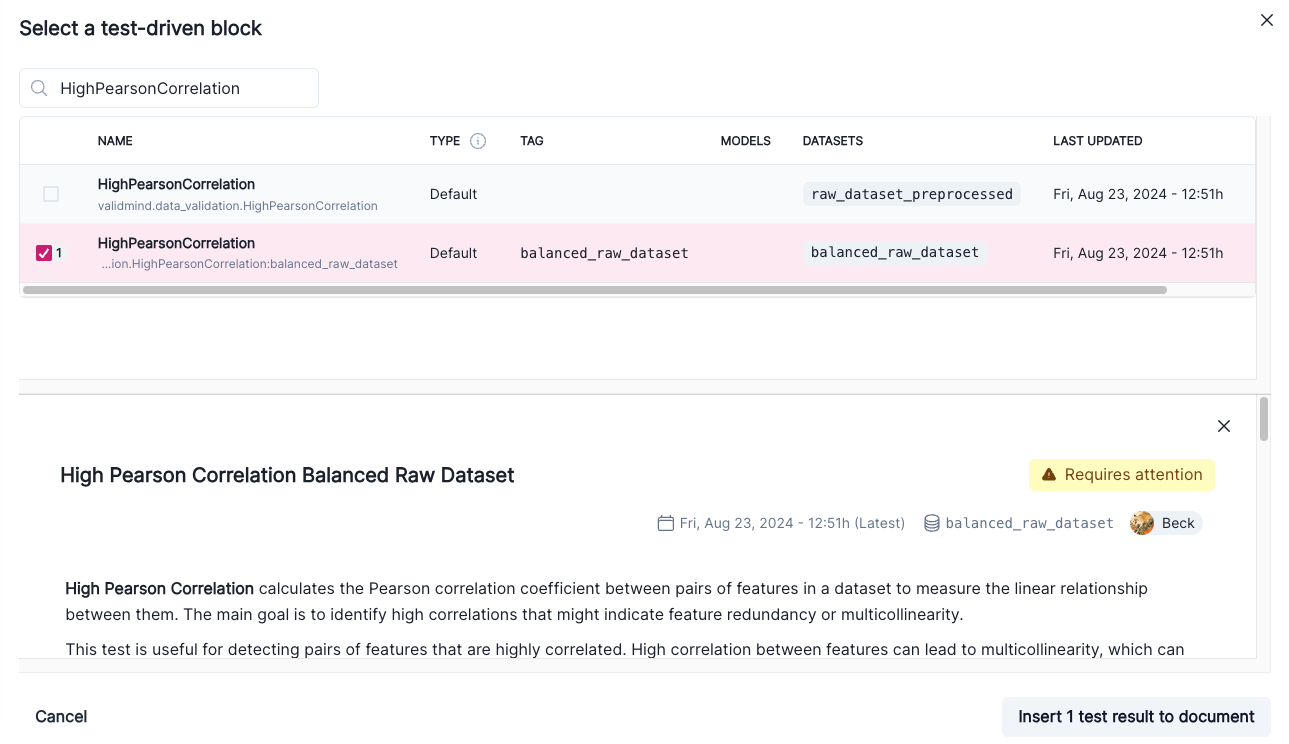
  5. Click + and then select Test-Driven Block under FROM LIBRARY:

    • Click on VM Library under TEST-DRIVEN in the left sidebar.
    • In the search bar, type in HighPearsonCorrelation.
    • Select HighPearsonCorrelation:balanced_raw_dataset as the test.

    A preview of the test gets shown:

    Screenshot showing the HighPearsonCorrelation test selected

  6. Finally, click Insert 1 Test Result to Document to add the test result to the documentation.

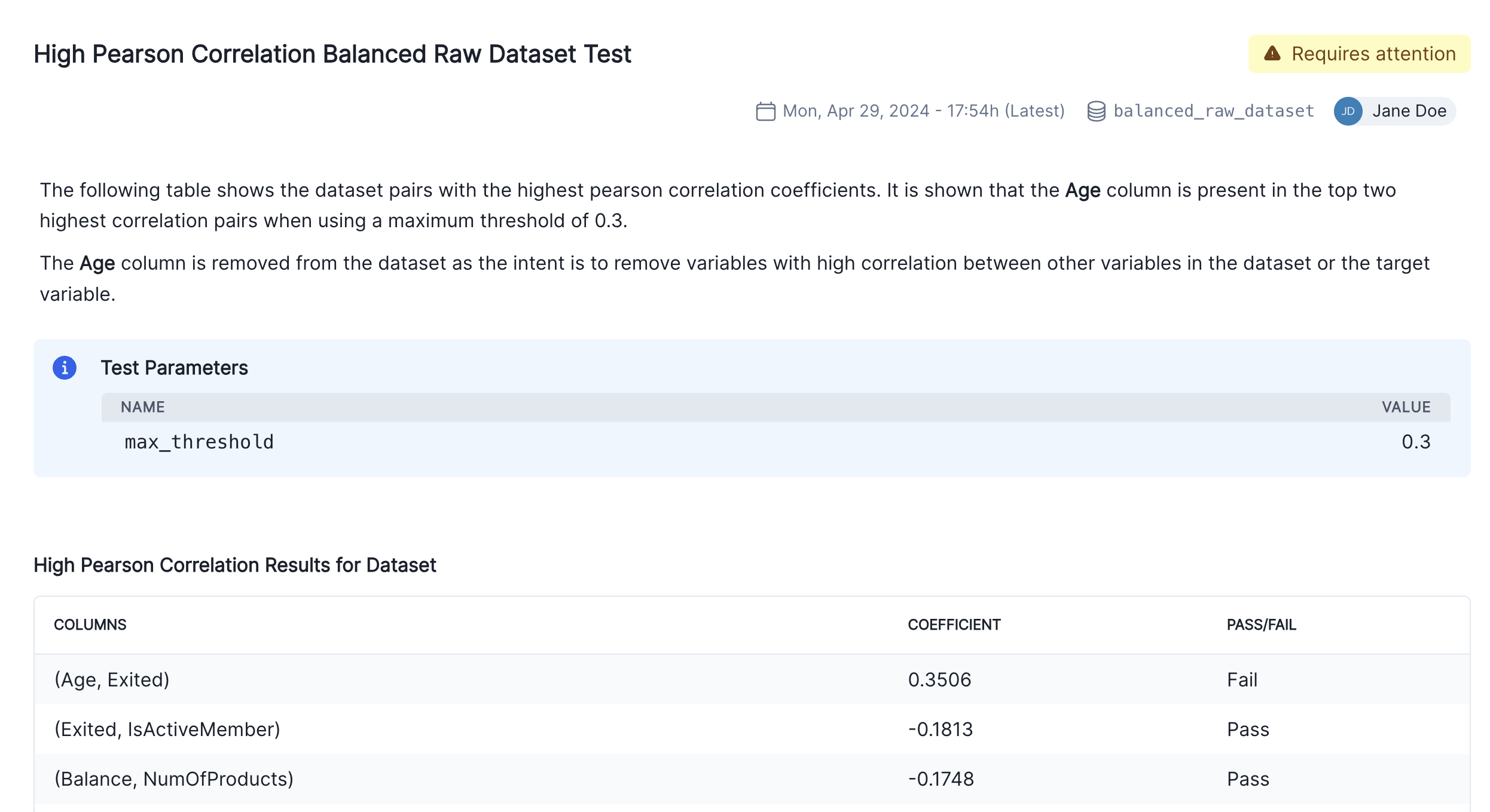
    Confirm that the individual results for the high correlation test has been correctly inserted into section 2.3. Correlations and Interactions of the documentation.

  7. Finalize the documentation by editing the test result's description block to explain the changes you made to the raw data and the reasons behind them as shown in the screenshot below:

    Screenshot showing the inserted High Pearson Correlation block

Model testing

So far, we've focused on the data assessment and pre-processing that usually occurs prior to any models being built. Now, let's instead assume we have already built a model and we want to incorporate some model results into our documentation.

Train simple logistic regression model

Using ValidMind tests, we'll train a simple logistic regression model on our dataset and evaluate its performance by using the LogisticRegression class from the sklearn.linear_model.

To start, let's grab the first few rows from the balanced_raw_no_age_df dataset with the highly correlated features removed we initialized earlier:

balanced_raw_no_age_df.head()
CreditScore Geography Gender Tenure Balance NumOfProducts HasCrCard IsActiveMember EstimatedSalary Exited
3610 548 Spain Male 0 178056.54 2 1 0 38434.73 0
3064 646 Spain Male 1 0.00 2 1 0 183289.22 0
404 638 Spain Male 9 77637.35 2 1 1 111346.22 0
7772 625 France Female 3 0.00 2 1 0 41295.10 1
1635 654 France Male 6 0.00 1 0 0 183872.88 1

Before training the model, we need to encode the categorical features in the dataset:

  • Use the OneHotEncoder class from the sklearn.preprocessing module to encode the categorical features.
  • The categorical features in the dataset are Geography and Gender.
balanced_raw_no_age_df = pd.get_dummies(
    balanced_raw_no_age_df, columns=["Geography", "Gender"], drop_first=True
)
balanced_raw_no_age_df.head()
CreditScore Tenure Balance NumOfProducts HasCrCard IsActiveMember EstimatedSalary Exited Geography_Germany Geography_Spain Gender_Male
3610 548 0 178056.54 2 1 0 38434.73 0 False True True
3064 646 1 0.00 2 1 0 183289.22 0 False True True
404 638 9 77637.35 2 1 1 111346.22 0 False True True
7772 625 3 0.00 2 1 0 41295.10 1 False False False
1635 654 6 0.00 1 0 0 183872.88 1 False False True

We'll split our preprocessed dataset into training and testing, to help assess how well the model generalizes to unseen data:

  • We start by dividing our balanced_raw_no_age_df dataset into training and test subsets using train_test_split, with 80% of the data allocated to training (train_df) and 20% to testing (test_df).
  • From each subset, we separate the features (all columns except "Exited") into X_train and X_test, and the target column ("Exited") into y_train and y_test.
from sklearn.model_selection import train_test_split

train_df, test_df = train_test_split(balanced_raw_no_age_df, test_size=0.20)

X_train = train_df.drop("Exited", axis=1)
y_train = train_df["Exited"]
X_test = test_df.drop("Exited", axis=1)
y_test = test_df["Exited"]

Then using GridSearchCV, we'll find the best-performing hyperparameters or settings and save them:

from sklearn.linear_model import LogisticRegression

# Logistic Regression grid params
log_reg_params = {
    "penalty": ["l1", "l2"],
    "C": [0.001, 0.01, 0.1, 1, 10, 100, 1000],
    "solver": ["liblinear"],
}

# Grid search for Logistic Regression
from sklearn.model_selection import GridSearchCV

grid_log_reg = GridSearchCV(LogisticRegression(), log_reg_params)
grid_log_reg.fit(X_train, y_train)

# Logistic Regression best estimator
log_reg = grid_log_reg.best_estimator_
/opt/hostedtoolcache/Python/3.11.14/x64/lib/python3.11/site-packages/sklearn/linear_model/_logistic.py:1135: FutureWarning:

'penalty' was deprecated in version 1.8 and will be removed in 1.10. To avoid this warning, leave 'penalty' set to its default value and use 'l1_ratio' or 'C' instead. Use l1_ratio=0 instead of penalty='l2', l1_ratio=1 instead of penalty='l1', and C=np.inf instead of penalty=None.

/opt/hostedtoolcache/Python/3.11.14/x64/lib/python3.11/site-packages/sklearn/linear_model/_logistic.py:1160: UserWarning:

Inconsistent values: penalty=l1 with l1_ratio=0.0. penalty is deprecated. Please use l1_ratio only.

/opt/hostedtoolcache/Python/3.11.14/x64/lib/python3.11/site-packages/sklearn/linear_model/_logistic.py:1135: FutureWarning:

'penalty' was deprecated in version 1.8 and will be removed in 1.10. To avoid this warning, leave 'penalty' set to its default value and use 'l1_ratio' or 'C' instead. Use l1_ratio=0 instead of penalty='l2', l1_ratio=1 instead of penalty='l1', and C=np.inf instead of penalty=None.

/opt/hostedtoolcache/Python/3.11.14/x64/lib/python3.11/site-packages/sklearn/linear_model/_logistic.py:1160: UserWarning:

Inconsistent values: penalty=l1 with l1_ratio=0.0. penalty is deprecated. Please use l1_ratio only.

/opt/hostedtoolcache/Python/3.11.14/x64/lib/python3.11/site-packages/sklearn/linear_model/_logistic.py:1135: FutureWarning:

'penalty' was deprecated in version 1.8 and will be removed in 1.10. To avoid this warning, leave 'penalty' set to its default value and use 'l1_ratio' or 'C' instead. Use l1_ratio=0 instead of penalty='l2', l1_ratio=1 instead of penalty='l1', and C=np.inf instead of penalty=None.

/opt/hostedtoolcache/Python/3.11.14/x64/lib/python3.11/site-packages/sklearn/linear_model/_logistic.py:1160: UserWarning:

Inconsistent values: penalty=l1 with l1_ratio=0.0. penalty is deprecated. Please use l1_ratio only.

/opt/hostedtoolcache/Python/3.11.14/x64/lib/python3.11/site-packages/sklearn/linear_model/_logistic.py:1135: FutureWarning:

'penalty' was deprecated in version 1.8 and will be removed in 1.10. To avoid this warning, leave 'penalty' set to its default value and use 'l1_ratio' or 'C' instead. Use l1_ratio=0 instead of penalty='l2', l1_ratio=1 instead of penalty='l1', and C=np.inf instead of penalty=None.

/opt/hostedtoolcache/Python/3.11.14/x64/lib/python3.11/site-packages/sklearn/linear_model/_logistic.py:1160: UserWarning:

Inconsistent values: penalty=l1 with l1_ratio=0.0. penalty is deprecated. Please use l1_ratio only.

/opt/hostedtoolcache/Python/3.11.14/x64/lib/python3.11/site-packages/sklearn/linear_model/_logistic.py:1135: FutureWarning:

'penalty' was deprecated in version 1.8 and will be removed in 1.10. To avoid this warning, leave 'penalty' set to its default value and use 'l1_ratio' or 'C' instead. Use l1_ratio=0 instead of penalty='l2', l1_ratio=1 instead of penalty='l1', and C=np.inf instead of penalty=None.

/opt/hostedtoolcache/Python/3.11.14/x64/lib/python3.11/site-packages/sklearn/linear_model/_logistic.py:1160: UserWarning:

Inconsistent values: penalty=l1 with l1_ratio=0.0. penalty is deprecated. Please use l1_ratio only.

/opt/hostedtoolcache/Python/3.11.14/x64/lib/python3.11/site-packages/sklearn/linear_model/_logistic.py:1135: FutureWarning:

'penalty' was deprecated in version 1.8 and will be removed in 1.10. To avoid this warning, leave 'penalty' set to its default value and use 'l1_ratio' or 'C' instead. Use l1_ratio=0 instead of penalty='l2', l1_ratio=1 instead of penalty='l1', and C=np.inf instead of penalty=None.

/opt/hostedtoolcache/Python/3.11.14/x64/lib/python3.11/site-packages/sklearn/linear_model/_logistic.py:1135: FutureWarning:

'penalty' was deprecated in version 1.8 and will be removed in 1.10. To avoid this warning, leave 'penalty' set to its default value and use 'l1_ratio' or 'C' instead. Use l1_ratio=0 instead of penalty='l2', l1_ratio=1 instead of penalty='l1', and C=np.inf instead of penalty=None.

/opt/hostedtoolcache/Python/3.11.14/x64/lib/python3.11/site-packages/sklearn/linear_model/_logistic.py:1135: FutureWarning:

'penalty' was deprecated in version 1.8 and will be removed in 1.10. To avoid this warning, leave 'penalty' set to its default value and use 'l1_ratio' or 'C' instead. Use l1_ratio=0 instead of penalty='l2', l1_ratio=1 instead of penalty='l1', and C=np.inf instead of penalty=None.

/opt/hostedtoolcache/Python/3.11.14/x64/lib/python3.11/site-packages/sklearn/linear_model/_logistic.py:1135: FutureWarning:

'penalty' was deprecated in version 1.8 and will be removed in 1.10. To avoid this warning, leave 'penalty' set to its default value and use 'l1_ratio' or 'C' instead. Use l1_ratio=0 instead of penalty='l2', l1_ratio=1 instead of penalty='l1', and C=np.inf instead of penalty=None.

/opt/hostedtoolcache/Python/3.11.14/x64/lib/python3.11/site-packages/sklearn/linear_model/_logistic.py:1135: FutureWarning:

'penalty' was deprecated in version 1.8 and will be removed in 1.10. To avoid this warning, leave 'penalty' set to its default value and use 'l1_ratio' or 'C' instead. Use l1_ratio=0 instead of penalty='l2', l1_ratio=1 instead of penalty='l1', and C=np.inf instead of penalty=None.

/opt/hostedtoolcache/Python/3.11.14/x64/lib/python3.11/site-packages/sklearn/linear_model/_logistic.py:1135: FutureWarning:

'penalty' was deprecated in version 1.8 and will be removed in 1.10. To avoid this warning, leave 'penalty' set to its default value and use 'l1_ratio' or 'C' instead. Use l1_ratio=0 instead of penalty='l2', l1_ratio=1 instead of penalty='l1', and C=np.inf instead of penalty=None.

/opt/hostedtoolcache/Python/3.11.14/x64/lib/python3.11/site-packages/sklearn/linear_model/_logistic.py:1160: UserWarning:

Inconsistent values: penalty=l1 with l1_ratio=0.0. penalty is deprecated. Please use l1_ratio only.

/opt/hostedtoolcache/Python/3.11.14/x64/lib/python3.11/site-packages/sklearn/linear_model/_logistic.py:1135: FutureWarning:

'penalty' was deprecated in version 1.8 and will be removed in 1.10. To avoid this warning, leave 'penalty' set to its default value and use 'l1_ratio' or 'C' instead. Use l1_ratio=0 instead of penalty='l2', l1_ratio=1 instead of penalty='l1', and C=np.inf instead of penalty=None.

/opt/hostedtoolcache/Python/3.11.14/x64/lib/python3.11/site-packages/sklearn/linear_model/_logistic.py:1160: UserWarning:

Inconsistent values: penalty=l1 with l1_ratio=0.0. penalty is deprecated. Please use l1_ratio only.

/opt/hostedtoolcache/Python/3.11.14/x64/lib/python3.11/site-packages/sklearn/linear_model/_logistic.py:1135: FutureWarning:

'penalty' was deprecated in version 1.8 and will be removed in 1.10. To avoid this warning, leave 'penalty' set to its default value and use 'l1_ratio' or 'C' instead. Use l1_ratio=0 instead of penalty='l2', l1_ratio=1 instead of penalty='l1', and C=np.inf instead of penalty=None.

/opt/hostedtoolcache/Python/3.11.14/x64/lib/python3.11/site-packages/sklearn/linear_model/_logistic.py:1160: UserWarning:

Inconsistent values: penalty=l1 with l1_ratio=0.0. penalty is deprecated. Please use l1_ratio only.

/opt/hostedtoolcache/Python/3.11.14/x64/lib/python3.11/site-packages/sklearn/linear_model/_logistic.py:1135: FutureWarning:

'penalty' was deprecated in version 1.8 and will be removed in 1.10. To avoid this warning, leave 'penalty' set to its default value and use 'l1_ratio' or 'C' instead. Use l1_ratio=0 instead of penalty='l2', l1_ratio=1 instead of penalty='l1', and C=np.inf instead of penalty=None.

/opt/hostedtoolcache/Python/3.11.14/x64/lib/python3.11/site-packages/sklearn/linear_model/_logistic.py:1160: UserWarning:

Inconsistent values: penalty=l1 with l1_ratio=0.0. penalty is deprecated. Please use l1_ratio only.

/opt/hostedtoolcache/Python/3.11.14/x64/lib/python3.11/site-packages/sklearn/linear_model/_logistic.py:1135: FutureWarning:

'penalty' was deprecated in version 1.8 and will be removed in 1.10. To avoid this warning, leave 'penalty' set to its default value and use 'l1_ratio' or 'C' instead. Use l1_ratio=0 instead of penalty='l2', l1_ratio=1 instead of penalty='l1', and C=np.inf instead of penalty=None.

/opt/hostedtoolcache/Python/3.11.14/x64/lib/python3.11/site-packages/sklearn/linear_model/_logistic.py:1160: UserWarning:

Inconsistent values: penalty=l1 with l1_ratio=0.0. penalty is deprecated. Please use l1_ratio only.

/opt/hostedtoolcache/Python/3.11.14/x64/lib/python3.11/site-packages/sklearn/linear_model/_logistic.py:1135: FutureWarning:

'penalty' was deprecated in version 1.8 and will be removed in 1.10. To avoid this warning, leave 'penalty' set to its default value and use 'l1_ratio' or 'C' instead. Use l1_ratio=0 instead of penalty='l2', l1_ratio=1 instead of penalty='l1', and C=np.inf instead of penalty=None.

/opt/hostedtoolcache/Python/3.11.14/x64/lib/python3.11/site-packages/sklearn/linear_model/_logistic.py:1135: FutureWarning:

'penalty' was deprecated in version 1.8 and will be removed in 1.10. To avoid this warning, leave 'penalty' set to its default value and use 'l1_ratio' or 'C' instead. Use l1_ratio=0 instead of penalty='l2', l1_ratio=1 instead of penalty='l1', and C=np.inf instead of penalty=None.

/opt/hostedtoolcache/Python/3.11.14/x64/lib/python3.11/site-packages/sklearn/linear_model/_logistic.py:1135: FutureWarning:

'penalty' was deprecated in version 1.8 and will be removed in 1.10. To avoid this warning, leave 'penalty' set to its default value and use 'l1_ratio' or 'C' instead. Use l1_ratio=0 instead of penalty='l2', l1_ratio=1 instead of penalty='l1', and C=np.inf instead of penalty=None.

/opt/hostedtoolcache/Python/3.11.14/x64/lib/python3.11/site-packages/sklearn/linear_model/_logistic.py:1135: FutureWarning:

'penalty' was deprecated in version 1.8 and will be removed in 1.10. To avoid this warning, leave 'penalty' set to its default value and use 'l1_ratio' or 'C' instead. Use l1_ratio=0 instead of penalty='l2', l1_ratio=1 instead of penalty='l1', and C=np.inf instead of penalty=None.

/opt/hostedtoolcache/Python/3.11.14/x64/lib/python3.11/site-packages/sklearn/linear_model/_logistic.py:1135: FutureWarning:

'penalty' was deprecated in version 1.8 and will be removed in 1.10. To avoid this warning, leave 'penalty' set to its default value and use 'l1_ratio' or 'C' instead. Use l1_ratio=0 instead of penalty='l2', l1_ratio=1 instead of penalty='l1', and C=np.inf instead of penalty=None.

/opt/hostedtoolcache/Python/3.11.14/x64/lib/python3.11/site-packages/sklearn/linear_model/_logistic.py:1135: FutureWarning:

'penalty' was deprecated in version 1.8 and will be removed in 1.10. To avoid this warning, leave 'penalty' set to its default value and use 'l1_ratio' or 'C' instead. Use l1_ratio=0 instead of penalty='l2', l1_ratio=1 instead of penalty='l1', and C=np.inf instead of penalty=None.

/opt/hostedtoolcache/Python/3.11.14/x64/lib/python3.11/site-packages/sklearn/linear_model/_logistic.py:1160: UserWarning:

Inconsistent values: penalty=l1 with l1_ratio=0.0. penalty is deprecated. Please use l1_ratio only.

/opt/hostedtoolcache/Python/3.11.14/x64/lib/python3.11/site-packages/sklearn/linear_model/_logistic.py:1135: FutureWarning:

'penalty' was deprecated in version 1.8 and will be removed in 1.10. To avoid this warning, leave 'penalty' set to its default value and use 'l1_ratio' or 'C' instead. Use l1_ratio=0 instead of penalty='l2', l1_ratio=1 instead of penalty='l1', and C=np.inf instead of penalty=None.

/opt/hostedtoolcache/Python/3.11.14/x64/lib/python3.11/site-packages/sklearn/linear_model/_logistic.py:1160: UserWarning:

Inconsistent values: penalty=l1 with l1_ratio=0.0. penalty is deprecated. Please use l1_ratio only.

/opt/hostedtoolcache/Python/3.11.14/x64/lib/python3.11/site-packages/sklearn/linear_model/_logistic.py:1135: FutureWarning:

'penalty' was deprecated in version 1.8 and will be removed in 1.10. To avoid this warning, leave 'penalty' set to its default value and use 'l1_ratio' or 'C' instead. Use l1_ratio=0 instead of penalty='l2', l1_ratio=1 instead of penalty='l1', and C=np.inf instead of penalty=None.

/opt/hostedtoolcache/Python/3.11.14/x64/lib/python3.11/site-packages/sklearn/linear_model/_logistic.py:1160: UserWarning:

Inconsistent values: penalty=l1 with l1_ratio=0.0. penalty is deprecated. Please use l1_ratio only.

/opt/hostedtoolcache/Python/3.11.14/x64/lib/python3.11/site-packages/sklearn/linear_model/_logistic.py:1135: FutureWarning:

'penalty' was deprecated in version 1.8 and will be removed in 1.10. To avoid this warning, leave 'penalty' set to its default value and use 'l1_ratio' or 'C' instead. Use l1_ratio=0 instead of penalty='l2', l1_ratio=1 instead of penalty='l1', and C=np.inf instead of penalty=None.

/opt/hostedtoolcache/Python/3.11.14/x64/lib/python3.11/site-packages/sklearn/linear_model/_logistic.py:1160: UserWarning:

Inconsistent values: penalty=l1 with l1_ratio=0.0. penalty is deprecated. Please use l1_ratio only.

/opt/hostedtoolcache/Python/3.11.14/x64/lib/python3.11/site-packages/sklearn/linear_model/_logistic.py:1135: FutureWarning:

'penalty' was deprecated in version 1.8 and will be removed in 1.10. To avoid this warning, leave 'penalty' set to its default value and use 'l1_ratio' or 'C' instead. Use l1_ratio=0 instead of penalty='l2', l1_ratio=1 instead of penalty='l1', and C=np.inf instead of penalty=None.

/opt/hostedtoolcache/Python/3.11.14/x64/lib/python3.11/site-packages/sklearn/linear_model/_logistic.py:1160: UserWarning:

Inconsistent values: penalty=l1 with l1_ratio=0.0. penalty is deprecated. Please use l1_ratio only.

/opt/hostedtoolcache/Python/3.11.14/x64/lib/python3.11/site-packages/sklearn/linear_model/_logistic.py:1135: FutureWarning:

'penalty' was deprecated in version 1.8 and will be removed in 1.10. To avoid this warning, leave 'penalty' set to its default value and use 'l1_ratio' or 'C' instead. Use l1_ratio=0 instead of penalty='l2', l1_ratio=1 instead of penalty='l1', and C=np.inf instead of penalty=None.

/opt/hostedtoolcache/Python/3.11.14/x64/lib/python3.11/site-packages/sklearn/linear_model/_logistic.py:1135: FutureWarning:

'penalty' was deprecated in version 1.8 and will be removed in 1.10. To avoid this warning, leave 'penalty' set to its default value and use 'l1_ratio' or 'C' instead. Use l1_ratio=0 instead of penalty='l2', l1_ratio=1 instead of penalty='l1', and C=np.inf instead of penalty=None.

/opt/hostedtoolcache/Python/3.11.14/x64/lib/python3.11/site-packages/sklearn/linear_model/_logistic.py:1135: FutureWarning:

'penalty' was deprecated in version 1.8 and will be removed in 1.10. To avoid this warning, leave 'penalty' set to its default value and use 'l1_ratio' or 'C' instead. Use l1_ratio=0 instead of penalty='l2', l1_ratio=1 instead of penalty='l1', and C=np.inf instead of penalty=None.

/opt/hostedtoolcache/Python/3.11.14/x64/lib/python3.11/site-packages/sklearn/linear_model/_logistic.py:1135: FutureWarning:

'penalty' was deprecated in version 1.8 and will be removed in 1.10. To avoid this warning, leave 'penalty' set to its default value and use 'l1_ratio' or 'C' instead. Use l1_ratio=0 instead of penalty='l2', l1_ratio=1 instead of penalty='l1', and C=np.inf instead of penalty=None.

/opt/hostedtoolcache/Python/3.11.14/x64/lib/python3.11/site-packages/sklearn/linear_model/_logistic.py:1135: FutureWarning:

'penalty' was deprecated in version 1.8 and will be removed in 1.10. To avoid this warning, leave 'penalty' set to its default value and use 'l1_ratio' or 'C' instead. Use l1_ratio=0 instead of penalty='l2', l1_ratio=1 instead of penalty='l1', and C=np.inf instead of penalty=None.

/opt/hostedtoolcache/Python/3.11.14/x64/lib/python3.11/site-packages/sklearn/linear_model/_logistic.py:1135: FutureWarning:

'penalty' was deprecated in version 1.8 and will be removed in 1.10. To avoid this warning, leave 'penalty' set to its default value and use 'l1_ratio' or 'C' instead. Use l1_ratio=0 instead of penalty='l2', l1_ratio=1 instead of penalty='l1', and C=np.inf instead of penalty=None.

/opt/hostedtoolcache/Python/3.11.14/x64/lib/python3.11/site-packages/sklearn/linear_model/_logistic.py:1160: UserWarning:

Inconsistent values: penalty=l1 with l1_ratio=0.0. penalty is deprecated. Please use l1_ratio only.

/opt/hostedtoolcache/Python/3.11.14/x64/lib/python3.11/site-packages/sklearn/linear_model/_logistic.py:1135: FutureWarning:

'penalty' was deprecated in version 1.8 and will be removed in 1.10. To avoid this warning, leave 'penalty' set to its default value and use 'l1_ratio' or 'C' instead. Use l1_ratio=0 instead of penalty='l2', l1_ratio=1 instead of penalty='l1', and C=np.inf instead of penalty=None.

/opt/hostedtoolcache/Python/3.11.14/x64/lib/python3.11/site-packages/sklearn/linear_model/_logistic.py:1160: UserWarning:

Inconsistent values: penalty=l1 with l1_ratio=0.0. penalty is deprecated. Please use l1_ratio only.

/opt/hostedtoolcache/Python/3.11.14/x64/lib/python3.11/site-packages/sklearn/linear_model/_logistic.py:1135: FutureWarning:

'penalty' was deprecated in version 1.8 and will be removed in 1.10. To avoid this warning, leave 'penalty' set to its default value and use 'l1_ratio' or 'C' instead. Use l1_ratio=0 instead of penalty='l2', l1_ratio=1 instead of penalty='l1', and C=np.inf instead of penalty=None.

/opt/hostedtoolcache/Python/3.11.14/x64/lib/python3.11/site-packages/sklearn/linear_model/_logistic.py:1160: UserWarning:

Inconsistent values: penalty=l1 with l1_ratio=0.0. penalty is deprecated. Please use l1_ratio only.

/opt/hostedtoolcache/Python/3.11.14/x64/lib/python3.11/site-packages/sklearn/linear_model/_logistic.py:1135: FutureWarning:

'penalty' was deprecated in version 1.8 and will be removed in 1.10. To avoid this warning, leave 'penalty' set to its default value and use 'l1_ratio' or 'C' instead. Use l1_ratio=0 instead of penalty='l2', l1_ratio=1 instead of penalty='l1', and C=np.inf instead of penalty=None.

/opt/hostedtoolcache/Python/3.11.14/x64/lib/python3.11/site-packages/sklearn/linear_model/_logistic.py:1160: UserWarning:

Inconsistent values: penalty=l1 with l1_ratio=0.0. penalty is deprecated. Please use l1_ratio only.

/opt/hostedtoolcache/Python/3.11.14/x64/lib/python3.11/site-packages/sklearn/linear_model/_logistic.py:1135: FutureWarning:

'penalty' was deprecated in version 1.8 and will be removed in 1.10. To avoid this warning, leave 'penalty' set to its default value and use 'l1_ratio' or 'C' instead. Use l1_ratio=0 instead of penalty='l2', l1_ratio=1 instead of penalty='l1', and C=np.inf instead of penalty=None.

/opt/hostedtoolcache/Python/3.11.14/x64/lib/python3.11/site-packages/sklearn/linear_model/_logistic.py:1160: UserWarning:

Inconsistent values: penalty=l1 with l1_ratio=0.0. penalty is deprecated. Please use l1_ratio only.

/opt/hostedtoolcache/Python/3.11.14/x64/lib/python3.11/site-packages/sklearn/linear_model/_logistic.py:1135: FutureWarning:

'penalty' was deprecated in version 1.8 and will be removed in 1.10. To avoid this warning, leave 'penalty' set to its default value and use 'l1_ratio' or 'C' instead. Use l1_ratio=0 instead of penalty='l2', l1_ratio=1 instead of penalty='l1', and C=np.inf instead of penalty=None.

/opt/hostedtoolcache/Python/3.11.14/x64/lib/python3.11/site-packages/sklearn/linear_model/_logistic.py:1135: FutureWarning:

'penalty' was deprecated in version 1.8 and will be removed in 1.10. To avoid this warning, leave 'penalty' set to its default value and use 'l1_ratio' or 'C' instead. Use l1_ratio=0 instead of penalty='l2', l1_ratio=1 instead of penalty='l1', and C=np.inf instead of penalty=None.

/opt/hostedtoolcache/Python/3.11.14/x64/lib/python3.11/site-packages/sklearn/linear_model/_logistic.py:1135: FutureWarning:

'penalty' was deprecated in version 1.8 and will be removed in 1.10. To avoid this warning, leave 'penalty' set to its default value and use 'l1_ratio' or 'C' instead. Use l1_ratio=0 instead of penalty='l2', l1_ratio=1 instead of penalty='l1', and C=np.inf instead of penalty=None.

/opt/hostedtoolcache/Python/3.11.14/x64/lib/python3.11/site-packages/sklearn/linear_model/_logistic.py:1135: FutureWarning:

'penalty' was deprecated in version 1.8 and will be removed in 1.10. To avoid this warning, leave 'penalty' set to its default value and use 'l1_ratio' or 'C' instead. Use l1_ratio=0 instead of penalty='l2', l1_ratio=1 instead of penalty='l1', and C=np.inf instead of penalty=None.

/opt/hostedtoolcache/Python/3.11.14/x64/lib/python3.11/site-packages/sklearn/linear_model/_logistic.py:1135: FutureWarning:

'penalty' was deprecated in version 1.8 and will be removed in 1.10. To avoid this warning, leave 'penalty' set to its default value and use 'l1_ratio' or 'C' instead. Use l1_ratio=0 instead of penalty='l2', l1_ratio=1 instead of penalty='l1', and C=np.inf instead of penalty=None.

/opt/hostedtoolcache/Python/3.11.14/x64/lib/python3.11/site-packages/sklearn/linear_model/_logistic.py:1135: FutureWarning:

'penalty' was deprecated in version 1.8 and will be removed in 1.10. To avoid this warning, leave 'penalty' set to its default value and use 'l1_ratio' or 'C' instead. Use l1_ratio=0 instead of penalty='l2', l1_ratio=1 instead of penalty='l1', and C=np.inf instead of penalty=None.

/opt/hostedtoolcache/Python/3.11.14/x64/lib/python3.11/site-packages/sklearn/linear_model/_logistic.py:1160: UserWarning:

Inconsistent values: penalty=l1 with l1_ratio=0.0. penalty is deprecated. Please use l1_ratio only.

/opt/hostedtoolcache/Python/3.11.14/x64/lib/python3.11/site-packages/sklearn/linear_model/_logistic.py:1135: FutureWarning:

'penalty' was deprecated in version 1.8 and will be removed in 1.10. To avoid this warning, leave 'penalty' set to its default value and use 'l1_ratio' or 'C' instead. Use l1_ratio=0 instead of penalty='l2', l1_ratio=1 instead of penalty='l1', and C=np.inf instead of penalty=None.

/opt/hostedtoolcache/Python/3.11.14/x64/lib/python3.11/site-packages/sklearn/linear_model/_logistic.py:1160: UserWarning:

Inconsistent values: penalty=l1 with l1_ratio=0.0. penalty is deprecated. Please use l1_ratio only.

/opt/hostedtoolcache/Python/3.11.14/x64/lib/python3.11/site-packages/sklearn/linear_model/_logistic.py:1135: FutureWarning:

'penalty' was deprecated in version 1.8 and will be removed in 1.10. To avoid this warning, leave 'penalty' set to its default value and use 'l1_ratio' or 'C' instead. Use l1_ratio=0 instead of penalty='l2', l1_ratio=1 instead of penalty='l1', and C=np.inf instead of penalty=None.

/opt/hostedtoolcache/Python/3.11.14/x64/lib/python3.11/site-packages/sklearn/linear_model/_logistic.py:1160: UserWarning:

Inconsistent values: penalty=l1 with l1_ratio=0.0. penalty is deprecated. Please use l1_ratio only.

/opt/hostedtoolcache/Python/3.11.14/x64/lib/python3.11/site-packages/sklearn/linear_model/_logistic.py:1135: FutureWarning:

'penalty' was deprecated in version 1.8 and will be removed in 1.10. To avoid this warning, leave 'penalty' set to its default value and use 'l1_ratio' or 'C' instead. Use l1_ratio=0 instead of penalty='l2', l1_ratio=1 instead of penalty='l1', and C=np.inf instead of penalty=None.

/opt/hostedtoolcache/Python/3.11.14/x64/lib/python3.11/site-packages/sklearn/linear_model/_logistic.py:1160: UserWarning:

Inconsistent values: penalty=l1 with l1_ratio=0.0. penalty is deprecated. Please use l1_ratio only.

/opt/hostedtoolcache/Python/3.11.14/x64/lib/python3.11/site-packages/sklearn/linear_model/_logistic.py:1135: FutureWarning:

'penalty' was deprecated in version 1.8 and will be removed in 1.10. To avoid this warning, leave 'penalty' set to its default value and use 'l1_ratio' or 'C' instead. Use l1_ratio=0 instead of penalty='l2', l1_ratio=1 instead of penalty='l1', and C=np.inf instead of penalty=None.

/opt/hostedtoolcache/Python/3.11.14/x64/lib/python3.11/site-packages/sklearn/linear_model/_logistic.py:1160: UserWarning:

Inconsistent values: penalty=l1 with l1_ratio=0.0. penalty is deprecated. Please use l1_ratio only.

/opt/hostedtoolcache/Python/3.11.14/x64/lib/python3.11/site-packages/sklearn/linear_model/_logistic.py:1135: FutureWarning:

'penalty' was deprecated in version 1.8 and will be removed in 1.10. To avoid this warning, leave 'penalty' set to its default value and use 'l1_ratio' or 'C' instead. Use l1_ratio=0 instead of penalty='l2', l1_ratio=1 instead of penalty='l1', and C=np.inf instead of penalty=None.

/opt/hostedtoolcache/Python/3.11.14/x64/lib/python3.11/site-packages/sklearn/linear_model/_logistic.py:1135: FutureWarning:

'penalty' was deprecated in version 1.8 and will be removed in 1.10. To avoid this warning, leave 'penalty' set to its default value and use 'l1_ratio' or 'C' instead. Use l1_ratio=0 instead of penalty='l2', l1_ratio=1 instead of penalty='l1', and C=np.inf instead of penalty=None.

/opt/hostedtoolcache/Python/3.11.14/x64/lib/python3.11/site-packages/sklearn/linear_model/_logistic.py:1135: FutureWarning:

'penalty' was deprecated in version 1.8 and will be removed in 1.10. To avoid this warning, leave 'penalty' set to its default value and use 'l1_ratio' or 'C' instead. Use l1_ratio=0 instead of penalty='l2', l1_ratio=1 instead of penalty='l1', and C=np.inf instead of penalty=None.

/opt/hostedtoolcache/Python/3.11.14/x64/lib/python3.11/site-packages/sklearn/linear_model/_logistic.py:1135: FutureWarning:

'penalty' was deprecated in version 1.8 and will be removed in 1.10. To avoid this warning, leave 'penalty' set to its default value and use 'l1_ratio' or 'C' instead. Use l1_ratio=0 instead of penalty='l2', l1_ratio=1 instead of penalty='l1', and C=np.inf instead of penalty=None.

/opt/hostedtoolcache/Python/3.11.14/x64/lib/python3.11/site-packages/sklearn/linear_model/_logistic.py:1135: FutureWarning:

'penalty' was deprecated in version 1.8 and will be removed in 1.10. To avoid this warning, leave 'penalty' set to its default value and use 'l1_ratio' or 'C' instead. Use l1_ratio=0 instead of penalty='l2', l1_ratio=1 instead of penalty='l1', and C=np.inf instead of penalty=None.

/opt/hostedtoolcache/Python/3.11.14/x64/lib/python3.11/site-packages/sklearn/linear_model/_logistic.py:1135: FutureWarning:

'penalty' was deprecated in version 1.8 and will be removed in 1.10. To avoid this warning, leave 'penalty' set to its default value and use 'l1_ratio' or 'C' instead. Use l1_ratio=0 instead of penalty='l2', l1_ratio=1 instead of penalty='l1', and C=np.inf instead of penalty=None.

/opt/hostedtoolcache/Python/3.11.14/x64/lib/python3.11/site-packages/sklearn/linear_model/_logistic.py:1160: UserWarning:

Inconsistent values: penalty=l1 with l1_ratio=0.0. penalty is deprecated. Please use l1_ratio only.

/opt/hostedtoolcache/Python/3.11.14/x64/lib/python3.11/site-packages/sklearn/linear_model/_logistic.py:1135: FutureWarning:

'penalty' was deprecated in version 1.8 and will be removed in 1.10. To avoid this warning, leave 'penalty' set to its default value and use 'l1_ratio' or 'C' instead. Use l1_ratio=0 instead of penalty='l2', l1_ratio=1 instead of penalty='l1', and C=np.inf instead of penalty=None.

/opt/hostedtoolcache/Python/3.11.14/x64/lib/python3.11/site-packages/sklearn/linear_model/_logistic.py:1160: UserWarning:

Inconsistent values: penalty=l1 with l1_ratio=0.0. penalty is deprecated. Please use l1_ratio only.

/opt/hostedtoolcache/Python/3.11.14/x64/lib/python3.11/site-packages/sklearn/linear_model/_logistic.py:1135: FutureWarning:

'penalty' was deprecated in version 1.8 and will be removed in 1.10. To avoid this warning, leave 'penalty' set to its default value and use 'l1_ratio' or 'C' instead. Use l1_ratio=0 instead of penalty='l2', l1_ratio=1 instead of penalty='l1', and C=np.inf instead of penalty=None.

/opt/hostedtoolcache/Python/3.11.14/x64/lib/python3.11/site-packages/sklearn/linear_model/_logistic.py:1160: UserWarning:

Inconsistent values: penalty=l1 with l1_ratio=0.0. penalty is deprecated. Please use l1_ratio only.

/opt/hostedtoolcache/Python/3.11.14/x64/lib/python3.11/site-packages/sklearn/linear_model/_logistic.py:1135: FutureWarning:

'penalty' was deprecated in version 1.8 and will be removed in 1.10. To avoid this warning, leave 'penalty' set to its default value and use 'l1_ratio' or 'C' instead. Use l1_ratio=0 instead of penalty='l2', l1_ratio=1 instead of penalty='l1', and C=np.inf instead of penalty=None.

/opt/hostedtoolcache/Python/3.11.14/x64/lib/python3.11/site-packages/sklearn/linear_model/_logistic.py:1160: UserWarning:

Inconsistent values: penalty=l1 with l1_ratio=0.0. penalty is deprecated. Please use l1_ratio only.

/opt/hostedtoolcache/Python/3.11.14/x64/lib/python3.11/site-packages/sklearn/linear_model/_logistic.py:1135: FutureWarning:

'penalty' was deprecated in version 1.8 and will be removed in 1.10. To avoid this warning, leave 'penalty' set to its default value and use 'l1_ratio' or 'C' instead. Use l1_ratio=0 instead of penalty='l2', l1_ratio=1 instead of penalty='l1', and C=np.inf instead of penalty=None.

/opt/hostedtoolcache/Python/3.11.14/x64/lib/python3.11/site-packages/sklearn/linear_model/_logistic.py:1160: UserWarning:

Inconsistent values: penalty=l1 with l1_ratio=0.0. penalty is deprecated. Please use l1_ratio only.

/opt/hostedtoolcache/Python/3.11.14/x64/lib/python3.11/site-packages/sklearn/linear_model/_logistic.py:1135: FutureWarning:

'penalty' was deprecated in version 1.8 and will be removed in 1.10. To avoid this warning, leave 'penalty' set to its default value and use 'l1_ratio' or 'C' instead. Use l1_ratio=0 instead of penalty='l2', l1_ratio=1 instead of penalty='l1', and C=np.inf instead of penalty=None.

/opt/hostedtoolcache/Python/3.11.14/x64/lib/python3.11/site-packages/sklearn/linear_model/_logistic.py:1135: FutureWarning:

'penalty' was deprecated in version 1.8 and will be removed in 1.10. To avoid this warning, leave 'penalty' set to its default value and use 'l1_ratio' or 'C' instead. Use l1_ratio=0 instead of penalty='l2', l1_ratio=1 instead of penalty='l1', and C=np.inf instead of penalty=None.

/opt/hostedtoolcache/Python/3.11.14/x64/lib/python3.11/site-packages/sklearn/linear_model/_logistic.py:1135: FutureWarning:

'penalty' was deprecated in version 1.8 and will be removed in 1.10. To avoid this warning, leave 'penalty' set to its default value and use 'l1_ratio' or 'C' instead. Use l1_ratio=0 instead of penalty='l2', l1_ratio=1 instead of penalty='l1', and C=np.inf instead of penalty=None.

/opt/hostedtoolcache/Python/3.11.14/x64/lib/python3.11/site-packages/sklearn/linear_model/_logistic.py:1135: FutureWarning:

'penalty' was deprecated in version 1.8 and will be removed in 1.10. To avoid this warning, leave 'penalty' set to its default value and use 'l1_ratio' or 'C' instead. Use l1_ratio=0 instead of penalty='l2', l1_ratio=1 instead of penalty='l1', and C=np.inf instead of penalty=None.

/opt/hostedtoolcache/Python/3.11.14/x64/lib/python3.11/site-packages/sklearn/linear_model/_logistic.py:1135: FutureWarning:

'penalty' was deprecated in version 1.8 and will be removed in 1.10. To avoid this warning, leave 'penalty' set to its default value and use 'l1_ratio' or 'C' instead. Use l1_ratio=0 instead of penalty='l2', l1_ratio=1 instead of penalty='l1', and C=np.inf instead of penalty=None.

/opt/hostedtoolcache/Python/3.11.14/x64/lib/python3.11/site-packages/sklearn/linear_model/_logistic.py:1135: FutureWarning:

'penalty' was deprecated in version 1.8 and will be removed in 1.10. To avoid this warning, leave 'penalty' set to its default value and use 'l1_ratio' or 'C' instead. Use l1_ratio=0 instead of penalty='l2', l1_ratio=1 instead of penalty='l1', and C=np.inf instead of penalty=None.

/opt/hostedtoolcache/Python/3.11.14/x64/lib/python3.11/site-packages/sklearn/linear_model/_logistic.py:1160: UserWarning:

Inconsistent values: penalty=l1 with l1_ratio=0.0. penalty is deprecated. Please use l1_ratio only.

/opt/hostedtoolcache/Python/3.11.14/x64/lib/python3.11/site-packages/sklearn/linear_model/_logistic.py:1135: FutureWarning:

'penalty' was deprecated in version 1.8 and will be removed in 1.10. To avoid this warning, leave 'penalty' set to its default value and use 'l1_ratio' or 'C' instead. Use l1_ratio=0 instead of penalty='l2', l1_ratio=1 instead of penalty='l1', and C=np.inf instead of penalty=None.

/opt/hostedtoolcache/Python/3.11.14/x64/lib/python3.11/site-packages/sklearn/linear_model/_logistic.py:1160: UserWarning:

Inconsistent values: penalty=l1 with l1_ratio=0.0. penalty is deprecated. Please use l1_ratio only.

/opt/hostedtoolcache/Python/3.11.14/x64/lib/python3.11/site-packages/sklearn/linear_model/_logistic.py:1135: FutureWarning:

'penalty' was deprecated in version 1.8 and will be removed in 1.10. To avoid this warning, leave 'penalty' set to its default value and use 'l1_ratio' or 'C' instead. Use l1_ratio=0 instead of penalty='l2', l1_ratio=1 instead of penalty='l1', and C=np.inf instead of penalty=None.

/opt/hostedtoolcache/Python/3.11.14/x64/lib/python3.11/site-packages/sklearn/linear_model/_logistic.py:1160: UserWarning:

Inconsistent values: penalty=l1 with l1_ratio=0.0. penalty is deprecated. Please use l1_ratio only.

/opt/hostedtoolcache/Python/3.11.14/x64/lib/python3.11/site-packages/sklearn/linear_model/_logistic.py:1135: FutureWarning:

'penalty' was deprecated in version 1.8 and will be removed in 1.10. To avoid this warning, leave 'penalty' set to its default value and use 'l1_ratio' or 'C' instead. Use l1_ratio=0 instead of penalty='l2', l1_ratio=1 instead of penalty='l1', and C=np.inf instead of penalty=None.

/opt/hostedtoolcache/Python/3.11.14/x64/lib/python3.11/site-packages/sklearn/linear_model/_logistic.py:1160: UserWarning:

Inconsistent values: penalty=l1 with l1_ratio=0.0. penalty is deprecated. Please use l1_ratio only.

/opt/hostedtoolcache/Python/3.11.14/x64/lib/python3.11/site-packages/sklearn/linear_model/_logistic.py:1135: FutureWarning:

'penalty' was deprecated in version 1.8 and will be removed in 1.10. To avoid this warning, leave 'penalty' set to its default value and use 'l1_ratio' or 'C' instead. Use l1_ratio=0 instead of penalty='l2', l1_ratio=1 instead of penalty='l1', and C=np.inf instead of penalty=None.

/opt/hostedtoolcache/Python/3.11.14/x64/lib/python3.11/site-packages/sklearn/linear_model/_logistic.py:1160: UserWarning:

Inconsistent values: penalty=l1 with l1_ratio=0.0. penalty is deprecated. Please use l1_ratio only.

/opt/hostedtoolcache/Python/3.11.14/x64/lib/python3.11/site-packages/sklearn/linear_model/_logistic.py:1135: FutureWarning:

'penalty' was deprecated in version 1.8 and will be removed in 1.10. To avoid this warning, leave 'penalty' set to its default value and use 'l1_ratio' or 'C' instead. Use l1_ratio=0 instead of penalty='l2', l1_ratio=1 instead of penalty='l1', and C=np.inf instead of penalty=None.

/opt/hostedtoolcache/Python/3.11.14/x64/lib/python3.11/site-packages/sklearn/linear_model/_logistic.py:1135: FutureWarning:

'penalty' was deprecated in version 1.8 and will be removed in 1.10. To avoid this warning, leave 'penalty' set to its default value and use 'l1_ratio' or 'C' instead. Use l1_ratio=0 instead of penalty='l2', l1_ratio=1 instead of penalty='l1', and C=np.inf instead of penalty=None.

/opt/hostedtoolcache/Python/3.11.14/x64/lib/python3.11/site-packages/sklearn/linear_model/_logistic.py:1135: FutureWarning:

'penalty' was deprecated in version 1.8 and will be removed in 1.10. To avoid this warning, leave 'penalty' set to its default value and use 'l1_ratio' or 'C' instead. Use l1_ratio=0 instead of penalty='l2', l1_ratio=1 instead of penalty='l1', and C=np.inf instead of penalty=None.

/opt/hostedtoolcache/Python/3.11.14/x64/lib/python3.11/site-packages/sklearn/linear_model/_logistic.py:1135: FutureWarning:

'penalty' was deprecated in version 1.8 and will be removed in 1.10. To avoid this warning, leave 'penalty' set to its default value and use 'l1_ratio' or 'C' instead. Use l1_ratio=0 instead of penalty='l2', l1_ratio=1 instead of penalty='l1', and C=np.inf instead of penalty=None.

/opt/hostedtoolcache/Python/3.11.14/x64/lib/python3.11/site-packages/sklearn/linear_model/_logistic.py:1135: FutureWarning:

'penalty' was deprecated in version 1.8 and will be removed in 1.10. To avoid this warning, leave 'penalty' set to its default value and use 'l1_ratio' or 'C' instead. Use l1_ratio=0 instead of penalty='l2', l1_ratio=1 instead of penalty='l1', and C=np.inf instead of penalty=None.

/opt/hostedtoolcache/Python/3.11.14/x64/lib/python3.11/site-packages/sklearn/linear_model/_logistic.py:1135: FutureWarning:

'penalty' was deprecated in version 1.8 and will be removed in 1.10. To avoid this warning, leave 'penalty' set to its default value and use 'l1_ratio' or 'C' instead. Use l1_ratio=0 instead of penalty='l2', l1_ratio=1 instead of penalty='l1', and C=np.inf instead of penalty=None.

/opt/hostedtoolcache/Python/3.11.14/x64/lib/python3.11/site-packages/sklearn/linear_model/_logistic.py:1160: UserWarning:

Inconsistent values: penalty=l1 with l1_ratio=0.0. penalty is deprecated. Please use l1_ratio only.

Initialize model evaluation objects

The last step for evaluating the model's performance is to initialize the ValidMind Dataset and Model objects in preparation for assigning model predictions to each dataset.

# Initialize the datasets into their own dataset objects
vm_train_ds = vm.init_dataset(
    input_id="train_dataset_final",
    dataset=train_df,
    target_column="Exited",
)

vm_test_ds = vm.init_dataset(
    input_id="test_dataset_final",
    dataset=test_df,
    target_column="Exited",
)

You'll also need to initialize a ValidMind model object (vm_model) that can be passed to other functions for analysis and tests on the data for each of our three models.

You simply initialize this model object with vm.init_model():

# Register the model
vm_model = vm.init_model(log_reg, input_id="log_reg_model_v1")

Assign predictions

Once the model has been registered you can assign model predictions to the training and testing datasets.

  • The assign_predictions() method from the Dataset object can link existing predictions to any number of models.
  • This method links the model's class prediction values and probabilities to our vm_train_ds and vm_test_ds datasets.

If no prediction values are passed, the method will compute predictions automatically:

vm_train_ds.assign_predictions(model=vm_model)
vm_test_ds.assign_predictions(model=vm_model)
2026-01-10 02:06:46,929 - INFO(validmind.vm_models.dataset.utils): Running predict_proba()... This may take a while
2026-01-10 02:06:46,931 - INFO(validmind.vm_models.dataset.utils): Done running predict_proba()
2026-01-10 02:06:46,931 - INFO(validmind.vm_models.dataset.utils): Running predict()... This may take a while
2026-01-10 02:06:46,934 - INFO(validmind.vm_models.dataset.utils): Done running predict()
2026-01-10 02:06:46,936 - INFO(validmind.vm_models.dataset.utils): Running predict_proba()... This may take a while
2026-01-10 02:06:46,938 - INFO(validmind.vm_models.dataset.utils): Done running predict_proba()
2026-01-10 02:06:46,940 - INFO(validmind.vm_models.dataset.utils): Running predict()... This may take a while
2026-01-10 02:06:46,940 - INFO(validmind.vm_models.dataset.utils): Done running predict()

Run the model evaluation tests

In this next example, we'll focus on running the tests within the Model Development section of the model documentation. Only tests associated with this section will be executed, and the corresponding results will be updated in the model documentation.

test_config = {
    "validmind.model_validation.sklearn.ClassifierPerformance:in_sample": {
        "inputs": {
            "dataset": vm_train_ds,
            "model": vm_model,
        },
    }
}
results = vm.run_documentation_tests(
    section=["model_development"],
    inputs={
        "dataset": vm_test_ds,  # Any test that requires a single dataset will use vm_test_ds
        "model": vm_model,
        "datasets": (
            vm_train_ds,
            vm_test_ds,
        ),  # Any test that requires multiple datasets will use vm_train_ds and vm_test_ds
    },
    config=test_config,
)
Test suite complete!
34/34 (100.0%)

Test Suite Results: Binary Classification V2


Check out the updated documentation on ValidMind.

Template for binary classification models.

Model Development

In summary

In this second notebook, you learned how to:

Next steps

Integrate custom tests

Now that you're familiar with the basics of using the ValidMind Library to run and log tests to provide evidence for your model documentation, let's learn how to incorporate your own custom tests into ValidMind: 3 — Integrate custom tests