Configuring
AI Workflows
AI Governance — Module 3 of 4
Click to start
Learning objectives
“As an administrator, I want to configure workflows that support AI governance — including intake, approvals, human oversight, and escalation paths.”
This third module is part of a four-part series:
AI Governance
Module 3 — Contents
Training is interactive — you explore ValidMind live. Try it!
→ , ↓ , SPACE , N — next slide ← , ↑ , P , H — previous slide ? — all keyboard shortcuts
Intake workflows
What is an intake workflow?
Intake workflows control how new AI systems enter your governance program. They ensure:
All AI systems are registered
Required information is captured
Initial classification is performed
Ownership is assigned
Configuring intake
In ValidMind:
- Define required fields for registration
- Set up validation rules
- Configure automatic notifications
- Route new registrations for review
Example: Risk classification workflow
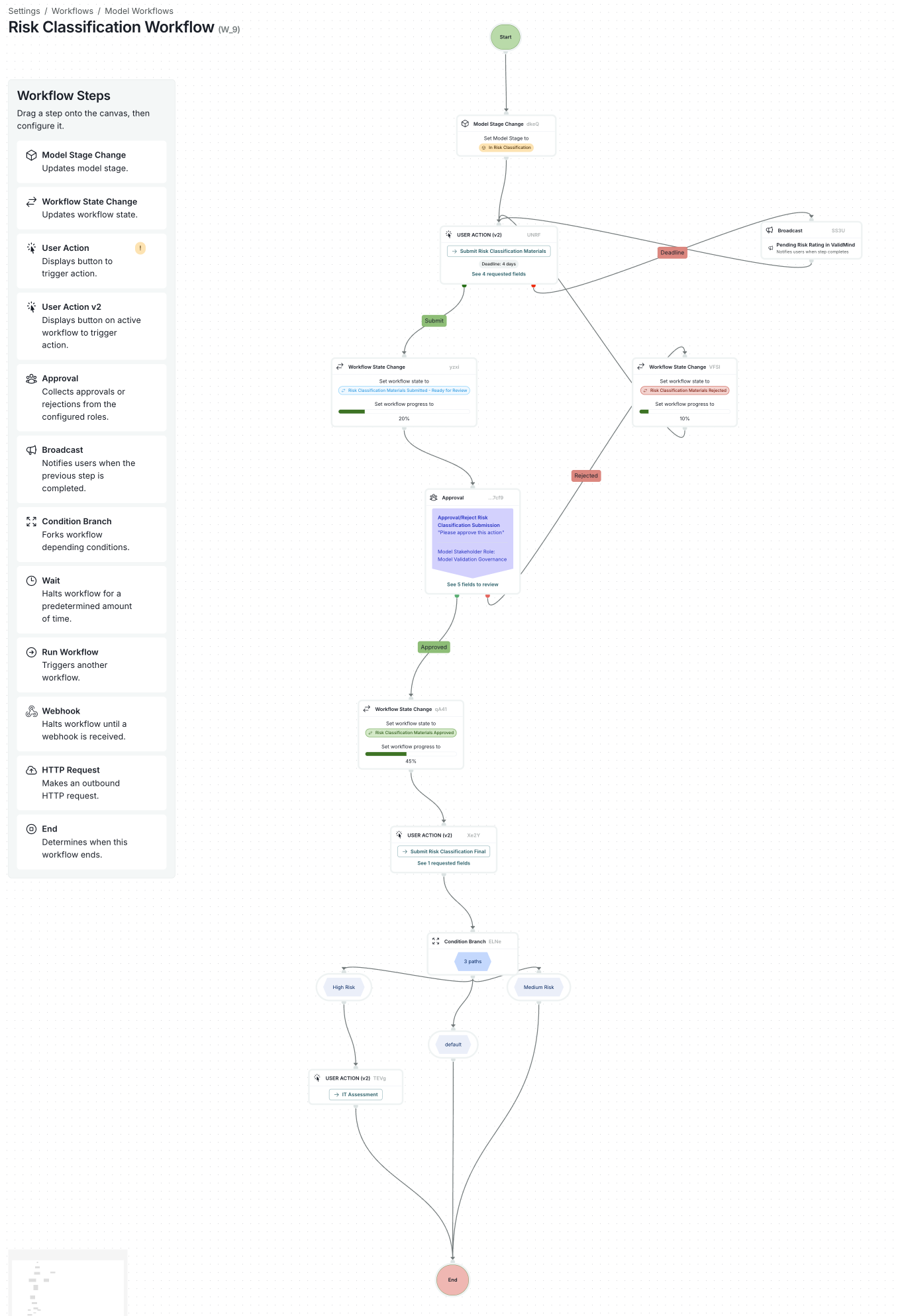
Risk classification workflow steps
This example intake workflow demonstrates key AI governance patterns:
- Model Stage Change — Sets model stage to In Risk Classification
- User Action — Collects risk classification materials with deadline
- Broadcast — Notifies stakeholders of pending risk rating
- Approval — Routes to Model Validation Governance for review
- Condition Branch — Different paths for High Risk, Medium Risk, or Default
Approval workflows
Purpose of approval workflows
Approval workflows ensure AI systems receive appropriate review before deployment. They implement:
Risk-based approval gates
Multiple approver requirements
Segregation of duties
Documented decision-making
Designing approval flows
Consider these design principles:
| Risk level | Approval requirements |
|---|---|
| High-risk | Multiple approvers, governance committee |
| Medium-risk | Manager + compliance review |
| Low-risk | Single approver |
Configuring approvals
ValidMind supports:
- Workflow states and transitions
- Role-based approval authorities
- Sequential and parallel approvals
- Approval deadline tracking
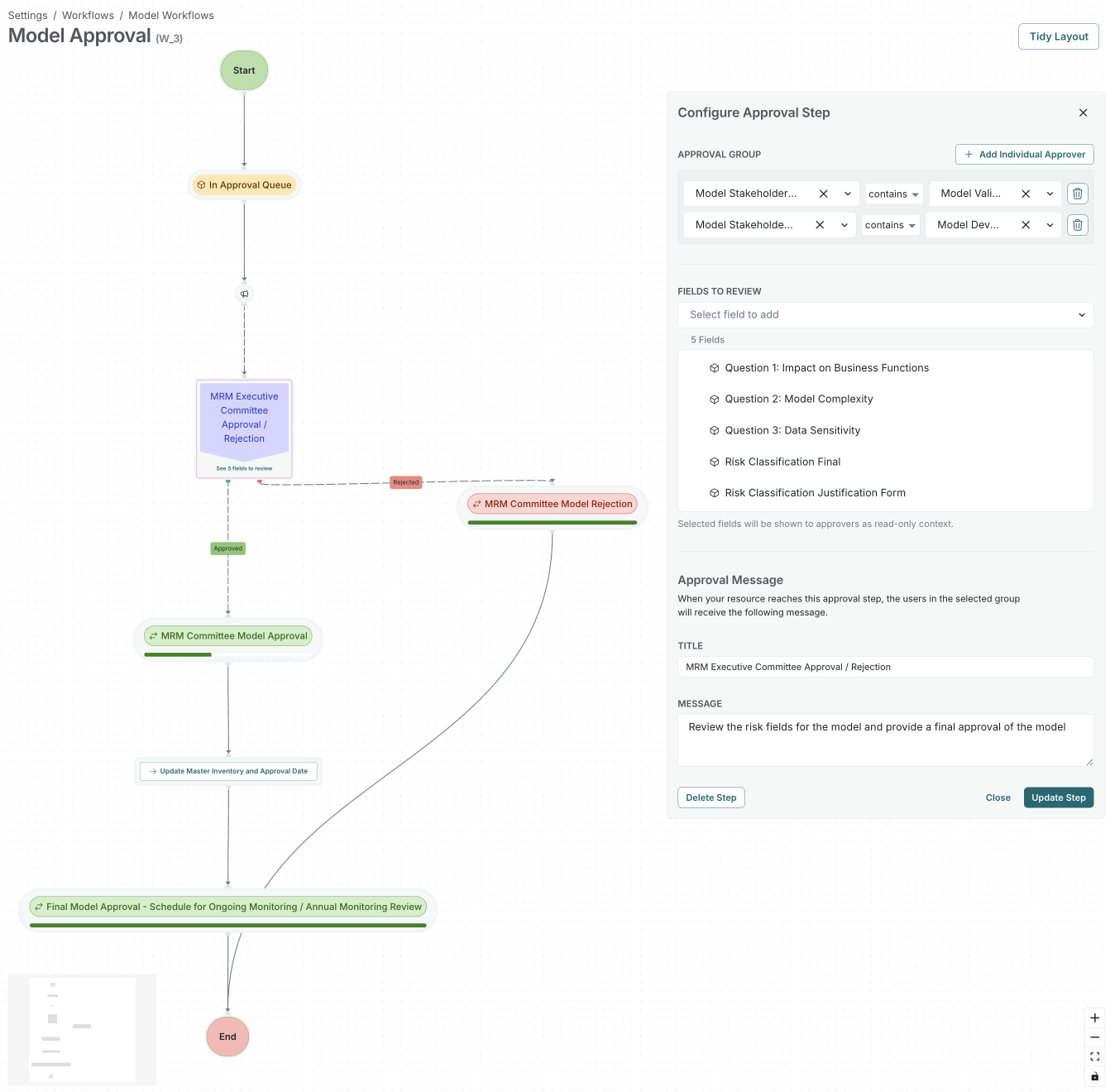
Human oversight controls
Regulatory context
The EU AI Act (Article 14) requires human oversight** for high-risk AI systems. Human oversight includes:
Ability to understand AI outputs
Capability to intervene
Authority to override decisions
Mechanisms for feedback
Implementing oversight
Use ValidMind to document and enforce oversight:
- Record oversight requirements in documentation
- Configure review workflows for AI outputs
- Track intervention decisions
- Maintain evidence of human involvement
Review workflows
Set up periodic review workflows:
- Define review frequency by risk tier
- Configure reviewer assignments
- Track review completion
- Escalate overdue reviews
Escalations
Escalation paths
Configure escalations for:
Overdue approvals
High-risk validation issues
Policy violations
Compliance incidents
Escalation ensures issues reach appropriate decision-makers.
Next steps
Continue to Module 4 to learn about compliance and oversight.
ValidMind Academy | Home